A tray helper for every AI coding tool: sessions, alerts and usage in one place
Last updated October 1, 2026
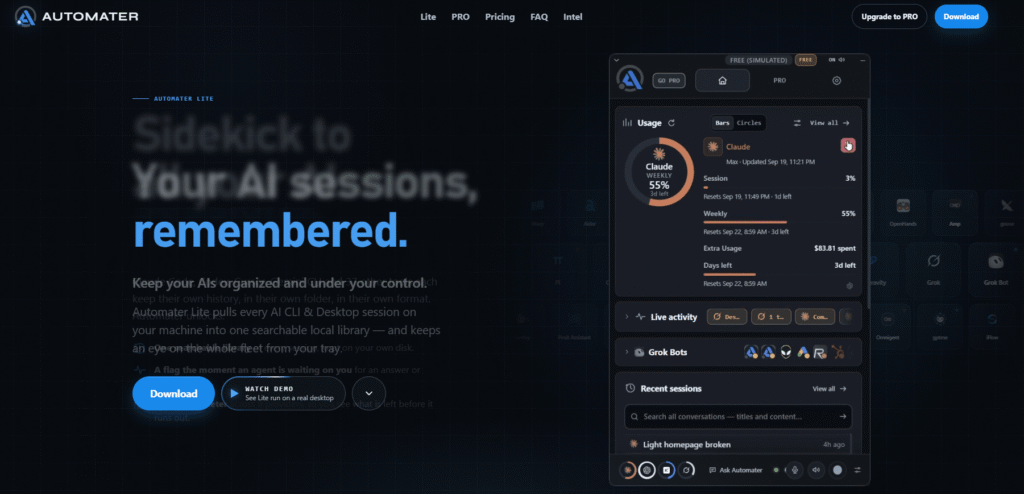
Automater is a free system tray app that sits across all your AI coding agents and CLIs — giving you one searchable session library, live agent status, and unified usage tracking, all stored locally on your own disk.
The problem it solves is one every developer running multiple AI tools hits quickly: Claude Code, Codex, Cursor, Gemini CLI, and 37 other tools each keep their own session history, in their own folder, in their own format. There is no unified search. There is no way to know which agent is waiting on you without switching between terminals. There is no single view of how much quota you have left across nine different providers.
Automater Lite fixes all three — for free, forever, with no account required. It reads the transcript files your tools already write, indexes them locally, and puts a single panel in your system tray that is always one click away.
PRO adds the parts that act: chat from the tray, managed agent sessions, computer control, fleet monitoring across machines, and built-in tools.
Lite reads each tool’s own transcript files and folds them into one local library. No plugins, no setup — it finds them automatically.
| Category | Tools |
|---|---|
| Anthropic | Claude Code, Claude Cowork |
| OpenAI | Codex, Copilot |
| Gemini, VS Code | |
| xAI | Grok, Grok Bot |
| Cursor | Cursor |
| ByteDance | Trae |
| MiniMax | MiniMax |
| DeepSeek | DeepSeek |
| Moonshot | Kimi |
| Alibaba | Qwen Code |
| Meta | Muse Code |
| Other CLIs | Windsurf, Warp, Aider, Kiro, Roo Code, Kilo Code, OpenHands, Amp, goose, Mistral Vibe, gptme, iFlow, Poolside, Forge, Shelley, Posit Assistant, MiMoCode, QwenPaw, Codebuff, Command Code, IcodeMate, Omnigent, Antigravity, Z.ai GLM, Pi, OpenCode |
| Feature | Lite (Free) | PRO ($15/yr) |
|---|---|---|
| Session library — 45 formats | ✅ | ✅ |
| Needs You flag | ✅ Always free | ✅ |
| Usage meter — 9 providers | ✅ | ✅ |
| Voice dictation (local) | ✅ | ✅ |
| Detected AI apps | ✅ | ✅ |
| Grok Bot chats | ✅ | ✅ |
| Ask Automater (chat with AI) | ❌ | ✅ |
| Managed sessions | ❌ | ✅ |
| Computer control | ❌ | ✅ |
| Fleet monitoring | ❌ | ✅ Beta |
| Live Visualizer | ❌ | ✅ Beta |
| Built-in terminal | ❌ | ✅ Beta |
| Built-in browser | ❌ | ✅ Beta |
| AI News & alerts | ❌ | ✅ |
| Camera FX | ❌ | ✅ Beta |
| Cloud voice | ❌ | ✅ |
| PRO Leaderboard | ❌ | ✅ |
Step 1 — Install it Run the Automater Lite app. No account, no setup wizard. Takes about a minute.
Step 2 — It finds your sessions Lite knows where 41 AI CLIs and desktop apps write their transcripts — in 45 formats — and indexes those files locally. Nothing is uploaded.
Step 3 — One panel, four ways to work Click the tray icon: search sessions, reopen one in its own CLI, see which agents are running or waiting, and check usage. Pin it, park it at the screen edge, or use it as a plain window.
| Automater | Manual Terminal Switching | Warp | Custom Scripts | |
|---|---|---|---|---|
| Unified session search | ✅ 41 tools | ❌ | ❌ One tool | ❌ Build yourself |
| Needs You alert | ✅ | ❌ | ❌ | ❌ |
| Usage across 9 providers | ✅ | ❌ | ❌ | ❌ |
| Local voice dictation | ✅ | ❌ | ❌ | ❌ |
| 100% local storage | ✅ | ✅ | ✅ | ✅ |
| Free forever | ✅ | ✅ | ✅ Free tier | ❌ |
| Setup time | ~1 minute | None | Minutes | Hours |
What does Automater Lite do?
Lite reads the transcript files your AI CLIs already write, indexes them locally into one searchable library, flags the moment any agent is waiting on you, and shows token usage across 9 providers — all from a system tray panel, free forever, with no account required.
What does PRO add?
PRO adds the parts that act: chat with any AI from the tray with screen context, managed agent sessions, computer control, Fleet monitoring across machines, built-in terminal and browser, AI news and alerts, Camera FX, and cloud voice routing.
Where does my data live?
On your own disk. Lite indexes session files locally and nothing is uploaded. PRO’s cloud voice routes speech through Automater Cloud when the local machine is busy — everything else stays local.
Which tools does it read?
41 AI apps and CLIs in 45 session formats — including Claude Code, Codex, Cursor, Gemini, Grok, Windsurf, Warp, Aider, Kiro, Roo Code, OpenHands, DeepSeek, Kimi, Qwen Code, and more.
Which operating systems does it support?
Windows, macOS, and Linux.
What happens to my library if I stop paying PRO?
Your session library stays on your disk. Lite features remain free forever. Only PRO-specific features become unavailable.
How do updates work?
Automater ships signed installers with verified updates. The latest Windows build is v0.1.24.
Is the Needs You flag ever paywalled?
No. Needs You and approval visibility are never paywalled — they are free in Lite forever.
| Criteria | Rating |
|---|---|
| Accuracy & Reliability | ⭐ 4.2/5 |
| Ease of Use | ⭐ 4.6/5 |
| Features & Functionality | ⭐ 4.0/5 |
| Performance | ⭐ 4.3/5 |
| Customization | ⭐ 4.4/5 |
| Security & Privacy | ⭐ 3.8/5 |
| Customer Support | ⭐ 3.5/5 |
| Value for Money | ⭐ 4.5/5 |
| Integrations | ⭐ 4.1/5 |
SeedRouter puts LLM, image, video and audio models behind one API key. Pay per request — failed requests…

PagerGPT is a no-code AI agent platform that helps businesses build intelligent AI assistants for customer support, sales,…
Tomorrow Terminal is an AI-powered trading terminal that covers 8,400+ active US tickers — scanning the market every…
Magica AI is an all-in-one AI platform that combines the world’s leading AI models into a single intelligent…

n8n is a visual workflow automation platform built for connecting AI agents to your existing tools and infrastructure…

Manus AI is an autonomous general-purpose AI agent — you give it a goal, not just a prompt,…
Cursor is an AI-powered coding agent built by Anysphere — now part of SpaceX — that turns ideas into working software through autonomous…
Chatbase is an AI-powered customer experience platform that enables businesses to build intelligent AI agents for customer support,…
Devin is the world’s first AI software engineer, built by Cognition for engineering teams that need more than autocomplete. Where most…

AIAgentSkills is a free, community-run index of “AI Agent Skills” — reusable capability packages (also known as Claude…

Tabnine is the original enterprise AI coding platform — trusted by millions of developers and thousands of companies worldwide,…

GlobalGPT is an AI model aggregator that bundles access to 100+ AI models — including GPT-5.6, Claude Sonnet…
