AI-Powered Photo Editing & Image Generation Made Easy
Last updated August 20, 2026
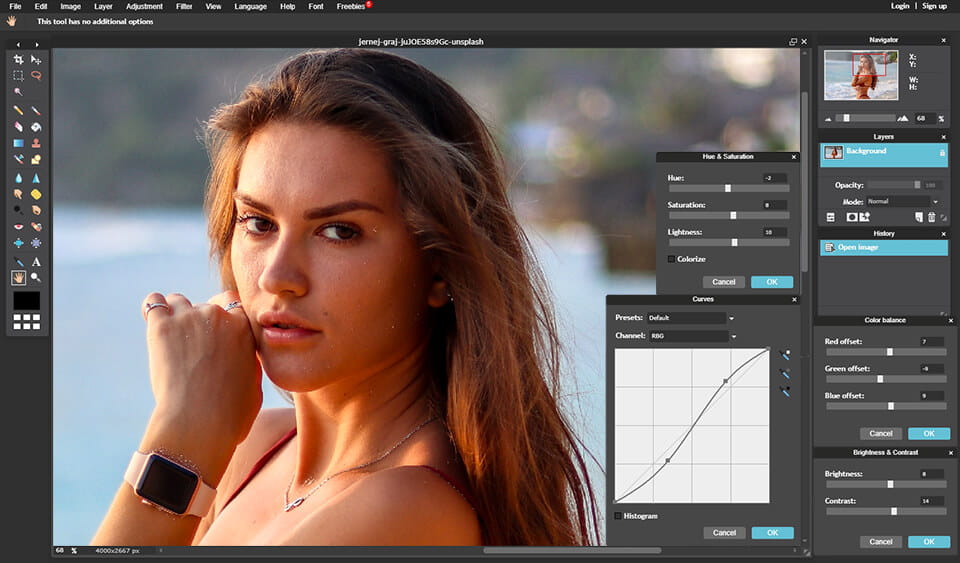
Pixlr is a free, browser-based AI photo editor and image generator that combines a full photo editing suite, AI image and video generation, face swap, background removal, and 20+ editing tools in one platform — no download required. It’s positioned as a free Photoshop alternative, powered by a wide range of AI models including Flux, Kling AI, Recraft, Veo, Stable Diffusion, and ElevenLabs for audio.
Paragraph 2: Beyond editing, Pixlr covers generation and design broadly: create images and video from text prompts, remove backgrounds and unwanted objects with one click, extend images beyond their original frame with generative expand, and build photo collages from layouts. Users can access image, video, and audio generation from the same interface without switching between separate apps.
Paragraph 3: Designed for photographers, designers, marketers, and everyday creators, Pixlr’s core editing and generation tools are free to use, with paid plans unlocking ad-free editing, more AI credits, and access to premium models.
Pros
Cons
If you’re comparing Pixlr against other AI photo/design tools:
Browse more in AI Tools For Image Editing → or our general AI Image Editor guide →
What is Pixlr?
Pixlr is a free, browser-based AI photo editor and image generator that combines photo editing, AI image and video generation, face swap, background removal, and 20+ editing tools in one platform.
Is Pixlr free to use?
Yes. Pixlr’s core photo editor, AI image generator, and background remover are usable for free. Paid plans (starting at $1.99/month) add ad-free editing, more AI credits, and access to premium models.
Is Pixlr safe to use?
Pixlr is a long-established, browser-based editing platform. As with any AI tool, avoid uploading sensitive personal images you wouldn’t want processed by third-party AI models, and review Pixlr’s current privacy policy for specifics on data handling.
What AI models does Pixlr use?
Pixlr draws on a range of leading AI models including Flux, Flux Pro, Kling AI, Recraft V4, Google Veo, Qwen, Stable Diffusion, SDXL, Seedance, Seedream, Grok Imagine, PixVerse, LTX Video, Vidu, ImagineArt, Wan AI, ElevenLabs, and ACE-Step, rather than relying on one proprietary model.
How does Pixlr compare to Photoshop?
Pixlr is positioned as a free Photoshop alternative — it covers core editing tools plus AI generation and background removal without a subscription requirement, though Photoshop still offers deeper professional-grade editing precision for advanced users.
Can I generate AI videos with Pixlr?
Yes. Pixlr includes an AI video generator that can create and animate video from text prompts or existing images, in addition to its image and audio generation tools.
Is Pixlr suitable for beginners?
Yes. Pixlr is built to be accessible without a steep learning curve, while still offering enough depth (layers, generative tools, upscaling) for more advanced editing needs.
| Criteria | Rating |
|---|---|
| Accuracy & Reliability | ⭐ 4.6/5 |
| Ease of Use | ⭐ 4.8/5 |
| Features & Functionality | ⭐ 4.7/5 |
| Performance | ⭐ 4.5/5 |
| Customization | ⭐ 4.4/5 |
| Security & Privacy | ⭐ 4.3/5 |
| Customer Support | ⭐ 4.0/5 |
| Value for Money | ⭐ 4.7/5 |
| Integrations | ⭐ 4.1/5 |

ProductShot AI is an AI product photography tool built specifically for ecommerce — turning a single product photo…
VEED.IO is an all-in-one AI-powered online video editing platform that enables creators, businesses, educators, and marketing teams to…

DFIRST.AI is an AI-powered marketing platform that helps businesses create consistent, on-brand campaigns by understanding their unique brand…
Topaz Video AI is a powerful AI-powered video enhancement software developed by Topaz Labs that helps creators improve…

InVideo AI is an AI-powered video creation platform that enables users to generate professional-quality videos from simple text…
Luna Lisa is an AI image generation and photo editing platform built around its VIP Luna Lisa image…

king3.online is an independent Kling 3.0-style video generator. Type a prompt or upload a still, pick duration and…
Virvid AI is built for creators who want to grow faceless social media channels without spending hours scripting,…
BeadPattern is an AI-powered pattern generator built specifically for physical bead crafting — Perler, Hama, Fuse, and Artkal…
Cutout.Pro is an AI-powered visual content creation and editing platform that helps users create professional-quality images and videos…
Hailuo AI is an advanced AI-powered creative platform developed by MiniMax that enables users to generate cinematic videos,…
Gling AI is an intelligent video editing platform that automates the most repetitive editing tasks for creators. Instead…
