Edit, enhance, and generate stunning photos, all in one place.
Last updated August 17, 2026
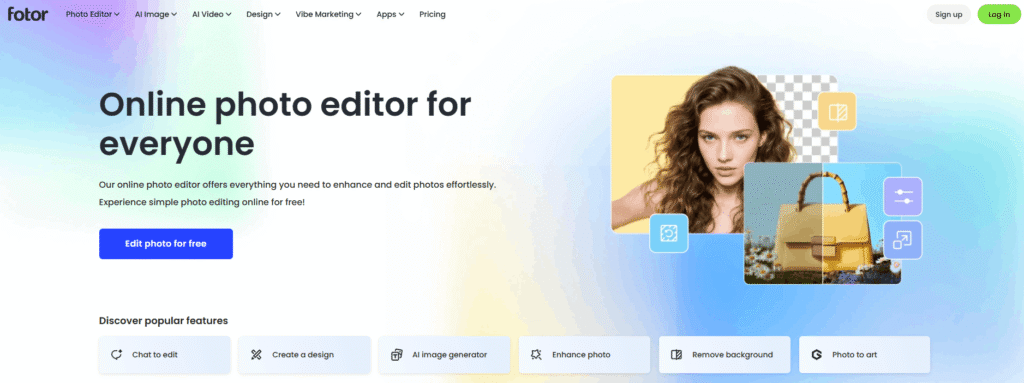
Fotor is an all-in-one online photo editor that combines everyday editing tools with AI-powered features — background removal, photo enhancement, object removal, and AI art generation — all accessible from a browser or app, no design experience required. It’s positioned as a Photoshop alternative for people who want professional-looking results with far fewer steps.
Beyond editing, Fotor also covers design and content creation broadly: collage making, AI image generation from text prompts, filters and effects, templates, stickers, and (on paid plans) AI slide generation and brand kits — making it a reasonable fit for anyone from casual photo editors to small teams needing quick marketing visuals.
Pros
Cons
If you’re comparing Fotor against other AI photo and image tools:
Browse more in AI Tools for Image Editing.
What is Fotor? Fotor is an all-in-one online photo editor that combines standard editing tools with AI features like background removal, object removal, photo enhancement, and AI art generation, plus collage-making and design templates.
Is Fotor free to use? Yes. Fotor’s Basic plan is free forever and includes limited AI credits and basic editing tools, though exports are watermarked and creations are only stored for 30 days.
How much does Fotor Pro cost? Fotor Pro costs ₹799/month (India pricing) and includes 100 AI credits per month, 100+ editing tools, and HD, watermark-free exports.
Can I remove a photo background for free in Fotor? Yes, Fotor’s AI Background Remover is available on the Free plan with limited credits; unlimited or higher-volume use requires a paid Pro plan or above.
Does Fotor generate AI images from text? Yes. Fotor includes an AI Image Generator that creates AI art from text prompts, with exclusive AI model and style access unlocked on paid plans.
Is Fotor good for businesses? Fotor’s Pro+ and Max plans add features aimed at teams and businesses, including multiple brand kits, AI slide generation, and higher cloud storage, making it more suited to business use than the entry-level plans.
| Criteria | Rating |
|---|---|
| Accuracy & Reliability | ⭐ 4.6/5 |
| Ease of Use | ⭐ 4.8/5 |
| Features & Functionality | ⭐ 4.7/5 |
| Performance | ⭐ 4.6/5 |
| Customization | ⭐ 4.5/5 |
| Security & Privacy | ⭐ 4.5/5 |
| Customer Support | ⭐ 4.3/5 |
| Value for Money | ⭐ 4.4/5 |
| Integrations | ⭐ 4.2/5 |
Hailuo AI is an advanced AI-powered creative platform developed by MiniMax that enables users to generate cinematic videos,…
WeryAI is an all-in-one AI creative platform that brings together leading AI models for video generation, image creation,…
ReWords AI is an online AI tool built for one specific, genuinely useful job: replacing existing text inside…

MimicPC is a browser-based AI workspace that lets users run powerful AI applications without installing software or configuring complex…
Artbreeder is an AI-powered creative platform for generating, mixing, and exploring unique images and artwork. It gives creators…
Gemini AI is Google’s advanced multimodal artificial intelligence assistant developed by Google DeepMind. It can understand and generate…
Topaz Video AI is a powerful AI-powered video enhancement software developed by Topaz Labs that helps creators improve…

Headshotsly is an AI headshot generator that turns one selfie into a professional-quality photo in about 2 minutes…
AI Baby Generator is an advanced AI-powered future baby prediction tool that creates realistic images of your potential…

Dream by WOMBO is an AI-powered image and video generation platform for creating unique artwork, illustrations, characters, and…

DigiBouquet AI is a digital gifting tool that lets you send a flower bouquet gift as a personalized,…
Meshy AI is an advanced AI-powered 3D model generator that transforms text prompts and images into production-ready 3D…
