
Turn any product into a ranking listing — in seconds
Last updated August 30, 2026
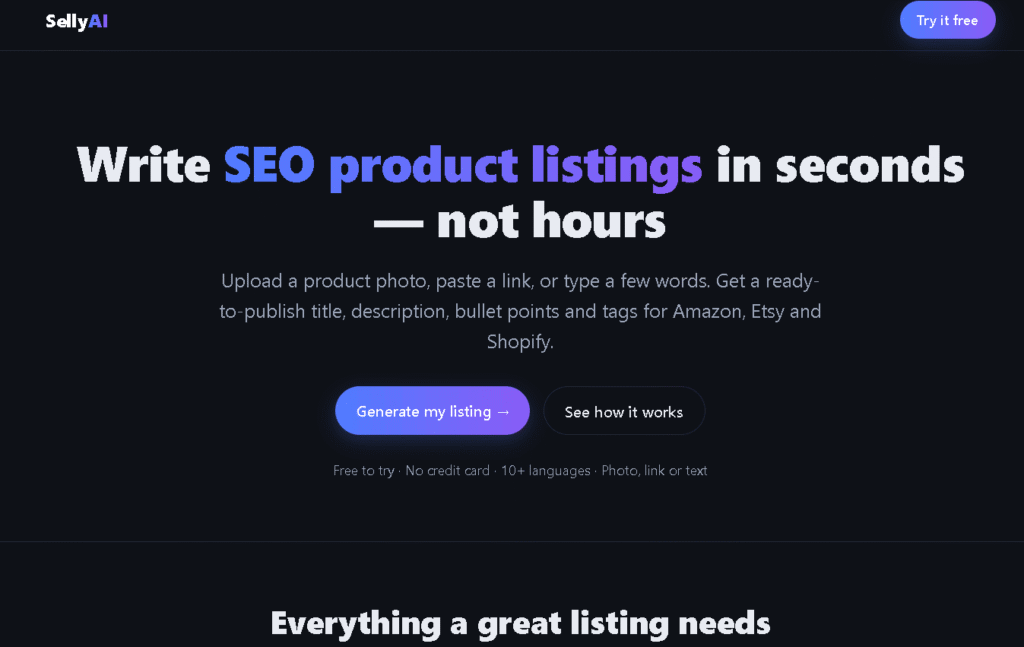
SellyAI is an AI-powered product listing generator that turns a photo, a product URL, or a few typed words into a complete, ready-to-publish listing — including SEO-optimized title, description, bullet points, tags, and meta — in seconds.
Built specifically for sellers on Amazon, Etsy, and Shopify, SellyAI doesn’t produce generic AI copy. Each output is tuned to the rules, character limits, and ranking signals of the platform you’re selling on. Amazon listings come out differently from Etsy listings, which come out differently from Shopify — because each marketplace has its own search algorithm and buyer behavior.
The tool works in three ways: upload a product photo and the AI analyzes the image and writes the listing automatically; paste a product URL and it reads the existing page and rewrites it better; or type a product name and a few details and it generates the full pack from scratch. No writing skills required. No templates to fill in. No hours spent staring at a blank description field.
SellyAI supports 10+ languages including English, Spanish, French, German, Portuguese, Italian, Chinese, Japanese, Arabic, and Russian — making it one of the most accessible listing tools for international sellers.
Pros
Cons
Amazon sellers — Generate keyword-rich titles and bullet points tuned to Amazon’s A9 search algorithm. Particularly useful for new product launches where you need a strong listing fast.
Etsy sellers — Create SEO-optimized titles, descriptions, and tags that match how Etsy buyers actually search. Especially useful for handmade, print-on-demand, and digital product sellers who list frequently.
Shopify store owners — Generate product descriptions and meta content that reads naturally for human buyers while including the right keywords for Google Shopping and organic search.
International sellers — Sell in multiple markets without hiring translators or copywriters. Generate listings in 10+ languages from the same product input.
New sellers — If you’re just starting out and don’t know how to write a listing that ranks, SellyAI removes the guesswork entirely.
High-volume sellers — If you’re adding new products regularly, SellyAI cuts listing creation time from hours to seconds per product.
Uncommon use cases: Dropshippers relisting supplier products with original copy; resellers on multiple platforms who need platform-specific versions of the same listing; non-English-speaking sellers who want to list in English markets without translation costs.
| Feature | SellyAI | Copysmith | Jasper AI |
|---|---|---|---|
| Primary focus | Marketplace product listings | eCommerce content at scale | Brand-consistent marketing content |
| Amazon support | ✅ Yes (tuned output) | ✅ Yes | ✅ Yes |
| Etsy support | ✅ Yes (tuned output) | ⚠️ Generic | ❌ No |
| Shopify support | ✅ Yes (tuned output) | ✅ Yes | ✅ Yes |
| Photo-to-listing | ✅ Yes | ❌ No | ❌ No |
| Link-to-listing | ✅ Yes | ❌ No | ❌ No |
| 10+ languages | ✅ Yes | ✅ Yes | ✅ Yes |
| Bulk generation | ❌ Not yet | ✅ Yes | ✅ Yes |
| Direct platform integration | ❌ Copy-paste | ✅ Yes (Shopify) | ✅ Yes |
| Free plan | ✅ Yes (no card) | ❌ Trial only | ❌ Trial only |
| Paid from | Coming soon | $19/mo | $59/seat/mo |
| Best for | Individual sellers, new listings fast | High-volume eCommerce teams | Enterprise marketing teams |
Choose SellyAI if: You’re an individual seller on Amazon, Etsy, or Shopify who needs a fast, free way to generate platform-specific, SEO-optimized listings — especially from a product photo or URL. The photo-to-listing and link-to-listing inputs are genuinely unique.
Choose Copysmith if: You’re managing a large product catalog and need bulk generation, direct Shopify integration, and team collaboration features.
Choose Jasper if: You need brand-consistent marketing content across multiple channels beyond just product listings — Jasper is a full marketing platform, not a listing-specific tool.
Method 1: Photo to Listing (fastest for physical products)
Method 2: Link to Listing (best for relisting or improving existing listings)
Method 3: Text to Listing (best for new products)
Pro tip: For the most accurate output, combine inputs — upload a photo AND add a few words describing the product. The more context you give the AI, the more specific and accurate the listing.
| Plan | Price | Features | Best For |
|---|---|---|---|
| Free | $0 | Listing generation, all 3 input methods, all 3 marketplaces, 10+ languages | Individual sellers, testing |
| Pro | Coming soon | Higher limits, premium AI quality | High-volume sellers |
Is SellyAI free? Yes — SellyAI is free to use with no credit card required. A paid Pro tier with higher generation limits and premium AI quality is in development but not yet available at time of this review.
What’s the catch on the free plan? There are usage limits on the free tier (exact limits not publicly specified). The Pro plan will remove those limits when launched.
Verdict: Yes — the fastest free listing generator available for Amazon, Etsy, and Shopify sellers.
SellyAI’s combination of photo-to-listing, link-to-listing, and text-to-listing in one free tool is genuinely useful. The platform-specific outputs for Amazon, Etsy, and Shopify are a meaningful differentiator — most AI writing tools produce generic product copy that you then have to manually adapt for each marketplace. SellyAI skips that step.
The photo-to-listing feature is the standout capability. Upload a product image and get a full SEO listing without typing a single word — this is particularly valuable for sellers with large physical product catalogs who don’t want to write descriptions manually.
Best for: Individual sellers on Amazon, Etsy, or Shopify who need fast, platform-specific, SEO-optimized listings — especially from product photos or existing URLs. The free plan with no credit card required makes it a zero-risk tool to test.
Watch for: The Pro plan is listed as “coming soon” — if you need high-volume bulk generation or direct platform integrations, check back when Pro launches or consider Copysmith for enterprise-scale needs in the meantime.
| Criteria | Rating |
|---|---|
| Accuracy & Reliability | ⭐ 4.4/5 |
| Ease of Use | ⭐ 4.9/5 |
| Features & Functionality | ⭐ 4.3/5 |
| Performance & Speed | ⭐ 4.8/5 |
| Customization | ⭐ 4.0/5 |
| Security & Privacy | ⭐ 4.2/5 |
| Customer Support | ⭐ 3.8/5 |
| Value for Money | ⭐ 4.9/5 |
| Integrations | ⭐ 3.5/5 |
What is SellyAI?
SellyAI is an AI-powered product listing generator that creates SEO-optimized titles, descriptions, bullet points, tags, and meta content for Amazon, Etsy, and Shopify — from a product photo, URL, or a few typed words.
Is SellyAI free?
Yes — SellyAI is free to try with no credit card required. You can generate listings immediately without creating an account or entering payment details. A paid Pro tier with higher limits is coming soon.
How does SellyAI’s photo-to-listing feature work?
Upload a product image and SellyAI’s AI analyzes the photo — identifying the product type, key features, materials, and visual details — then automatically writes a full SEO listing based on what it sees. Adding a few words alongside the photo improves accuracy further.
Which marketplaces does SellyAI support?
SellyAI currently supports Amazon, Etsy, and Shopify, with each platform having its own optimized output style. More platforms are planned.
What languages does SellyAI support?
SellyAI supports 10+ languages: English, Spanish, French, German, Portuguese, Italian, Chinese, Japanese, Arabic, and Russian.
What does SellyAI generate in one listing pack?
A full listing pack includes: SEO-optimized title, product description, bullet points, tags, and meta description — everything needed to publish a complete listing on your chosen marketplace.
Can SellyAI rewrite an existing product listing?
Yes — paste your existing product URL into the link input and SellyAI reads the page and rewrites it with better SEO and marketplace-specific optimization.
Does SellyAI work for Etsy sellers specifically?
Yes — Etsy is one of SellyAI’s three supported marketplaces with its own tuned output style. The generated titles, descriptions, and tags are optimized for Etsy’s search algorithm and buyer behavior, not just generic product copy.
Does SellyAI integrate directly with Amazon, Etsy, or Shopify?
Not currently — SellyAI generates the listing content which you then copy and paste into your store. Direct platform integrations are not yet available.
Is SellyAI good for non-English sellers?
Yes — with support for 10+ languages including Chinese, Japanese, Arabic, and Russian, SellyAI is one of the most accessible listing tools for international sellers who want to list in multiple markets.
What’s the difference between SellyAI and Copysmith?
SellyAI is focused on individual sellers who need fast, free, platform-specific listings — with unique photo and link input methods. Copysmith is built for high-volume eCommerce teams needing bulk generation, direct Shopify integration, and team collaboration. SellyAI is the better starting point for individual sellers; Copysmith is better for large catalogs.

Clerk.io is an AI platform built specifically for ecommerce, combining five connected modules — Search, Recommendations, Chat, Email,…

TeamPost is an AI LinkedIn ghostwriter built for teams. Every employee gets their own AI ghostwriter that learns…

Yomu AI is an AI-powered academic writing and research assistant designed to help students, researchers, academics, and other…

Bing AI, now integrated into Microsoft Copilot, is an AI-powered assistant that combines web search, content generation, coding…
AI Text Cleaner is a text-hygiene tool built around four functions: removing invisible/non-printing Unicode characters, cleaning up leftover…

Rankability is an AI search visibility platform built specifically for SEO agencies — giving teams a single connected workflow to track…

Copy.ai is an AI-native go-to-market platform designed to help marketing, sales, and revenue teams automate repetitive workflows and…

Copysmith is the company behind three connected AI platforms built to help content rank on Google, get cited…

ChatGPT, built by OpenAI, remains the most widely used AI assistant in the world — the default most…

Grammarly is an AI-powered writing assistant that helps you write clearer, more polished, and mistake-free text across email,…

EarnDraft is an AI ebook creator that turns a one-line idea into a complete outline, five written chapters,…

AI Text Watermark Remover is a browser-based tool for cleaning text pasted from ChatGPT, Claude, Gemini, and other…
