Free embroidery cost and retail price calculator by stitch count, quantity, labor and materials.
Last updated September 4, 2026
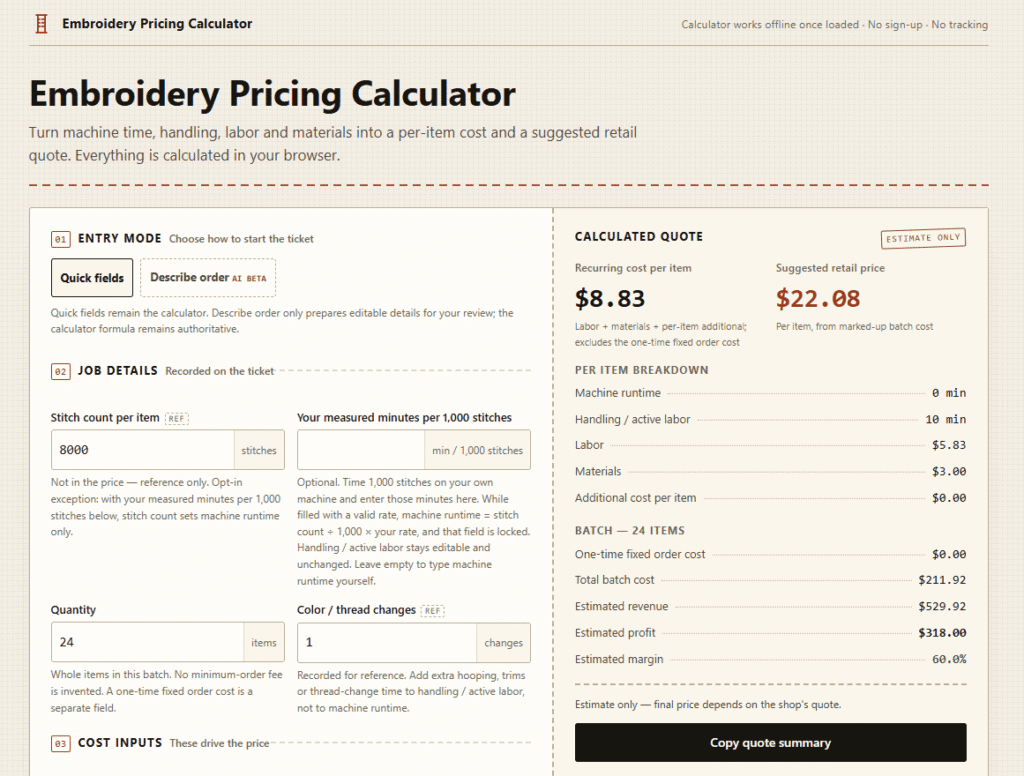
Calculate embroidery cost and suggested retail price from stitch count, quantity, labor and materials. Runs in the browser — no account, no upload.
Embroidery Pricing Calculator is a free browser-based pricing tool built for embroidery shop owners, home-based embroiderers, and small craft businesses who need a fast, transparent way to price jobs accurately.
You enter your machine runtime, handling time, labor cost, materials, and markup — and the tool instantly calculates your per-item cost, suggested retail price, batch profit, and estimated margin. Everything runs locally in your browser with no signup, no tracking, and no data sent to any server.
The tool also includes a beta AI-assisted entry feature — type a plain-language description of your order and the AI prepares editable job details for your review before the calculator runs. This makes it faster to set up complex jobs without manually filling every field from scratch.
If you run an embroidery business and have ever underpriced a job, this tool solves that problem with eight lines of transparent arithmetic you can inspect and edit before copying a single number.
If you use tools like Koala AI or Copy.ai to run your craft business content, Embroidery Pricing Calculator handles the numbers side of the same workflow.
Record stitch count, quantity, color changes, and order details in a structured job ticket format. Stitch count and color changes are recorded for reference — they do not change the calculated price unless you opt in to the stitch-rate conversion.
Eight transparent lines of arithmetic calculate your price in order:
Every step is visible. Nothing is hidden inside a black-box formula.
All default values — 3.00 materials, 2.5× markup — are clearly labeled as editable placeholders, not industry standards. Replace every figure with your own shop numbers before copying a quote.
The Describe order field lets you type a plain-language description of your job. The AI processor reads your description and prepares editable job details for review. The calculator formula remains authoritative — AI only helps fill the fields faster.
Example: “24 polo shirts, company logo, estimated 8,000 stitches, two color changes” → AI prepares draft fields → you review and confirm → calculator runs.
Add digitizing fees, setup charges, or minimum-order costs as a one-time fixed amount that is added to batch cost once — never multiplied by quantity. Most pricing tools miss this entirely.
Generate a plain-text quote summary in one click — ready to paste into your own quote document, email, or invoice template.
All calculator math runs locally in your browser. No cookies, no analytics tracking, no third-party data sharing. The only network request is the optional AI order description — and only when you click Ask AI.
Step 1 — Choose entry mode Use Quick Fields to fill the job ticket manually, or use Describe Order to let the AI beta feature prepare draft fields from a plain-language description.
Step 2 — Record job details Enter stitch count, quantity, and color changes for the job ticket record.
Step 3 — Enter your shop costs Fill in machine runtime, handling time, labor cost per hour, materials per item, any additional per-item cost, any one-time fixed order cost, and your markup multiplier.
Step 4 — Read the calculated quote The tool instantly shows per-item cost, suggested retail price, batch cost, estimated revenue, profit, and margin.
Step 5 — Copy and use Copy the plain-text quote summary and paste it into your own quote document or invoice.
| Plan | Cost | Features |
|---|---|---|
| Free | $0 forever | Full calculator, job ticket, copy quote, all fields editable |
| AI Feature | Free beta | Describe order AI entry — free during beta |
No subscription. No signup. No payment. The full tool is free.
The tool is honest about its limitations. These costs are not automatically calculated — you must add them manually via the additional cost or fixed order cost fields:
This transparency is a strength — the tool does not invent costs it cannot know. You add what applies to your shop.
| Feature | Embroidery Pricing Calc | Generic Spreadsheet | Paid Quoting Software |
|---|---|---|---|
| Free | ✅ Yes | ✅ Yes | ❌ Usually paid |
| AI-assisted entry | ✅ Beta | ❌ No | ⚠️ Some |
| Browser-based | ✅ Yes | ❌ Desktop only | ⚠️ Varies |
| Transparent formula | ✅ Yes | ✅ Yes | ❌ Often hidden |
| Fixed order cost field | ✅ Yes | ⚠️ Manual | ⚠️ Varies |
| No signup needed | ✅ Yes | ✅ Yes | ❌ Usually required |
| Privacy-first | ✅ Yes | ✅ Yes | ❌ Usually cloud |
Does stitch count change the price?
Not by default. Stitch count is recorded for reference only. The opt-in exception: enter your own measured minutes per 1,000 stitches and stitch count converts to machine runtime at your rate.
Is this a formal quote I can send to customers?
No. It is an internal planning estimate. Use the copyable summary as a starting point for your own quote document.
Does the AI feature send my data to a server?
Only the Describe Order text is sent — and only when you click Ask AI. All calculator math stays in your browser with no data transmitted.
Is it really free?
Yes. The full calculator including the AI beta feature is completely free with no signup, no subscription, and no payment required.
Can I use it for large batch orders?
Yes. Quantity accepts 1 to 10,000 items with no minimum order fee invented by the tool.
Embroidery Pricing Calculator is a genuinely useful free tool for any embroidery business owner who has ever underpriced a job or struggled to explain their pricing to a client.
The transparent eight-step formula, editable defaults, and one-time fixed order cost field put it ahead of most generic spreadsheet approaches. The AI-assisted order entry feature — while still in beta — adds real speed for complex multi-item jobs.
| Criteria | Rating |
|---|---|
| Accuracy & Reliability | ⭐ 4.2/5 |
| Ease of Use | ⭐ 4.4/5 |
| Features & Functionality | ⭐ 3.4/5 |
| Performance | ⭐ 4.3/5 |
| Customization | ⭐ 3.5/5 |
| Security & Privacy | ⭐ 4.8/5 |
| Customer Support | ⭐ 3.0/5 |
| Value for Money | ⭐ 4.6/5 |
| Integrations | ⭐ 2.5/5 |

Sonaopus is a prompt-structuring tool that solves a specific, common frustration: re-explaining your situation to ChatGPT, Claude, or…

LivePerson is an enterprise conversational AI platform built for large-scale customer experience (CX) operations — orchestrating both human…
Manus AI is an autonomous general-purpose AI agent — you give it a goal, not just a prompt,…
Frase is the content operating system for AI search — a single platform that runs the complete content loop:…

Scite is an AI-powered research platform that goes beyond finding papers — it helps researchers understand whether the evidence…

Smartlead is an AI-native cold email and outbound sales platform trusted by over 100,000 businesses — from solo founders and lead…

BuzzStream is the world’s best outreach CRM for digital PR and link building — an end-to-end platform that helps…
Zapier is a no-code automation platform that connects over 8,000 apps, letting you build workflows (“Zaps”) that trigger…

Elicit is the AI research assistant built specifically for scientific research — trusted by over 5 million researchers at leading pharmaceutical…
gpu.fund is an independent, live cloud GPU price index that tracks rental prices across 15 cloud providers, 49…
Tabnine is the original enterprise AI coding platform — trusted by millions of developers and thousands of companies worldwide,…
Tomorrow Terminal is an AI-powered trading terminal that covers 8,400+ active US tickers — scanning the market every…
