Text to Brainrot — turn study notes into short videos
Last updated October 12, 2026
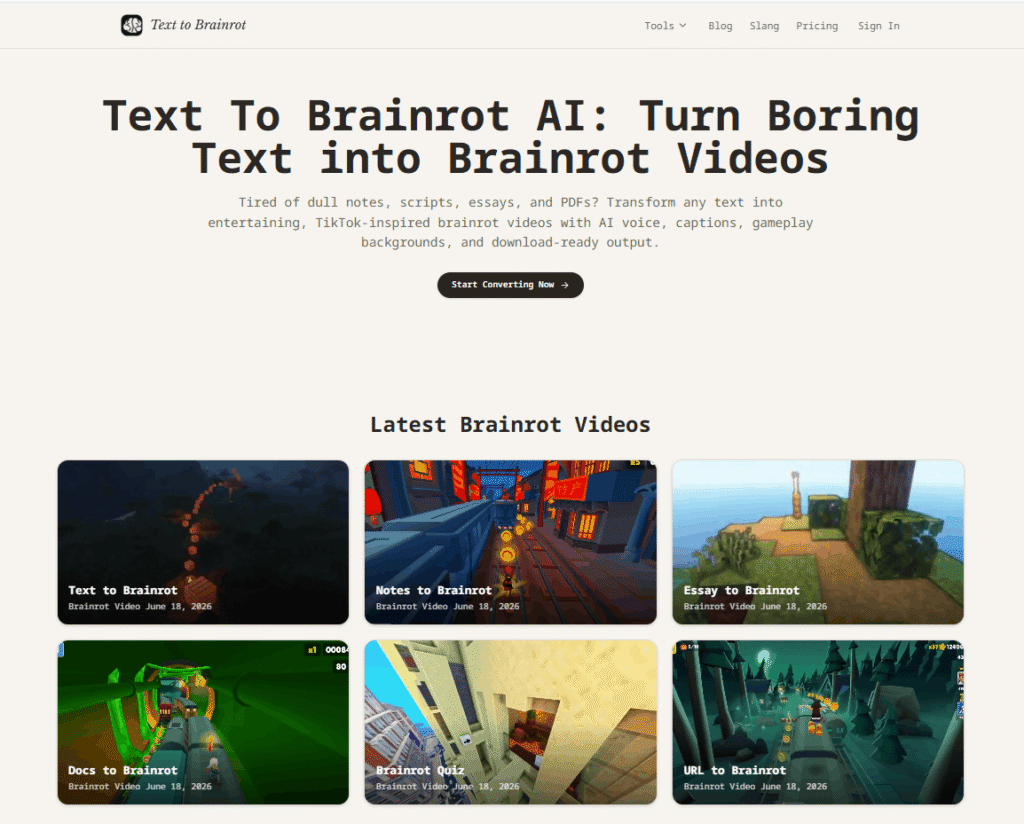
Text to Brainrot is a browser-based AI video generator that turns any written content — text, notes, essays, PDFs, URLs, and documents — into short vertical videos with AI narration, bold captions, moving gameplay backgrounds, and download-ready output.
The concept is simple: paste your content, pick a mode, select a voice and background, preview the script, generate the video, and download the finished result. No timeline editing, no voiceover recording, no caption syncing. The entire workflow from text to downloadable vertical short takes minutes.
Text to Brainrot borrows the pacing and visual language of internet-native short-form video — the kind that keeps viewers watching on TikTok, YouTube Shorts, and Instagram Reels — and applies it to any source text. Study notes become replayable study clips. Blog paragraphs become social content. Essays become short-form explainers. Reddit-style stories become faceless channel content.
For creators already using AI video generation tools like Stivio for image-to-video or VideoGen for automated video creation, Text to Brainrot fills the text-to-short-form-video gap with a workflow built specifically for fast, repeatable content production.
| Mode | Best For | What It Does |
|---|---|---|
| Brainrot Mode | Social content, hooks, short-form repurposing | Rewrites text with a short-form hook and internet-native pacing |
| Raw Mode | Exact wording, scripts, precise narration | Keeps the original wording unchanged — narrates as written |
| Quiz Mode | Study material, exam review, Q&A content | Converts content into question-and-answer format for study clips |
Text to Brainrot supports nine different input types — all following the same workflow: choose source, select mode, pick voice and background, preview, generate, download.
| Tool | What It Converts |
|---|---|
| Text to Brainrot | Paste any text — generate a brainrot video with voice, captions, and gameplay |
| PDF to Brainrot | Upload study PDFs — turn dense pages into TikTok-style videos |
| Notes to Brainrot | Paste messy notes — turn them into replayable short study videos |
| URL to Brainrot | Paste a webpage link — turn articles and references into brainrot videos |
| Essay to Brainrot | Turn long essays and academic writing into short-form videos |
| Docs to Brainrot | Convert Word documents and Google Docs into short brainrot videos |
| Brainrot Quiz | Convert exam reviews and notes into Q&A brainrot videos |
| Brainrot Translator | Translate normal text into internet-native brainrot language |
| Convert to Brainrot | General converter for PDFs, notes, essays, URLs, and plain text |
Step 1 — Paste content Text, notes, essay, PDF, or URL — any written source works.
Step 2 — Choose mode Brainrot Mode for short-form hooks, Quiz Mode for Q&A study content, or Raw Mode to keep the original wording.
Step 3 — Pick style Choose your AI voice, caption style, and gameplay background.
Step 4 — Download Preview the script, generate the video, and download the ready-to-share vertical short.
| Text to Brainrot | Traditional Editing | |
|---|---|---|
| Write script | ✅ AI generates from your text | ✅ Manual |
| Record voiceover | ✅ AI voice included | ❌ Manual recording |
| Add captions | ✅ Auto-generated and synced | ❌ Manual sync |
| Find background footage | ✅ Gameplay backgrounds built in | ❌ Manual sourcing |
| Export video | ✅ One click download | ❌ Render and export |
| Editing skills needed | ❌ None | ✅ Required |
| Time to finished video | ✅ Minutes | ❌ Hours |
| Best for | Fast short-form, study clips, daily publishing | Polished brand films |
Students and Learners Turn notes, textbook summaries, definitions, and study guides into replayable short videos. Narration explains the idea, captions highlight key words, and background motion keeps attention moving. Use it as a warm-up before deeper reading or a fast review loop before a test.
Creators and Social Media Teams Use Text to Brainrot as a repurposing engine. A tweet, blog paragraph, Reddit-style story, newsletter idea, product update, or hook becomes a video script without a complex editor. Ideal for faceless channels — voice, captions, and moving backgrounds carry the clip.
Teachers, Coaches, and Trainers Turn lesson summaries, onboarding policies, vocabulary lists, safety reminders, and product explanations into clips people replay. A bridge between serious material and short attention spans.
If you are already using AI tools for content creation like Koala AI for written content or AutoShorts.ai for automated short-form video, Text to Brainrot fills the specific gap of turning existing written content into brainrot-style vertical shorts without any editing workflow.
Text to Brainrot works as a content repurposing tool for SEO teams and bloggers. A blog paragraph, landing page section, FAQ answer, product explanation, or newsletter can become a short video that points people back to the full page. The video gives the same idea another distribution channel and turns static text into social content — useful for anyone using AI tools for marketing to maximise content reach.
What is Text to Brainrot?
Text to Brainrot is a browser-based AI video generator that turns written content — text, notes, essays, PDFs, and URLs — into short vertical videos with AI narration, bold captions, gameplay backgrounds, and download-ready output.
What is Brainrot Mode?
Brainrot Mode rewrites your text with a short-form hook and internet-native pacing — the kind that keeps viewers watching on TikTok and Shorts. Use it when your source text needs to be adapted for social content.
What is Quiz Mode?
Quiz Mode converts your content into question-and-answer format — ideal for exam review, study material, and educational short-form videos.
Can I keep my original text?
Yes. Use Raw Mode to keep the original wording unchanged. The AI narrates your text exactly as written without rewriting it.
What input length works best?
Short and focused input works best. A strong paragraph, a small set of bullet points, or a concise script produces a better video than a large block of text. For long PDFs or essays, convert one section at a time.
Is Text to Brainrot good for TikTok and YouTube Shorts?
Yes. The output is a vertical video with AI voice, captions, and gameplay backgrounds — the format that performs on TikTok, YouTube Shorts, and Instagram Reels.
How is Text to Brainrot different from a basic text to speech tool?
A basic text to speech tool only creates audio. Text to Brainrot creates a full video format: styled captions, gameplay background, pacing, and mode-specific rewrites. The output is ready for a vertical short without another editing pass.
Is Text to Brainrot only for memes?
No. Students use it for studying, creators use it for content repurposing, and teams can use it for onboarding or quick explainers. The format makes information easier to start watching — not every topic needs to be silly.
| Criteria | Rating |
|---|---|
| Accuracy & Reliability | ⭐ 4.9/5 |
| Ease of Use | ⭐ 4.6/5 |
| Features & Functionality | ⭐ 4.9/5 |
| Performance | ⭐ 4.8/5 |
| Customization | ⭐ 4.7/5 |
| Security & Privacy | ⭐ 4.6/5 |
| Customer Support | ⭐ 4.3/5 |
| Value for Money | ⭐ 4.2/5 |
| Integrations | ⭐ 4.8/5 |
EbSynth is an AI-assisted video editing and visual effects (VFX) tool that transforms videos by allowing you to…

HeyGen is an AI-powered video generation platform trusted by over 1,000,000 developers and leading organisations — from solo creators and…

Koala AI is an AI growth platform built for content creators, bloggers, niche site owners, and SEO professionals who…
Deepshot AI is an AI-powered lip-sync and video localization platform that enables creators to edit spoken dialogue, translate…
Stivio is an online image to video AI generator that turns any photo into a moving HD video…

Ella by Novella is a browser-based AI video editor and creator workspace that runs directly inside the Chrome…
Vmaker AI is a browser-based AI video creation platform that helps creators, marketers, educators, and businesses produce professional…
Captions is an AI-powered video creation and editing platform that helps creators produce professional-quality videos faster using advanced…

CloneViral AI is an advanced AI video generation platform that enables creators to produce professional videos through a…

Copysmith is the company behind three connected AI platforms built to help content rank on Google, get cited…
HeyFish AI enables businesses to create engaging AI-powered video advertisements in just a few minutes. Simply choose an…
Spikes Studio is an AI-powered video clipping platform that helps creators transform long-form videos into engaging short-form content…
