Turn any photo into a living, moving HD video in minutes
Last updated October 7, 2026
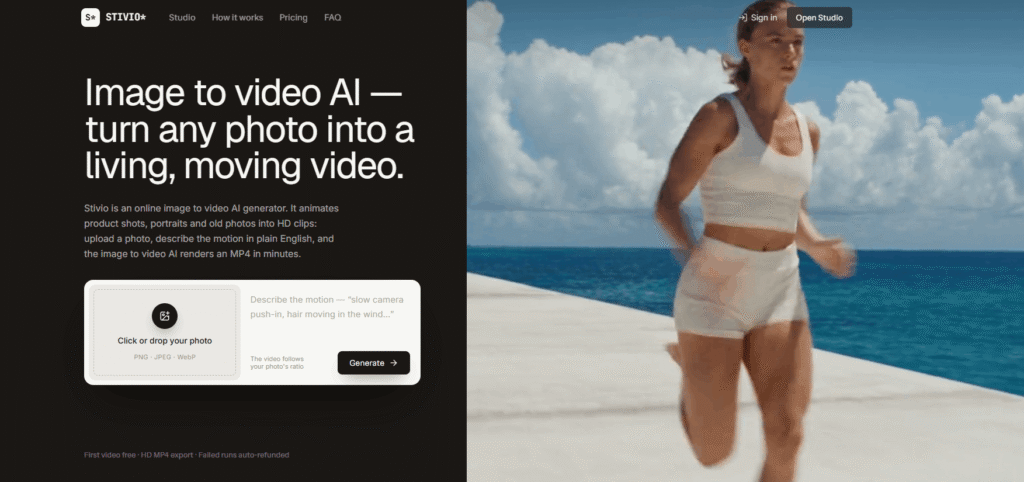
Stivio is an online image to video AI generator that turns any photo into a moving HD video clip in minutes — no editing skills, no software to install, no learning curve.
Upload a photo, describe the motion in plain English (“she bursts into a sprint down the sunlit pier, ocean wind, camera tracking”), and Stivio renders an HD MP4 in 1–5 minutes. The result is ready to post on Reels, TikTok, product pages, or drop into your editing timeline.
Most photos never move. The product shot stays frozen, the portrait stays still, the memory stays paused. Stivio takes the single frame you already have and gives it motion, light, and life.
The platform runs on six state-of-the-art AI video models — Kling, Seedance, Wan, and MiniMax H3 — with per-second pricing that shows the exact credit cost on the Generate button before you commit. Credits never expire. Failed runs are auto-refunded. The first video is free after sign-in with no card required.
Step 1 — Upload a Photo Drop in any image — a product shot, a portrait, a drawing. PNG, JPEG, or WebP up to 10MB. That single frame becomes the first frame of your video.
Step 2 — Describe the Motion One sentence is enough: what moves, how the camera behaves, the mood. The better the description, the better the video. Example: “slow camera push-in, hair moving in the wind.”
Step 3 — Download Your Clip The image to video AI renders your clip in 1–5 minutes. Preview it in the browser, download the HD MP4, or share the link.
| Model | Audio | Starting Price |
|---|---|---|
| Kling O3 | Optional | From 10 credits |
| Wan 2.6 | With audio | From 10 credits |
| MiniMax H3 | — | From 10 credits |
| Kling 2.6 | Optional | 10 credits |
| Seedance 2.5 | Optional | From 15 credits |
| Seedance 2.0 | Optional | From 25 credits |
Longer clips scale by the second. Exact price always shown before you generate.
E-commerce Sellers Turn flat catalog shots into scroll-stopping product videos for listings and ads. The image to video AI does the studio’s job — no reshoots, no video crew.
Creators and Marketers A week of video content from one folder of images. Feed in stills, get motion — B-roll, intros, and social clips without touching an editor.
Everyone Else Bring old photos to life. Family portraits, travel shots, pet pictures — watch a frozen moment start moving again.
| Stivio | Runway | Kling | Pika | |
|---|---|---|---|---|
| First video free | ✅ No card | ✅ Limited | ✅ Limited | ✅ Limited |
| One-time payment | ✅ | ❌ Subscription | ❌ Subscription | ❌ Subscription |
| Credits never expire | ✅ | ❌ | ❌ | ❌ |
| Failed runs refunded | ✅ | ❌ | ❌ | ❌ |
| 6 AI models | ✅ | ❌ Own model | ❌ Own model | ❌ Own model |
| No watermark (paid) | ✅ | ✅ | ✅ | ✅ |
| Commercial use | ✅ Paid plans | ✅ Paid plans | ✅ Paid plans | ✅ Paid plans |
| Plain-English prompts | ✅ | ✅ | ✅ | ✅ |
What is Stivio’s image to video AI?
Stivio is an online image to video AI generator. Upload a photo, describe the motion in plain English, and it renders an HD MP4 clip in 1–5 minutes. It runs on six AI video models including Kling, Seedance, Wan, and MiniMax H3.
Is there a free image to video AI generator?
Yes. Stivio gives you 10 credits on signup and your first 5-second video is completely free — no credit card required. The free video downloads with a small watermark. Paid plans remove the watermark.
Which AI model is best for image to video?
It depends on your use case. Kling O3 and Wan 2.6 start at 10 credits and are good all-rounders. Seedance 2.5 produces higher quality at 15 credits per 5 seconds. The exact credit cost is shown on the Generate button before you commit so you can compare.
How long does the image to video AI take?
1–5 minutes per clip depending on the model and clip length.
Do unused credits roll over?
Yes. Credits never expire on one-time packs and yearly plans. There is no monthly cap and no automatic renewal.
What if a generation fails?
Failed runs are auto-refunded. Credits are returned to your account automatically.
Do I own the videos? Can I use them commercially?
Yes. Paid plan users own their videos and can use them for personal and commercial purposes including product listings, ads, and social media.
Do you train AI models on my photos?
No. Your photos, prompts, and videos are never used to train AI models. They are sent only to the AI providers that render your video and are never sold or shared for advertising.
| Criteria | Rating |
|---|---|
| Accuracy & Reliability | ⭐ 4.9/5 |
| Ease of Use | ⭐ 4.6/5 |
| Features & Functionality | ⭐ 4.9/5 |
| Performance | ⭐ 4.8/5 |
| Customization | ⭐ 4.7/5 |
| Security & Privacy | ⭐ 4.6/5 |
| Customer Support | ⭐ 4.3/5 |
| Value for Money | ⭐ 4.2/5 |
| Integrations | ⭐ 4.8/5 |
HeyFish AI enables businesses to create engaging AI-powered video advertisements in just a few minutes. Simply choose an…

Runway AI is an advanced AI-powered creative platform that enables creators to generate, edit, and enhance videos, images,…
Spikes Studio is an AI-powered video clipping platform that helps creators transform long-form videos into engaging short-form content…
king3.online is an independent Kling 3.0-style video generator. Type a prompt or upload a still, pick duration and…
DomoAI is an AI-powered creative platform that helps users generate videos, animations, and digital artwork from text, images,…
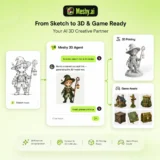
Meshy AI is an advanced AI-powered 3D model generator that transforms text prompts and images into production-ready 3D…
WeryAI is an all-in-one AI creative platform that brings together leading AI models for video generation, image creation,…
Magica AI is an all-in-one AI platform that combines the world’s leading AI models into a single intelligent…

MiniMax H3 AI Video Generator, at minimaxh3.lol, is an independent, third-party website — not MiniMax’s or Hailuo’s own…
Gling AI is an intelligent video editing platform that automates the most repetitive editing tasks for creators. Instead…
Dream by WOMBO is an AI-powered image and video generation platform for creating unique artwork, illustrations, characters, and…

Freebeat AI is an all-in-one AI music video creation platform designed for musicians, content creators, DJs, dancers, marketers,…
