Last updated July 28, 2026
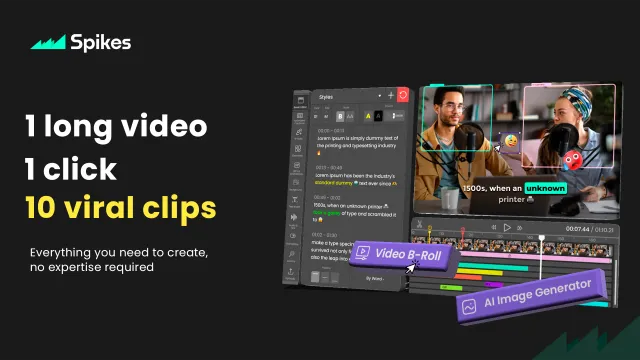
Spikes Studio is an AI-powered video clipping platform that helps creators transform long-form videos into engaging short-form content for platforms like YouTube Shorts, TikTok, Instagram Reels, and Twitch. Instead of spending hours manually editing videos, Spikes Studio automatically detects highlights, adds captions, improves visuals, and creates ready-to-publish clips in just a few clicks.
Whether you’re a YouTuber, podcaster, streamer, marketer, or business owner, Spikes Studio simplifies the content repurposing process and helps you publish more content in less time.
Automatically converts long videos into viral-ready short clips by identifying engaging moments using AI.
Generate accurate captions with customizable styles to improve accessibility and viewer engagement.
Automatically inserts relevant B-roll footage to make videos more dynamic and engaging.
Create modern, animated subtitles optimized for social media platforms.
Enhance videos with GIFs, emojis, and animated elements to increase watch time.
Creates videos optimized for:
Automatically transcribes videos for subtitles and searchable content.
Export high-quality Full HD videos without watermarks on paid plans.
Enterprise users receive collaboration features, account management, and scalable workflows.
Edit videos directly from your browser without downloading heavy software.
Spikes Studio is ideal for:
Unlike traditional video editors that require manual cutting and editing, Spikes Studio uses AI to automatically identify the best moments in your videos and converts them into short-form content optimized for social media.
Its combination of AI clipping, animated captions, AI-generated B-roll, transcription, and platform-specific optimization makes it a powerful solution for creators who publish content consistently.
Spikes Studio supports:
If you’re exploring similar tools, consider:
| Category | Rating |
|---|---|
| Features | ⭐⭐⭐⭐⭐ (4.8/5) |
| Ease of Use | ⭐⭐⭐⭐⭐ (4.8/5) |
| AI Automation | ⭐⭐⭐⭐⭐ (4.7/5) |
| Performance | ⭐⭐⭐⭐⭐ (4.8/5) |
| Video Quality | ⭐⭐⭐⭐⭐ (4.7/5) |
| Value for Money | ⭐⭐⭐⭐☆ (4.6/5) |
| Customer Support | ⭐⭐⭐⭐☆ (4.5/5) |

adcreator.ai is an AI-powered UGC video ad platform that turns a single product photo into a talking video…

MiniMax H3 AI Video Generator, at minimaxh3.lol, is an independent, third-party website — not MiniMax’s or Hailuo’s own…
Magica AI is an all-in-one AI platform that combines the world’s leading AI models into a single intelligent…

PixVerse AI is an AI-powered video creation platform built for generating high-quality videos from text prompts and images.…

Adobe Premiere Pro is a professional non-linear video editing application developed by Adobe and trusted by filmmakers, broadcasters,…

PixPix is an AI-powered creative workspace built for brands, e-commerce sellers, and creative teams who need professional-grade image and video…
Meshy AI is an advanced AI-powered 3D model generator that transforms text prompts and images into production-ready 3D…

Vance Video AI is an AI-powered video enhancement software designed to improve video quality using advanced machine learning…
Video Candy is an AI-powered online video editing platform that helps creators edit, convert, compress, and enhance videos…
Klap AI helps creators, marketers, podcasters, educators, agencies, and businesses repurpose long videos into viral short-form content automatically.…

HeyGen is an AI-powered video generation platform trusted by over 1,000,000 developers and leading organisations — from solo creators and…

Dubly.AI is an AI-powered video dubbing and lip-sync platform that helps creators translate videos into multiple languages while…
