
AI-Powered Image, Video & Creative Content Generation
Last updated August 14, 2026
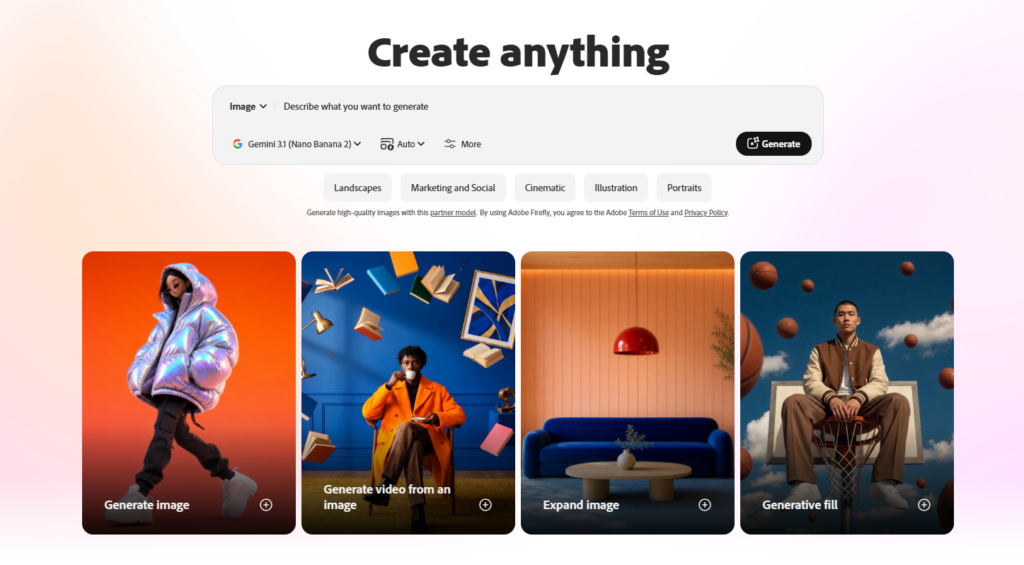
Adobe Firefly is Adobe’s generative AI platform for creating and editing images, videos, audio, and creative content with simple text prompts. It combines Adobe’s AI models with creative workflows designed for designers, marketers, content creators, and businesses.
Users can generate visuals from text, edit existing images, create videos, expand compositions, remove or replace elements, and explore different creative styles without requiring advanced design skills.
Firefly also integrates with Adobe’s broader creative ecosystem, making it useful for users who already work with applications such as Photoshop and Adobe Express.
Designers: Creating concepts, illustrations, marketing graphics, and visual assets.
Content Creators: Producing images, videos, thumbnails, social media visuals, and creative content.
Marketing Teams: Creating campaign assets, advertisements, product visuals, and promotional content.
Businesses: Developing branded graphics and creative materials without relying entirely on traditional production workflows.
Photographers: Enhancing images, expanding compositions, and experimenting with AI-powered editing.
Video Creators: Generating video concepts, animations, and supporting visual assets.
Agencies: Producing creative concepts and campaign materials for clients.
Uncommon Use Cases: Educators can use Firefly to create visual learning materials, while entrepreneurs can use it to quickly prototype branding, advertisements, product concepts, and promotional content.
Adobe Firefly stands out by combining generative AI with Adobe’s established creative ecosystem. Instead of functioning only as an AI image generator, Firefly brings together image generation, image editing, video creation, creative boards, and other AI-powered workflows.
Its connection with Adobe tools makes it particularly useful for designers and creative professionals who want to move from AI-generated concepts into more complete production workflows.
Adobe provides tutorials and learning resources covering image generation, generative fill, prompt writing, video generation, image editing, creative workflows, and other Firefly features.
Adobe Firefly is used to generate and edit images, create videos, expand images, remove or replace objects, and develop creative content using AI.
Adobe Firefly offers free access with limited usage, while paid plans provide additional generative credits and access to more features and models.
Yes. Firefly can generate images from text prompts and provides AI-powered editing features for modifying existing images.
Yes. Firefly includes AI video generation features that can create video content from text and images.
Yes. Its combination of generative AI, image editing, creative workflows, and Adobe integrations makes it particularly useful for designers and creative professionals.
Firefly is designed for professional and commercial creative workflows, but users should always check the applicable Adobe terms and the specific model or feature being used.
Yes. Firefly is integrated into Adobe’s creative ecosystem, including AI-powered features available through Photoshop and other Adobe applications.
Adobe Firefly is suitable for designers, marketers, photographers, video creators, businesses, agencies, and anyone who wants to create or edit visual content using generative AI.
| Category | Rating |
|---|
| Accuracy and Reliability | ⭐ 4.7/5 |
| Ease of Use | ⭐ 4.6/5 |
| Functionality and Features | ⭐ 4.9/5 |
| Performance and Speed | ⭐ 4.6/5 |
| Customization and Flexibility | ⭐ 4.8/5 |
| Data Privacy and Security | ⭐ 4.5/5 |
| Support and Resources | ⭐ 4.6/5 |
| Cost-Efficiency | ⭐ 4.4/5 |
| Integration Capabilities | ⭐ 4.8/5 |
Aura AI is an intuitive AI image generation platform designed for creators, students, professionals, and anyone who wants…

Luna Lisa is an AI image generation and photo editing platform built around its VIP Luna Lisa image…
Artbreeder is an AI-powered creative platform for generating, mixing, and exploring unique images and artwork. It gives creators…

MimicPC is a browser-based AI workspace that lets users run powerful AI applications without installing software or configuring complex…
Hailuo AI is an advanced AI-powered creative platform developed by MiniMax that enables users to generate cinematic videos,…

Mubert AI is a real-time AI music generator that creates original, royalty-free soundtracks for videos, podcasts, games, apps,…

Grok AI is a next-generation conversational AI assistant developed by xAI. Designed to provide accurate, up-to-date responses, Grok…
AI Baby Generator is an advanced AI-powered future baby prediction tool that creates realistic images of your potential…
Magica AI is an all-in-one AI platform that combines the world’s leading AI models into a single intelligent…
Pixlr is a free, browser-based AI photo editor and image generator that combines a full photo editing suite,…
aiAllure is an AI companion platform designed for more personalized, ongoing interactions. Users can explore AI companions and…

Gemini AI is Google’s advanced multimodal artificial intelligence assistant developed by Google DeepMind. It can understand and generate…
