Text to image. Image to video. One platform. Free to start.
Last updated August 31, 2026
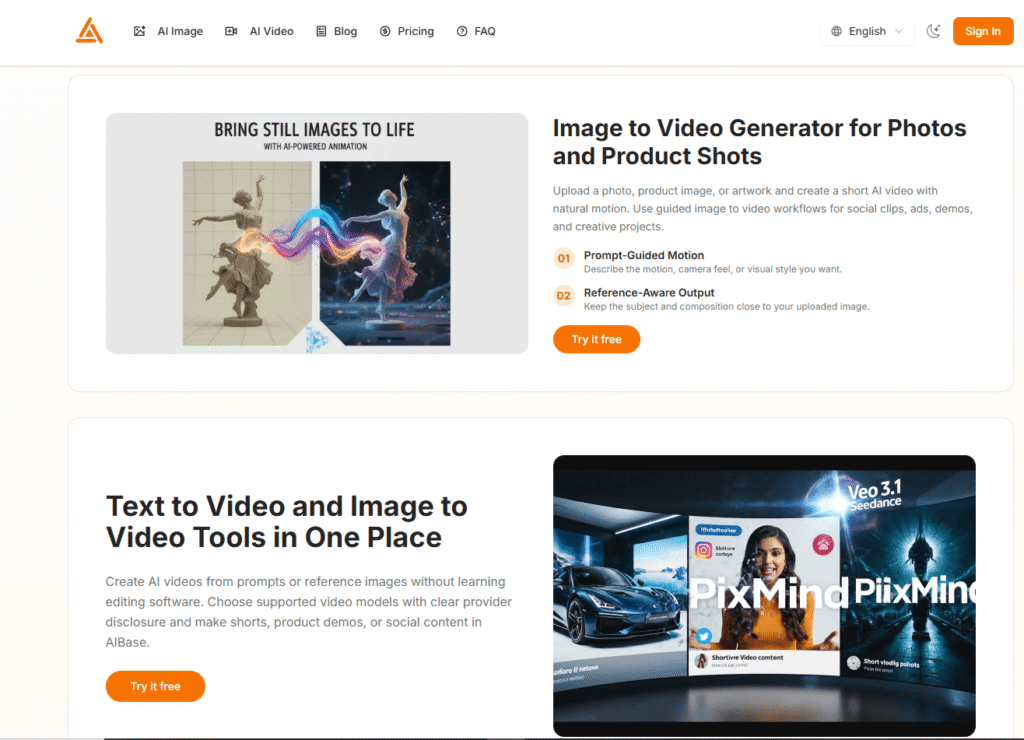
AIBase is an independent AI image and video generation workspace that brings text to image, image to image, text to video, and image to video workflows into one platform — without switching tools, without learning editing software, and without needing any design or technical skills.
Built for creators, marketers, social media managers, and product teams, AIBase lets you generate AI images from text prompts, edit visuals using reference images, and turn photos or product shots into short AI videos with natural motion — all from a single browser-based workspace.
What makes AIBase different from most AI image and video tools is its multi-model approach with transparent provider disclosure. Rather than locking you into one AI model, AIBase supports a range of third-party models — including Nano Banana 2, GPT Image 2, Nano Banana Pro, Seedream 5.0 Lite, Seedance 1.5 Pro, Seedance 2.0, Veo 3.1 Fast, Veo 3.1 Pro, Wan 2.7, and HappyHorse 1.0 — and clearly discloses which provider powers each generation. AIBase is an independent platform and is not affiliated with or endorsed by any of the model providers it supports.
Pricing is credit-based — you buy credits and spend them only on completed generations, with clear per-task credit costs published upfront. Monthly subscription plans start at $29.9/month (annual) with free credits available to start. No credit card required to try.
Pros
Cons
Content creators and social media managers — AIBase’s image to video workflow is ideal for turning product photos, portraits, or artwork into short social clips for TikTok, Instagram Reels, and YouTube Shorts without learning video editing software.
eCommerce sellers and product marketers — Upload product shots and generate short demo videos or animated product visuals for ads and listings. The reference-aware output keeps your product recognizable in the generated video.
Designers and visual artists — Use text to image and image to image workflows to generate concept art, design drafts, and visual references quickly. Multiple model options let you match different aesthetic styles.
Marketers and ad teams — Generate social graphics, ad visuals, and short video content from prompts or reference images without a dedicated design team. Free credits let you test before committing to a plan.
Bloggers and newsletter creators — Generate custom featured images, illustrations, and visual content for articles and newsletters without stock photo subscriptions.
Beginners exploring AI creative tools — AIBase’s prompt-based interface requires no design or technical skills. Free credits and clear tutorials make it one of the most accessible entry points into AI image and video generation.
Uncommon use cases: Generating animated product demos from static product photography for Shopify or Etsy listings; creating AI video backgrounds for presentations; using image to image workflows to generate multiple style variations of a logo or brand visual.
| Feature | AIBase | Midjourney | Hailuo AI |
|---|---|---|---|
| Text to image | ✅ Yes — multiple models | ✅ Yes — Midjourney model | ✅ Yes |
| Image to image | ✅ Yes | ✅ Yes | ✅ Yes |
| Text to video | ✅ Yes — Veo 3.1, Seedance, Wan | ❌ No | ✅ Yes — MiniMax H3 |
| Image to video | ✅ Yes | ❌ No | ✅ Yes |
| Multi-model support | ✅ Yes — 10+ models | ❌ Single model | ⚠️ Limited |
| Model transparency | ✅ Yes — provider disclosed | ❌ No | ❌ No |
| Free credits to start | ✅ Yes — no card required | ❌ No free tier | ✅ Yes — limited |
| Image editor | ✅ Yes | ✅ Yes | ❌ No |
| Video resolution | 720p default | N/A | 2K (MiniMax H3) |
| Beginner-friendly | ✅ Yes | ⚠️ Learning curve | ✅ Yes |
| Pay-as-you-go | ✅ Yes — credit packs | ❌ No | ✅ Yes |
| Monthly paid from | $29.9/mo (annual) | $10/mo | ~$9/mo |
| Best for | All-in-one image + video workspace | High-quality image generation | 2K cinematic video generation |
Choose AIBase if: You want text to image, image to image, text to video, and image to video in one workspace with multi-model flexibility and transparent provider disclosure. AIBase is the best choice for creators who want to work across both image and video generation without switching platforms.
Choose Midjourney if: You need the highest quality AI image generation specifically — Midjourney’s image quality is best-in-class for artistic and photorealistic outputs, but it doesn’t offer video generation.
Choose Hailuo AI if: You need the highest resolution AI video output (2K via MiniMax H3) and are primarily focused on cinematic video generation rather than image creation.
Text to Image:
Image to Image:
Image to Video:
Text to Video:
Pro tip: Start with Seedream 5.0 Lite for image generation (only 12 credits per image) to test prompts before using higher-credit models for final outputs.
| Plan | Monthly Price | Annual Price | Credits | Best For |
|---|---|---|---|---|
| Basic Monthly | $39.9/mo | $29.9/mo (40% off) | 800 credits/mo | Testing and occasional use |
| Pro Monthly | $69.9/mo | $49.9/mo (40% off) | 1,400 credits/mo | Regular creators needing more monthly credits |
| Ultimate Monthly | $120/mo | $99.9/mo (40% off) | 2,800 credits/mo | High-usage creators wanting maximum monthly flexibility |
| Task | Model | Resolution | Credits | Approx. Cost |
|---|---|---|---|---|
| Text to Image | Seedream 5.0 Lite | 2K | 12 credits | ~$0.05 |
| Text to Image | GPT Image 2 | 1K | 19 credits | ~$0.08 |
| Text to Image | Nano Banana 2 | 2K | 31 credits | ~$0.12 |
| Image to Image | Nano Banana 2 | 2K | 32 credits | ~$0.13 |
| Text to Image | Nano Banana Pro | 2K | 45 credits | ~$0.18 |
| Image to Image | Nano Banana Pro | 2K | 46 credits | ~$0.18 |
| Video (5s) | Seedance 1.5 Pro | 720p + audio | 150 credits | ~$0.60 |
| Video (4s) | Veo 3.1 Fast | 720p + audio | 168 credits | ~$0.67 |
| Video (5s) | Wan 2.7 | 720p | 160 credits | ~$0.64 |
| Video (4s) | Veo 3.1 Pro | 720p + audio | 190 credits | ~$0.76 |
| Video (5s) | HappyHorse 1.0 | 720p | 250 credits | ~$1.00 |
| Video (5s) | Seedance 2.0 | 720p + audio | 380 credits | ~$1.52 |
| Image Compress | Free Tool | Unlimited | Free | Free |
Important notes:
Verdict: Yes — the most accessible all-in-one AI image and video workspace for creators who want multiple workflows without multiple subscriptions.
AIBase’s strongest value proposition is consolidation: text to image, image to image, text to video, and image to video in one workspace, with multi-model support and transparent provider disclosure. For creators who currently use separate tools for image generation and video generation, AIBase eliminates that friction.
The free credits with no credit card required make it genuinely zero-risk to test. The published credit cost table is one of the most transparent pricing structures in the AI creative tools category — you know exactly what each generation costs before you commit.
The image to video workflow is particularly strong for product marketers and eCommerce sellers — uploading a product photo and generating a short animated demo video is one of the most practical use cases in the platform.
Best for: Content creators, social media managers, product marketers, and eCommerce sellers who want AI image and video generation in one workspace without learning multiple tools or paying for multiple subscriptions.
Watch for: Heavy video users should calculate credit consumption carefully — Seedance 2.0 at 380 credits per 5-second video means the Basic plan’s 800 credits covers only ~2 premium videos per month. Choose the Ultimate plan or credit packs if video generation is your primary use case.
If AIBase isn’t the right fit for your workflow, budget, or use case, here are the closest alternatives worth evaluating:
1. Hailuo AI The strongest alternative for AI video generation specifically — powered by MiniMax H3 with native 2K resolution and synchronized audio. Hailuo AI is better if video quality is your primary priority. Less focused on image generation workflows than AIBase.
2. MiniMax H3 The underlying model powering Hailuo AI’s 2K video generation — ranked #1 in Video Editing on Artificial Analysis benchmarks. Access via the official Hailuo AI app or third-party platforms. Better for cinematic 2K video; AIBase is better for the combined image and video workspace.
3. Canva A broader design platform with AI image generation built in. Canva is better if you need a full design suite (presentations, social graphics, documents) alongside AI image generation. Less focused on AI video generation than AIBase.
4. Artbreeder An AI image generation platform focused on mixing, blending, and exploring unique visual styles. Better for artistic exploration and character design. Does not offer video generation.
5. CapCut A full AI-powered video editing platform with text to video and AI effects. Better if you need a complete video editor with timeline editing, captions, and effects alongside AI generation. More complex than AIBase but more powerful for video editing workflows.
6. invideo AI An AI video creation platform that generates full videos from text prompts — including voiceover, stock footage, and captions. Better for creating longer-form video content from scripts. AIBase is better for short creative clips from images or prompts.
Browse more tools in AI Tools For Image Generator → and AI Tools For Video Generation →
| Criteria | Rating |
|---|---|
| Accuracy & Reliability | ⭐ 4.5/5 |
| Ease of Use | ⭐ 4.9/5 |
| Features & Functionality | ⭐ 4.6/5 |
| Performance & Speed | ⭐ 4.5/5 |
| Customization | ⭐ 4.4/5 |
| Security & Privacy | ⭐ 4.5/5 |
| Customer Support | ⭐ 4.2/5 |
| Value for Money | ⭐ 4.6/5 |
| Integrations | ⭐ 3.8/5 |
What is AIBase?
AIBase is an independent AI image and video generation platform that brings text to image, image to image, text to video, and image to video workflows into one workspace. It supports multiple third-party AI models with clear provider disclosure and is not affiliated with or endorsed by any model provider.
Is AIBase free?
AIBase offers free credits on signup with no credit card required — enough to try the main workflows. There is no permanent free plan; paid subscriptions start at 39.9/month (monthly).
How much does AIBase cost?
AIBase’s Basic plan is 39.9/month (monthly) for 800 credits. Pro is 99.9/month (annual) for 2,800 credits. Pay-as-you-go credit packs are also available. Annual plans save 40% vs monthly.
What AI models does AIBase support?
AIBase supports Nano Banana 2, GPT Image 2, Nano Banana Pro, Seedream 5.0 Lite (image models) and Seedance 1.5 Pro, Seedance 2.0, Veo 3.1 Fast, Veo 3.1 Pro, Wan 2.7, and HappyHorse 1.0 (video models). All models are provided by Evolink and disclosed transparently.
What is the cheapest way to generate AI images on AIBase?
Seedream 5.0 Lite is the most credit-efficient image model at 12 credits per 2K image (~$0.05). On the Basic plan (800 credits/month), you can generate approximately 66 images per month using Seedream 5.0 Lite.
Can AIBase turn a photo into a video?
Yes — AIBase’s image to video workflow lets you upload any photo, product image, or artwork and generate a short AI video with natural motion. You describe the motion and camera feel you want, and the output keeps the subject and composition close to your original image.
What video models are available on AIBase?
AIBase supports Seedance 1.5 Pro, Veo 3.1 Fast, and Wan 2.7 on all plans. Seedance 2.0, Veo 3.1 Pro, and HappyHorse 1.0 are available on yearly plans or credit packs only — not included in monthly subscriptions.
Do credits expire on AIBase?
Yes — credits renew monthly on subscription plans and do not roll over to the next month. Pay-as-you-go credit packs have their own expiry terms — check the pricing page for current details.
Does AIBase store my prompts or generated content?
AIBase’s privacy policy covers data handling — check aibase.art/privacy for current details. The platform is designed for independent creative use with no stated training on user-generated content.
Do I own the images and videos I generate on AIBase?
AIBase’s Terms of Service cover ownership rights for generated content — check aibase.art/terms for current details. Generally, AI-generated content ownership depends on the platform’s terms and the underlying model provider’s policies.
Is AIBase good for beginners?
Yes — AIBase is specifically designed for prompt-based creation with no design or technical skills required. If you can type a description or upload a reference image, you can generate AI images and videos. Free credits and tutorials are available to help new users get started.
What is the difference between Veo 3.1 Fast and Veo 3.1 Pro on AIBase?
Veo 3.1 Fast generates 4-second videos at 168 credits (~0.76) with higher quality output. Veo 3.1 Pro is available on yearly plans or credit packs only. Both include audio generation.

SellyAI is an AI-powered product listing generator that turns a photo, a product URL, or a few typed words…
Text to Brainrot is a browser-based AI video generator that turns any written content — text, notes, essays,…
PixPix is an AI-powered creative workspace built for brands, e-commerce sellers, and creative teams who need professional-grade image and video…

InVideo AI is an AI-powered video creation platform that enables users to generate professional-quality videos from simple text…

Rankability is an AI search visibility platform built specifically for SEO agencies — giving teams a single connected workflow to track…

DigiBouquet AI is a digital gifting tool that lets you send a flower bouquet gift as a personalized,…
VEED.IO is an all-in-one AI-powered online video editing platform that enables creators, businesses, educators, and marketing teams to…
NightCafe is an AI-powered creative platform for generating and exploring AI artwork. It provides access to multiple AI…
EarnDraft is an AI ebook creator that turns a one-line idea into a complete outline, five written chapters,…
Virvid AI is built for creators who want to grow faceless social media channels without spending hours scripting,…
AI Baby Generator is an advanced AI-powered future baby prediction tool that creates realistic images of your potential…
BeadPattern is an AI-powered pattern generator built specifically for physical bead crafting — Perler, Hama, Fuse, and Artkal…
