Free online chord progression generator. Pick a key and mood, press play, and start writing.
Last updated September 4, 2026
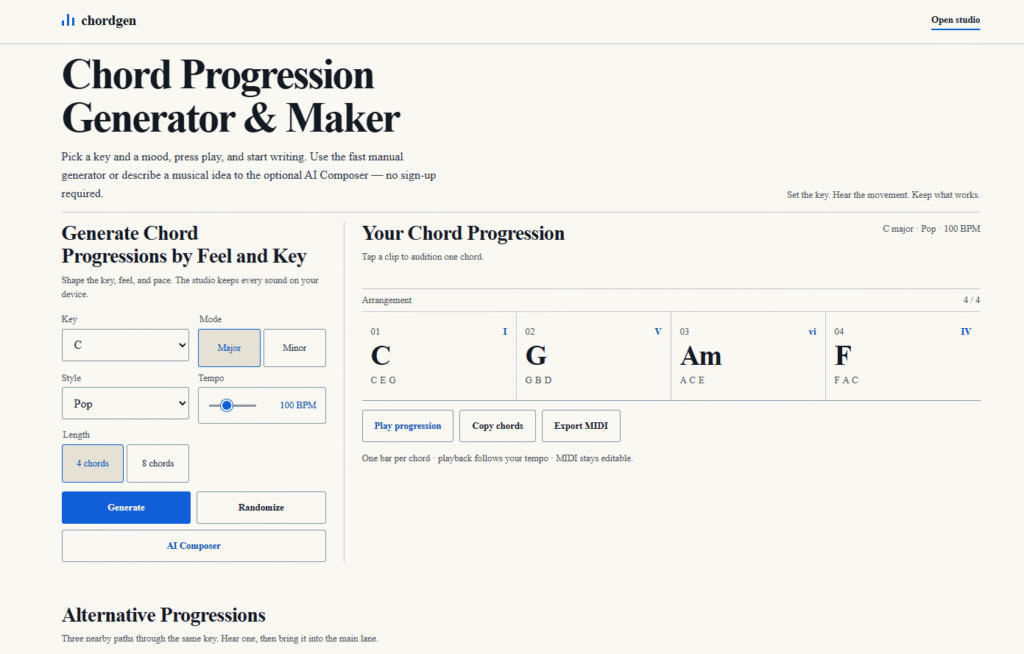
Chordgen is a free chord progression generator built for songwriters, producers, and beginners who want to start from a working set of chords instead of a blank page. Pick a key, mode (major or minor), style, and tempo, and it generates a progression — displayed with Roman numeral analysis, the notes in each chord, and instant audio playback — with no sign-up required and every sound kept on-device.
Beyond the fast manual generator, Chordgen includes an optional AI Composer for describing a musical idea in plain language rather than picking parameters manually, and automatically surfaces three Alternative Progressions in the same key so you can compare nearby paths (like vi-IV-I-V or I-vi-IV-V) before committing. A full chord reference for the selected key is shown alongside the generator, and finished progressions can be copied as chord names or exported directly as an editable MIDI file for use in other music software.
The tool is explicitly framed as a starting point rather than a rule — its own “Make it Yours” guidance encourages swapping chords, reordering sequences, or borrowing from an alternative progression, positioning Chordgen as a songwriting aid rather than a fully automated composition tool.
Pros
Cons
What is a chord progression generator?
A chord progression generator creates a sequence of chords from a selected key, mode, and musical feel, helping songwriters, producers, and beginners try combinations that work together without starting from a blank page.
How do I use a chord progression maker?
Choose a key and mode, select a style, set the tempo, and generate a progression. You can preview one chord or play the full sequence, then copy the chord names or export a MIDI file for your music software.
What are the most common chord progressions?
Common progressions include I-V-vi-IV in pop, ii-V-I in jazz, and I-IV-V in blues and rock. The Roman numerals describe each chord’s position in the key, so the same pattern can be moved to any key.
Is Chordgen free?
Yes. Chordgen is free with no sign-up required — manual generation, audio playback, and MIDI export all stay on your device.
Do I need music theory knowledge to use Chordgen?
No. The tool explains Roman numerals directly on the page (uppercase = major, lowercase = minor, ° = diminished), so beginners can follow along while learning.
Can I export what I make in Chordgen?
Yes. Progressions can be copied as chord names or exported as an editable MIDI file for use in other music software.
| Criteria | Rating |
|---|---|
| Accuracy & Reliability | ⭐ 4.5/5 |
| Ease of Use | ⭐ 4.8/5 |
| Features & Functionality | ⭐ 4.2/5 |
| Performance | ⭐ 4.6/5 |
| Customization | ⭐ 4.3/5 |
| Security & Privacy | ⭐ 4.7/5 |
| Customer Support | ⭐ 3.8/5 |
| Value for Money | ⭐ 5.0/5 |
| Integrations | ⭐ 3.9/5 |

Tunii is an AI vocal remover and stem-splitting tool that isolates vocals from any song, creating clean instrumental…
Mubert AI is a real-time AI music generator that creates original, royalty-free soundtracks for videos, podcasts, games, apps,…
Beatoven.ai is an AI-powered music generation platform that helps creators produce unique, royalty-free background music for videos, podcasts,…

Loudly is an AI-powered music generation platform that helps creators, marketers, filmmakers, and businesses produce original, royalty-free music…

Shikatagan.ai is a real-time AI news aggregator that pulls stories from Hacker News, TechCrunch, The Verge, Wired, MIT…

LOVO AI is a powerful AI voice generator and text-to-speech platform that helps creators produce realistic voiceovers in…
Generated Gallery is a free, searchable AI art gallery that collects generated images from across the web and…
Easy-Peasy.ai is an all-in-one AI productivity platform that combines the world’s leading AI models into a single workspace.…

ChatSlide AI is an AI-powered presentation creator that transforms PDFs, research papers, documents, notes, reports, transcripts, and text…
BeadPattern is an AI-powered pattern generator built specifically for physical bead crafting — Perler, Hama, Fuse, and Artkal…
Stitchgrid (imagetocrochetpattern.com) converts a photo into a lettered, editable crochet stitch chart — choose how many stitches go…
Lavender AI is an AI-powered email intelligence and sales email coaching platform designed to help sales professionals write…
