Make music. Make it yours.
Last updated November 2, 2026
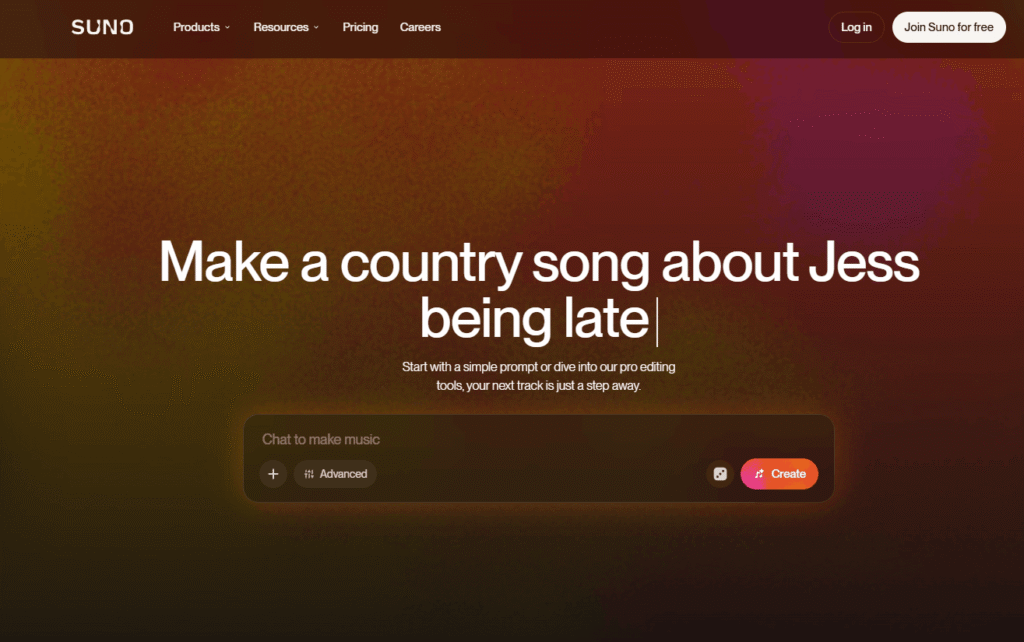
Suno is the world’s most popular AI music generator — used by millions of people every month to create original, high-quality songs from a simple text prompt. Whether you have a melody in your head, lyrics you have written, or just a feeling you want to hear, Suno turns your idea into a complete, fully produced track in seconds.
Developed by Suno, Inc., Suno has become the go-to platform for AI music creation — rated 4.9 stars with over 1 million reviews on iOS and 4.8 stars with over 2.3 million reviews on Android, making it the #1 AI music app in the world by user ratings.
Suno is not just a music generator. It is a complete music creation ecosystem — combining an AI song generator, a browser-based DAW (Suno Studio), voice cloning, stem separation, remix tools, custom model training, and a music library — all in one platform. It sits alongside tools like ElevenLabs and LOVO in the AI Tools For Audio category — but where those tools focus on voice and speech, Suno is built entirely around music creation. From your first free track to a commercially released album, Suno covers the entire creative journey.
🎵 AI Song Generator Start with a simple text prompt — a mood, a genre, a lyric idea, or a full description — and Suno generates a complete, fully produced song with vocals, instruments, and arrangement. No music experience required. If you also need AI-generated voiceovers alongside your music, ElevenLabs is the best companion tool in the AI Tools For Audio category.
🎛️ Suno Studio — Browser-Based DAW A full digital audio workstation built directly into your browser. Arrange, edit, and mix every part of your song — now with MIDI, effects, automation, and design-your-own-plugins (Premier plan). No software to install. For creators who need additional AI Tools For Audio Editing beyond what Suno Studio offers, Speak AI is a strong companion for voice intelligence and audio analysis.
🎤 Voices — AI Voice Cloning Record a few seconds of your own voice, then hear it sing anything you write in any style. Your voice, your songs, your sound. For text-to-speech and professional voiceover needs beyond music, LOVO is the leading AI Tools For Text-to-Voice platform on HeloAITools.
✂️ Stem Separation Pull any song apart into clean, time-aligned stems — vocals, drums, bass, instruments — and carry them into the DAW you already use. Available on Pro (2 types) and Premier (3 types including Advanced Split).
🔄 Remix Take any song somewhere new. Change its style, rewrite the lyrics, or rebuild it around your own recording. Remix is the fastest way to explore creative directions without starting from scratch.
🧠 Custom Models Train a model on your own recordings so every song it generates starts from your unique sound. Available on Pro and Premier plans.
📚 Music Library Browse songs by genre, mood, and occasion — whether you need a reference track, a creative spark, or the right music for a project.
🎚️ Granular Creation Controls Steer your style with Voices, Inspo, exclusions, and vocal gender controls. Experiment with weirdness and style sliders for more precise creative direction.
v6 Model — Most Capable Yet Suno’s newest model delivers fuller vocals, tighter arrangements, and more of the detail creators asked for — the most realistic AI music generation available.
📱 Available Everywhere Web app, iOS app, and Android app — create music from anywhere, on any device.
Step 1 — Describe Your Song Type a prompt — a genre, a mood, a lyric idea, or a full description. Example: “Make a house song about quitting your job” or “Upbeat indie pop about a road trip at sunset.”
Step 2 — Generate Suno creates a complete, fully produced track in seconds — vocals, instruments, arrangement, and all. Generate multiple variations and pick your favourite.
Step 3 — Edit and Refine Use Suno Studio to arrange, edit, and mix your track. Add your own voice with Voices, separate stems, remix the style, or train a custom model on your recordings. Creators who want to turn their Suno tracks into full music videos can use Freebeat — the best AI Tools For Video Generation platform for music-driven video content.
Step 4 — Share and Own Share your music with the Suno community or publish it to the world. Paid subscribers get full commercial rights — your songs are yours to keep, use, and release.
Uncommon Use Cases:
Three things set Suno apart from every other tool in the AI Tools For Music category:
1. End-to-end music creation in one platform Most AI music tools generate a track and stop there. Suno goes further — with a built-in DAW (Suno Studio), voice cloning, stem separation, remix tools, and custom model training, it covers the entire music creation workflow from first idea to finished, commercially releasable track. For voice-specific needs, ElevenLabs remains the strongest companion in the AI Tools For Audio space.
2. The #1 rated AI music app in the world With 4.9 stars from 1M+ iOS reviews and 4.8 stars from 2.3M+ Android reviews, Suno has the largest and most satisfied user base of any AI music platform. The community creates everything from chart-ready pop to experimental electronic to deeply personal acoustic songs.
3. Commercial rights on paid plans Songs you create as a paid Suno subscriber are yours — full commercial rights, no strings attached. Use them as background music in videos, publish an album, license them to brands, or release them on streaming platforms. Your creativity, your ownership.
| Suno | Udio | Soundraw | Mubert | |
|---|---|---|---|---|
| AI song generation | ✅ Full songs with vocals | ✅ Full songs with vocals | ✅ Instrumental focus | ✅ Instrumental focus |
| Browser-based DAW | ✅ Suno Studio | ❌ No | ❌ No | ❌ No |
| Voice cloning | ✅ Yes | ❌ No | ❌ No | ❌ No |
| Stem separation | ✅ Yes | ❌ No | ❌ No | ❌ No |
| Custom model training | ✅ Yes | ❌ No | ❌ No | ❌ No |
| Free plan | ✅ 50 credits/day | ✅ Limited | ✅ Limited | ✅ Limited |
| Commercial rights | ✅ Paid plans | ✅ Paid plans | ✅ Paid plans | ✅ Paid plans |
| Mobile app | ✅ iOS and Android | ❌ No | ❌ No | ❌ No |
| Best for | Complete music creation | AI song generation | Background music | Streaming music |
Looking for more AI Tools For Music and AI Tools For Audio? Here are the best companion tools to use alongside Suno:
| Tool | Best For | Link |
|---|---|---|
| ElevenLabs | AI voice generation and text-to-speech | View → |
| LOVO | AI voiceover and text-to-voice | View → |
| Speak AI | AI voice intelligence and audio analysis | View → |
| Freebeat | AI music video creation | View → |
Q1. What is Suno?
Suno is the world’s most popular AI music generator. It lets you create original, fully produced songs from a simple text prompt — with vocals, instruments, and arrangement — in seconds. No music experience required.
Q2. Is Suno free?
Yes. Suno has a free plan that gives you 50 credits per day with no credit card required. Paid plans start from ₹680/month and unlock the best models, commercial rights, voice cloning, stem separation, and advanced features.
Q3. Can I use Suno music commercially?
Yes — on paid plans. Songs created as a Pro or Premier subscriber come with full commercial rights. You can use them as background music in videos, publish an album, license them, or release them on streaming platforms. Free plan songs do not include commercial rights.
Q4. Do I need music experience to use Suno?
No. Suno is designed to make high-quality music creation accessible to everyone — from complete beginners to professional musicians. If you can describe what you want to hear, Suno can create it.
Q5. What is Suno Studio?
Suno Studio is a browser-based digital audio workstation (DAW) built directly into Suno. It lets you arrange, edit, and mix every part of your song. The Premier plan unlocks MIDI, effects, automation, and design-your-own-plugins. For additional AI Tools For Audio Editing, explore more tools on HeloAITools.
Q6. What is the v6 model in Suno?
v6 is Suno’s newest and most capable AI music model. It delivers fuller vocals, tighter arrangements, and more musical detail than previous versions — the most realistic AI music generation Suno has released.
Q7. Can I use my own voice in Suno?
Yes. The Voices feature on Pro and Premier plans lets you record a few seconds of your own voice, then hear it sing anything you write in any style. For professional AI voice generation beyond music, ElevenLabs is the leading tool in the AI Tools For Text-to-Voice category.
Q8. What is stem separation in Suno?
Stem separation lets you pull any song apart into clean, time-aligned stems — vocals, drums, bass, and instruments. Pro includes 2 stem separation types. Premier includes 3 types including Advanced Split.
| Criteria | Rating |
|---|---|
| Accuracy & Reliability | ⭐ 4.6/5 |
| Ease of Use | ⭐ 4.8/5 |
| Features & Functionality | ⭐ 4.9/5 |
| Performance | ⭐ 4.7/5 |
| Customization | ⭐ 4.6/5 |
| Security & Privacy | ⭐ 4.5/5 |
| Customer Support | ⭐ 4.4/5 |
| Value for Money | ⭐ 4.7/5 |
| Integrations | ⭐ 4.5/5 |
Tunii is an AI vocal remover and stem-splitting tool that isolates vocals from any song, creating clean instrumental…
Chordgen is a free chord progression generator built for songwriters, producers, and beginners who want to start from…
Wispr Flow is an AI-powered speech-to-text and voice productivity tool designed to let users speak naturally instead of…
Beatoven.ai is an AI-powered music generation platform that helps creators produce unique, royalty-free background music for videos, podcasts,…
Murf AI is a text-to-speech and AI voice platform built around three products: Murf Studio (voiceover creation for…
Seed Audio AI is a text-to-speech and voice cloning platform built to replace traditional voice recording bottlenecks —…
Mubert AI is a real-time AI music generator that creates original, royalty-free soundtracks for videos, podcasts, games, apps,…
Loudly is an AI-powered music generation platform that helps creators, marketers, filmmakers, and businesses produce original, royalty-free music…
Easy-Peasy.ai is an all-in-one AI productivity platform that combines the world’s leading AI models into a single workspace.…
WeryAI is an all-in-one AI creative platform that brings together leading AI models for video generation, image creation,…
Magica AI is an all-in-one AI platform that combines the world’s leading AI models into a single intelligent…
ElevenLabs is an advanced AI audio platform that enables creators, businesses, and developers to generate ultra-realistic voices, AI…