Visual storytelling without limits — AI-powered presentations, documents, and websites in minutes.
Last updated November 10, 2026
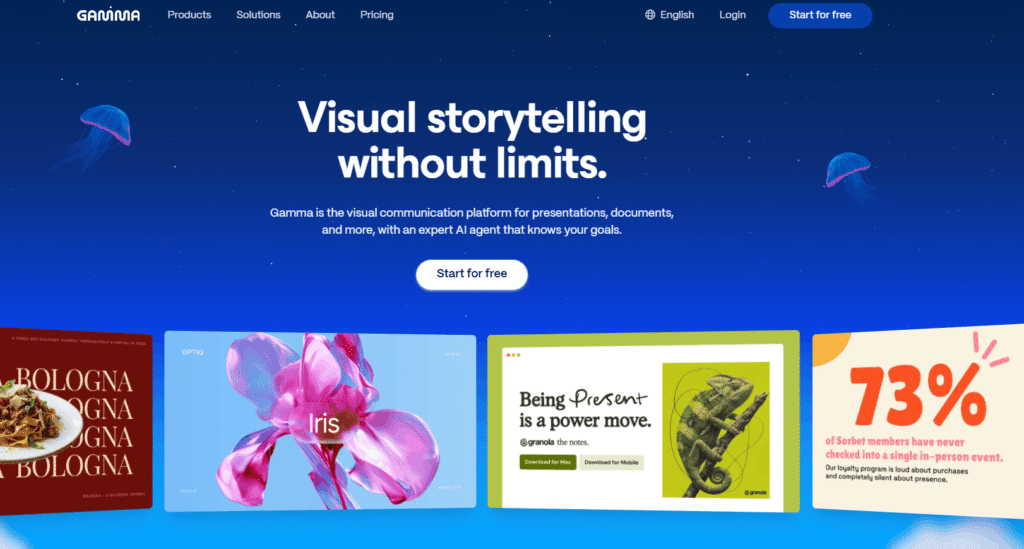
Gamma is the AI-powered visual communication platform for presentations, documents, websites, and social media visuals — used by over 100 million users worldwide, including teams at IBM, Mastercard, Novartis, The New York Times, and Northeastern University.
Where traditional tools like PowerPoint and Google Slides force you to start from a blank slide and fight with formatting for hours, Gamma starts with a conversation. Its expert AI agent understands your goals, orchestrates the best AI models for each part of the job, and produces a sharper story, a wider visual range, and edits that respect your intent — all in minutes.
Gamma is not just a presentation tool. It is a complete visual communication platform — covering presentations, documents, one-pagers, white papers, social media carousels, live websites, and AI-generated images — all in one place, all in your brand style. With 100+ million users, Gamma is the most widely adopted AI Tools For Presentation Maker platform in the world.
Gamma sits alongside tools like Jasper and Copy.ai in the AI Tools For Content Creation category — but with a unique focus on visual storytelling that goes far beyond text generation.
🧠 Brainstorm — Meet Your New Creative Partner Any AI tool can make slides. Gamma’s agent orchestrates the best AI models for each part of the job — so every deck gets a sharper story, a wider visual range, and edits that respect the goal. The process starts with a conversation, builds an outline first so you shape the story, and iterates in chat right beside your deck. For more AI Tools For Content Creation that start with AI brainstorming, explore the full category on HeloAITools.
🎨 Design — A Different Look for Any Story Describe the style, share inspiration from anywhere, or let Gamma choose a look that fits your goal. High-taste visual output so your content never looks generic. Gamma matches design to your content, audience, and brand — delivering a visual range you did not know was possible from an AI tool. Browse more AI Tools For Design Generators on HeloAITools.
✏️ Refine — Edit Any Way You Want Ask Gamma’s agent for changes, drop in smart layouts, or move anything anywhere with freeform editing. Switch between AI-assisted editing and full freeform design mode whenever you want — you never have to pick one. Custom instructions, brand controls, and workspace templates keep everything consistent across your team.
🔗 Connect — Import, Export, Connect All Your Tools Import PowerPoints and PDFs and they arrive the way you built them — formatting intact. Pull real content from Slack, Notion, Dropbox, and 25+ tools. Start in Claude, ChatGPT, or Slack. Export to PowerPoint, PDF, and more with high fidelity. Gamma fits into your existing workflow rather than replacing it.
📊 Presentations — Decks That Wow the Room Your story, your style. Clean export to PowerPoint, PDF, and more. Gamma’s AI agent builds presentation decks that are visually compelling, structurally sound, and ready to share — in a fraction of the time it takes in traditional tools. For teams that also need AI writing for their presentations, Jasper is a strong companion in the AI Tools For Marketing category.
📄 Documents — Docs That Draw You In From one-pagers to white papers — on-brand, structured, visual, and ready to share. Gamma transforms the traditional document into a visual experience that holds attention and communicates clearly. For more Writing Assistant tools, explore the full category on HeloAITools.
📱 Social Media Visuals — Polished and Ready to Publish Carousels and graphics sized for every platform, in your brand. Gamma generates social media visuals that are platform-ready and on-brand — no separate design tool needed. Browse more AI Tools For Social Media on HeloAITools.
🌐 Websites — A Live Site in Minutes Prompt it, publish it, share the link. Gamma turns your content into a live website in minutes — no developer, no CMS, no design skills required. For more dedicated AI Tools For Website Builder options, explore the full category on HeloAITools.
🖼️ AI-Generated Images — The Best Image Models, Built In Infographics, illustrations, and on-brand visuals — editable right where you work. Gamma integrates the best AI image models directly into the creation workflow so you never need to leave the platform to find visuals. For more dedicated AI image generation tools, explore the full category on HeloAITools.
⚙️ API — Gamma Inside Your Product Automate creation and editing, then scale what your team makes. Gamma’s API lets developers integrate AI-powered presentation and document creation directly into their own products and workflows.
Step 1 — Start With a Conversation Tell Gamma’s AI agent what you are making, who it is for, and what you want it to achieve. The agent starts with an outline — so you shape the story before any design begins.
Step 2 — Shape the Story Review and refine the outline in chat, right beside your deck. Add, remove, or restructure sections. Gamma iterates with you — not for you — so the final story is yours.
Step 3 — Design Automatically Describe a style, attach inspiration from anywhere, or let Gamma choose a look that fits your goal. The AI matches design to your content, audience, and brand — delivering high-taste visuals without generic templates.
Step 4 — Refine Your Way Ask Gamma’s agent for changes in chat, drop in smart layouts, or switch to full freeform design mode and move anything anywhere. Use custom instructions and brand controls to keep everything consistent.
Step 5 — Connect and Export Import from PowerPoint, PDF, Slack, Notion, Dropbox, and 25+ tools. Export to PowerPoint, PDF, and more. Share a live link or publish as a website. Gamma fits into every workflow.
Uncommon Use Cases:
Three things set Gamma apart from every other tool in the AI Tools For Presentation Maker and AI Tools For Design Generators categories:
1. An AI agent that orchestrates — not just generates Most AI presentation tools generate slides from a prompt and stop there. Gamma’s agent orchestrates the best AI models for each part of the job — brainstorming, outlining, designing, and editing — with a conversation-first approach that keeps you in control of the story. Tools like ChatGPT and Claude can help you write content, but they cannot design, layout, and publish a presentation in your brand style.
2. One platform for every visual format Presentations, documents, social media visuals, and live websites — all in one place, all in your brand style. No other AI tool covers this range. Jasper handles marketing copy. Copy.ai handles GTM workflows. Gamma handles the visual communication layer that sits on top of all of it.
3. 100 million users and enterprise trust With 100+ million users and innovation guided by leaders from IBM, Mastercard, Novartis, and The New York Times, Gamma is not a startup experiment — it is the established standard for AI-powered visual communication. The depth of enterprise adoption and the breadth of the user community make it the most trusted AI Tools For Presentation Maker platform available.
| Gamma | Canva | Beautiful.ai | Tome | Google Slides | |
|---|---|---|---|---|---|
| AI agent (orchestrated) | ✅ Yes — full agent | ⚠️ AI features | ✅ AI design | ✅ AI storytelling | ❌ No |
| Presentations | ✅ Yes | ✅ Yes | ✅ Yes | ✅ Yes | ✅ Yes |
| Documents | ✅ Yes | ✅ Yes | ❌ No | ✅ Yes | ❌ No |
| Social media visuals | ✅ Yes | ✅ Yes | ❌ No | ❌ No | ❌ No |
| Live websites | ✅ Yes | ✅ Yes | ❌ No | ❌ No | ❌ No |
| PowerPoint import | ✅ Formatting intact | ✅ Yes | ✅ Yes | ❌ No | ✅ Yes |
| 25+ integrations | ✅ Yes | ✅ Yes | ❌ Limited | ❌ Limited | ✅ Google ecosystem |
| AI image generation | ✅ Built in | ✅ Built in | ❌ No | ❌ No | ❌ No |
| Free plan | ✅ Yes | ✅ Yes | ✅ Limited | ✅ Limited | ✅ Yes |
| Monthly users | 100M+ | 200M+ | Growing | Growing | Billions |
| Best for | AI visual storytelling | Design and branding | Smart presentations | AI storytelling | Simple collaboration |
| Category | Rating |
|---|---|
| Ease of Use | ⭐ 4.9/5 |
| AI Presentation Quality | ⭐ 4.8/5 |
| Design Output | ⭐ 4.9/5 |
| Feature Range | ⭐ 4.8/5 |
| Integrations | ⭐ 4.8/5 |
| Free Plan Value | ⭐ 4.7/5 |
| Export Quality | ⭐ 4.7/5 |
| Team Collaboration | ⭐ 4.6/5 |
| Value for Money | ⭐ 4.8/5 |
| Overall | ⭐ 4.8/5 |
Q1. What is Gamma?
Gamma is the AI-powered visual communication platform for presentations, documents, websites, and social media visuals — used by over 100 million users worldwide. Its expert AI agent orchestrates brainstorming, design, and editing in one conversation-first workflow. It is the leading tool in the AI Tools For Presentation Maker category on HeloAITools.
Q2. Is Gamma free?
Yes. Gamma has a free plan that includes AI presentations, documents, websites, social visuals, AI image generation, and 25+ integrations — no credit card required. Paid plans unlock advanced AI features, higher usage limits, and team collaboration tools.
Q3. What can I create with Gamma?
You can create presentations, documents (one-pagers to white papers), social media carousels and graphics, live websites, and AI-generated images — all in your brand style, all from one platform. For more AI Tools For Content Creation, explore the full category on HeloAITools.
Q4. Can I import and export PowerPoint with Gamma?
Yes. Gamma imports PowerPoint and PDF files with formatting intact. You can also export your Gamma creations to PowerPoint, PDF, and more with high fidelity — making it easy to move between Gamma and traditional tools.
Q5. What integrations does Gamma support?
Gamma connects to 25+ tools including Slack, Notion, Dropbox, Claude, ChatGPT, and more. You can pull real content from your existing tools directly into Gamma and start creating from content you already have.
Q6. Can I use Gamma with my team?
Yes. Gamma supports team collaboration with workspace templates, brand controls, and custom instructions that keep output consistent across contributors. Enterprise teams at IBM, Mastercard, and Novartis use Gamma for organisation-wide visual communication. For more AI Tools For Business, explore the full category on HeloAITools.
Q7. Does Gamma train on my data?
Gamma has a Trust Center with detailed information on data privacy and security. Check gamma.app/trust for the latest data processing and privacy policies.
Q8. How is Gamma different from Canva?
Canva is primarily a design tool — you start with a template and build visually. Gamma starts with a conversation — its AI agent understands your goal, builds the story structure, and then designs around it. Gamma also covers live websites and documents in addition to presentations and social visuals. Both are strong tools in the AI Tools For Design Generators category — the right choice depends on whether you need design-first or story-first creation.

Creatify is an AI ad platform built to turn a product page URL into a finished, tested video…
LivePerson is an enterprise conversational AI platform built for large-scale customer experience (CX) operations — orchestrating both human…

Decktopus AI is an AI-powered presentation maker designed for professionals, businesses, educators, marketers, and students. Instead of spending…

Elicit is the AI research assistant built specifically for scientific research — trusted by over 5 million researchers at leading pharmaceutical…

MagicSlides AI is an AI-powered presentation generator that helps users create professional PowerPoint presentations from almost any content…

Copysmith is the company behind three connected AI platforms built to help content rank on Google, get cited…

TeamPost is an AI LinkedIn ghostwriter built for teams. Every employee gets their own AI ghostwriter that learns…

AhaSlides is an AI-powered interactive presentation platform that helps presenters engage audiences through live quizzes, polls, word clouds,…

Sonaopus is a prompt-structuring tool that solves a specific, common frustration: re-explaining your situation to ChatGPT, Claude, or…

Smartlead is an AI-native cold email and outbound sales platform trusted by over 100,000 businesses — from solo founders and lead…
Zapier is a no-code automation platform that connects over 8,000 apps, letting you build workflows (“Zaps”) that trigger…
EinfachAI is a specialist AI automation and agentic AI engineering service run by Nils Abegg — a senior…