Your tools. Your rules. Any AI. — connect 8,000+ apps with no-code automation
Last updated August 20, 2026
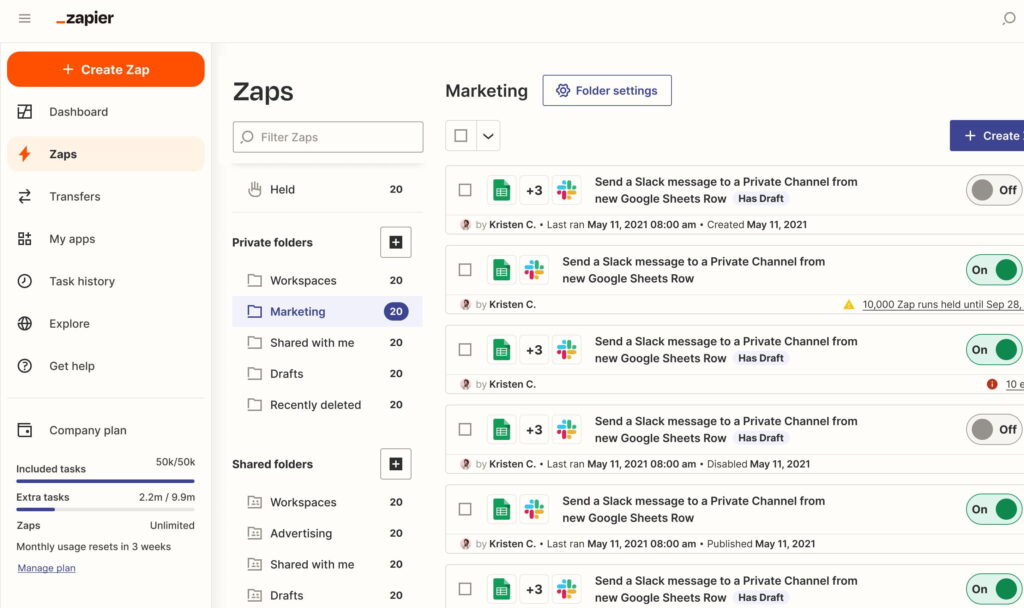
Zapier is a no-code automation platform that connects over 8,000 apps, letting you build workflows (“Zaps”) that trigger automatically when something happens in one app and carry out actions in another — no developer required. What started as a simple “if this app does X, do Y in that app” connector has grown into a full AI orchestration layer, now spanning Zaps, Tables, Forms, Canvas, AI Agents, and MCP.
The platform’s biggest 2025-2026 shift is AI-native automation: Zapier Copilot builds workflows from plain-English descriptions, Zapier Agents act as autonomous AI teammates that make decisions and execute multi-step tasks across your connected apps, and Zapier MCP exposes over 30,000 actions so external AI tools like Claude and ChatGPT can directly control your apps through Zapier’s connections.
Built for teams that want to automate repetitive work without hiring developers, Zapier is used by marketing, sales, support, and operations teams to connect the tools they already use — from a simple two-step Zap to complex, AI-driven multi-app systems.
Pros
Cons
If you’re comparing Zapier against other automation platforms:
Browse more in AI Tools For Automation →
What is Zapier?
Zapier is a no-code automation platform that connects over 8,000 apps, letting you build workflows that trigger automatically in one app and perform actions in another, now expanded into a full AI orchestration platform with Copilot, Agents, and MCP.
Is Zapier free?
Yes. The Free plan includes 100 tasks/month with unlimited two-step Zaps, Tables, and Forms — enough to test the platform, though real usage typically requires a paid plan.
How much does Zapier cost?
Zapier starts free, with Professional from $19.99/month, Team from $69/month, and custom Enterprise pricing. Pricing is task-based, so cost scales with how many actions your workflows run each month, not just which plan you’re on.
What is Zapier MCP?
Zapier MCP (Model Context Protocol) exposes over 30,000 Zapier actions so external AI tools like Claude and ChatGPT can directly trigger actions across your connected apps — effectively turning Zapier into a universal action layer for AI.
What are Zapier Agents?
Zapier Agents are autonomous AI teammates that combine large language models with Zapier’s app integrations to execute multi-step tasks — summarizing information, drafting emails, or updating project tools — triggered on a schedule or by events, without a human manually running each step.
Is Zapier better than n8n?
It depends on your team. Zapier is easier to start with and has the larger app ecosystem; n8n is self-hostable and generally more cost-effective at high volume for technical teams willing to manage more of the setup themselves.
Is Zapier good for beginners?
Yes — building a basic two-step Zap requires no coding and takes minutes. The learning curve increases with multi-step logic, Agents, and MCP, but the entry point is genuinely beginner-friendly.
| Criteria | Rating |
|---|---|
| Accuracy & Reliability | ⭐ 4.7/5 |
| Ease of Use | ⭐ 4.8/5 |
| Features & Functionality | ⭐ 4.9/5 |
| Performance | ⭐ 4.7/5 |
| Customization | ⭐ 4.7/5 |
| Security & Privacy | ⭐ 4.7/5 |
| Customer Support | ⭐ 4.6/5 |
| Value for Money | ⭐ 4.5/5 |
| Integrations | ⭐ 4.8/5 |
Frase is the content operating system for AI search — a single platform that runs the complete content loop:…
n8n is a visual workflow automation platform built for connecting AI agents to your existing tools and infrastructure…

Scite is an AI-powered research platform that goes beyond finding papers — it helps researchers understand whether the evidence…

Zanus AI is a private, on-premise AI operating system built for enterprises, government agencies, healthcare providers, law firms, and…

Sonaopus is a prompt-structuring tool that solves a specific, common frustration: re-explaining your situation to ChatGPT, Claude, or…

LivePerson is an enterprise conversational AI platform built for large-scale customer experience (CX) operations — orchestrating both human…
gpu.fund is an independent, live cloud GPU price index that tracks rental prices across 15 cloud providers, 49…
Atera is an all-in-one AI-powered IT management platform built for Managed Service Providers (MSPs), internal IT departments, enterprises,…

Optimizely is an AI-powered platform designed to help businesses create, manage, experiment with, and optimize digital experiences. The…

Stable Commerce is an AI-powered eCommerce platform that helps Etsy sellers build, manage, and grow their own independent…

VeriMails is an email verification platform that combines real-time SMTP handshake verification with catch-all detection to tell you…

Verand is an AI content platform built specifically for regulated businesses — the only tool in its category…
