
AI video editing, online or local for frequent editors
Last updated November 25, 2026
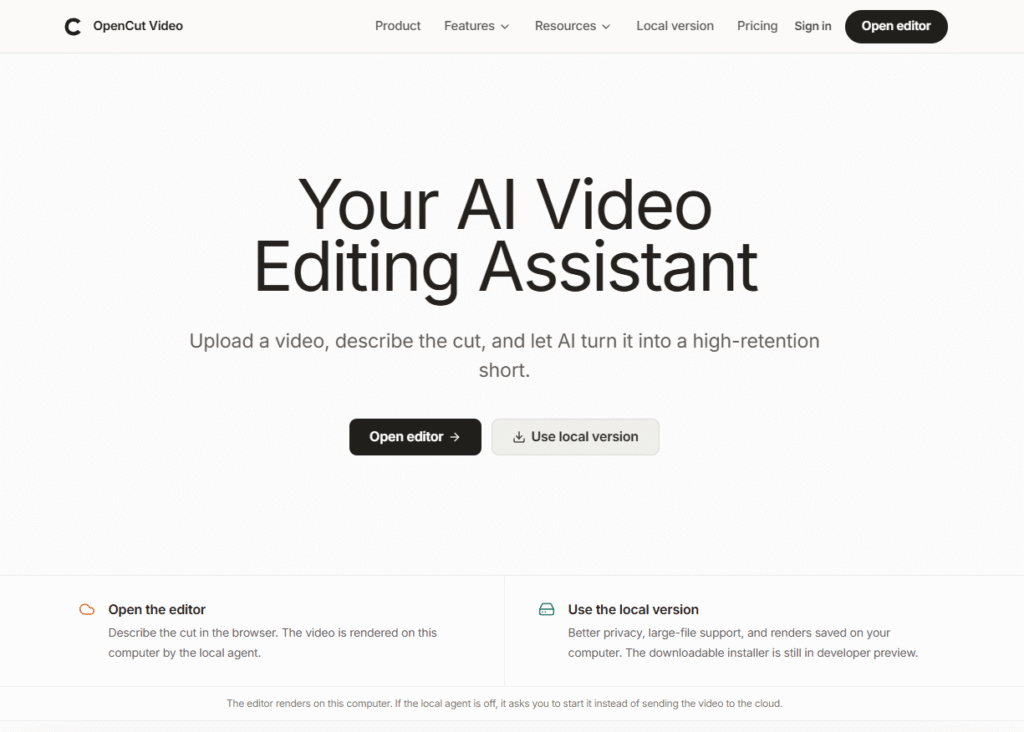
OpenCut Video (opencut.video) is a prompt-driven AI video editor that plans cuts with AI and renders with FFmpeg — either in your browser or locally on your computer. Upload your footage, describe the edit you want in plain language, and OpenCut turns that description into a finished, high-retention short with captions, pacing, and structure — ready to export as H.264 MP4.
It is not a traditional video editor where you drag clips on a timeline for hours. OpenCut is a conversational editing assistant — you describe the result you want (“cut this talking-head video into a fast 20-second short, start with the strongest claim, add clean captions”) and the AI reads your prompt, finds the strongest hook, tightens pauses, builds captions and graphics, and prepares the FFmpeg render — all in one automated sequence.
What makes OpenCut genuinely different from every other AI video editor in 2027 is its local rendering architecture. The AI plans the edit in the browser, but the actual video render happens on your computer using FFmpeg — meaning your raw footage never has to leave your device. For creators working with large files, sensitive content, or unreleased footage, this is a meaningful privacy and performance advantage.
The pricing model is also fundamentally different: no subscription, no monthly fee. The manual timeline editor is free forever. AI edits run on one-time credit packs that are valid for one year — you pay only for the edits you actually make, not a recurring seat fee whether you use it or not.
OpenCut Video sits in the AI Tools For Video Generation and AI Tools For Content Creation categories on HeloAITools — alongside tools like EveryGen AI and Creatify — but as the only AI video editor that combines conversational prompt-driven editing, local FFmpeg rendering, automatic captions in 100+ languages, and a pay-as-you-go credit model with no subscription.
🎬 AI Conversational Editing — Describe the Cut, Get the Result Type what you want in plain language — “find the strongest moments, remove repeated takes, turn this into a sharp 30-second creator edit” — and OpenCut’s AI reads the prompt, transcribes the footage, identifies the best segments, tightens pacing, and builds the timeline automatically. No manual clip selection, no frame-by-frame scrubbing. For more AI Tools For Video Generation tools, explore the full category on HeloAITools.
📝 Transcript-Driven Editing for Talking-Head Content Your footage is transcribed automatically. The AI picks the strongest segments from the transcript — not random clips — and renders them into a tight cut. Every word in the transcript is clickable: click a highlighted word to cut it directly from the timeline. This makes talking-head editing — the most common format for YouTube, TikTok, and Reels — dramatically faster than traditional editing.
🎯 Hook Detection — The First Two Seconds OpenCut’s AI specifically identifies the strongest hook in your footage and places it at the start of the cut. The hook lands in the first two seconds — the critical window that determines whether a viewer keeps watching or scrolls past. This is not a generic “find the best clip” feature — it is specifically optimised for short-form retention mechanics.
⏱️ Pacing and Pause Tightening The AI automatically removes dead air, tightens pauses, and matches the pacing to short-form viral rhythm. You can also upload a reference video under My Style and ask the agent to reuse its pacing, hook structure, and caption rhythm — making every new video consistent with your established creator style.
💬 Auto AI Captions in 100+ Languages Generate accurate captions straight from the transcript. Pick from 8 ready-made caption styles — Plain, TikTok Pop, Submagic, Editorial, Bubble Pop, Noir Glass, Creator Bold, Signal Flux — switch languages, or save your own look as a reusable template for every video after. Captions are burned directly into the exported H.264 MP4 — no separate subtitle file needed. For more AI Tools For Social Media tools, explore the full category on HeloAITools.
🖥️ Free Browser Timeline Editor The manual timeline editor is free forever — no account required, no credits needed. Trim, split, add crossfades, text overlays, and background music directly in the browser. The AI edit and the manual editor work together: use AI to get the first cut, then refine it manually on the timeline.
🔒 Local FFmpeg Rendering — Privacy-First Architecture This is OpenCut’s most distinctive technical feature. The AI plans the edit in the browser, but the actual video render happens on your computer using FFmpeg via the local agent. Your raw footage never leaves your device. For creators working with large files (the local agent supports large-file rendering that browser-only tools cannot handle), unreleased content, or sensitive footage, this is a genuine and largely irreplaceable advantage.
The local agent is currently in developer preview — available as a downloadable installer. When the local agent is running, renders happen on your computer and are saved locally. When it is off, the editor stays on the setup screen rather than silently switching to cloud rendering.
🎨 8 Caption Style Presets Eight ready-made caption styles cover every creator aesthetic — from clean editorial to viral TikTok Pop. Save your own custom style as a reusable template so every video in your series has consistent caption branding without resetting preferences each time.
📤 H.264 MP4 Export All exports are H.264 MP4 — the universal format accepted by every platform: YouTube, TikTok, Instagram Reels, LinkedIn, X, and more. No format conversion needed after export.
🔄 Conversational Revisions After the first cut, you can describe revisions in plain language — “make the hook tighter”, “add a call to action at the end”, “remove the section about pricing” — and the AI revises the edit without starting from scratch. Each revision uses credits from your balance.
Step 1 — Upload and Describe Upload your footage (or use the local agent for large files). Describe the edit you want in plain language — the style, length, structure, and any specific requirements. Optionally upload a reference video to match its pacing and hook structure.
Step 2 — AI Plans and Renders OpenCut reads your prompt, transcribes the footage, identifies the strongest hook, tightens pauses, builds captions and graphics, and prepares the FFmpeg render. Short talking-head clips produce a first cut in minutes. The render happens on your computer via the local agent — your footage stays local.
Step 3 — Review, Refine, Export Review the cut in the browser timeline editor. Trim, split, adjust captions, or describe revisions in plain language. Export as H.264 MP4 when you are satisfied. The finished file is saved on your computer.
🎙️ Content Creators and YouTubers Turn long talking-head recordings into tight, high-retention Shorts and clips. Use the hook detection to find the strongest opening moment. Match your established creator style with reference video pacing. For more AI Tools For Content Creation tools, explore the full category on HeloAITools.
📱 TikTokers and Instagram Reels Creators Generate vertical 9:16 short-form content from longer recordings. Use TikTok Pop or Bubble Pop caption styles for platform-native aesthetics. The viral short-form pacing optimisation is specifically built for TikTok and Reels retention mechanics. For more AI Tools For Social Media tools, explore the full category on HeloAITools.
🎓 Educators and Course Creators Cut long lecture recordings into focused, digestible clips. Auto-captions in 100+ languages make educational content accessible to international audiences. The transcript-driven editing makes it easy to find and extract specific explanations from long recordings.
🏢 Marketing Teams and Social Media Managers Repurpose long-form content — webinars, interviews, product demos — into short social clips without a dedicated video editor. The no-subscription credit model means you pay only for the edits you actually make, not a monthly seat fee for occasional use.
🔒 Privacy-Sensitive Creators Creators working with unreleased product footage, client content, or sensitive recordings benefit from the local rendering architecture — footage never leaves the device. No upload to a third-party server, no cloud processing of raw files.
Uncommon Use Cases:
1. Local FFmpeg rendering — your footage never leaves your device Every other AI video editor in 2027 uploads your footage to a cloud server for processing. OpenCut renders on your computer using FFmpeg via the local agent. This is not a minor privacy feature — it is a fundamentally different architecture that also enables large-file support that browser-only tools cannot handle. Tools like EveryGen AI generate video from prompts — OpenCut edits your existing footage locally.
2. No subscription — pay only for the edits you make Every AI video editing tool in 2027 charges a monthly subscription whether you use it or not. OpenCut charges one-time credits that are valid for one year. The manual timeline editor is free forever. For creators who edit in bursts rather than daily, this model saves significant money compared to a 50/month subscription.
3. Conversational editing with transcript-driven precision OpenCut does not just cut clips randomly — it reads the transcript, identifies the strongest hook, and builds the edit from the actual words spoken. The result is a cut that makes narrative sense, not just a highlight reel of visually interesting moments. The click-a-word-to-cut-it transcript interface is the fastest way to edit talking-head content available in 2027.
| OpenCut Video | EveryGen AI | Creatify | CapCut | Descript | |
|---|---|---|---|---|---|
| AI conversational editing | ✅ Yes | ❌ Text-to-video | ❌ Ad creation | ❌ No | ⚠️ Limited |
| Local rendering | ✅ Yes — FFmpeg | ❌ Cloud only | ❌ Cloud only | ❌ Cloud only | ❌ Cloud only |
| Footage stays on device | ✅ Yes | ❌ No | ❌ No | ❌ No | ❌ No |
| Transcript-driven editing | ✅ Yes | ❌ No | ❌ No | ❌ No | ✅ Yes |
| Hook detection | ✅ Yes | ❌ No | ❌ No | ❌ No | ❌ No |
| Auto captions 100+ languages | ✅ Yes | ❌ No | ✅ Yes | ✅ Yes | ✅ Yes |
| Free timeline editor | ✅ Forever free | ❌ No | ❌ No | ✅ Yes | ❌ No |
| No subscription | ✅ One-time credits | ❌ Subscription | ❌ Subscription | ✅ Free tier | ❌ Subscription |
| Reference style matching | ✅ Yes | ❌ No | ❌ No | ❌ No | ❌ No |
| Starting price | Free + $19 one-time | $8.25/mo | $19/mo | Free | $12/mo |
| Best for | Talking-head shorts, privacy | AI video generation | Product ads | General editing | Podcast editing |
| Category | Rating |
|---|---|
| AI Editing Quality | ⭐ 4.8/5 |
| Privacy and Local Rendering | ⭐ 5.0/5 |
| Pricing Model | ⭐ 5.0/5 |
| Caption Quality | ⭐ 4.7/5 |
| Hook Detection | ⭐ 4.8/5 |
| Ease of Use | ⭐ 4.6/5 |
| Free Plan Value | ⭐ 4.9/5 |
| Local Agent Stability | ⭐ 3.5/5 (developer preview) |
| Mobile Experience | ⭐ 3.0/5 (no mobile app) |
| Export Quality | ⭐ 4.7/5 |
Q1. What is OpenCut Video?
OpenCut Video is a prompt-driven AI video editor that plans cuts with AI and renders with FFmpeg on your computer. Upload footage, describe the edit in plain language, and OpenCut transcribes the speech, finds the strongest hook, tightens pacing, adds captions, and exports a finished H.264 MP4 — with your raw footage staying on your device. It is the leading privacy-first AI video editor in the AI Tools For Video Generation category on HeloAITools.
Q2. Is OpenCut Video free? The manual timeline editor is free forever — no account required, no credits needed. A 7-day trial includes one free AI edit. After the trial, AI edits run on one-time credit packs starting from $19 (Creator, 1,900 credits, ~30–90 short AI edits). There is no subscription — you pay only for the edits you make.
Q3. Does OpenCut Video upload my footage to the cloud?
No — when the local agent is running. The AI plans the edit in the browser, but the actual render happens on your computer using FFmpeg via the local agent. Your raw footage never leaves your device. If the local agent is off, the editor stays on the setup screen rather than silently switching to cloud rendering. For more privacy-focused AI Tools For Content Creation tools, explore the full category on HeloAITools.
Q4. What is the local agent? The local agent is a downloadable installer (currently in developer preview) that runs FFmpeg on your computer. When active, it handles all video rendering locally — enabling large-file support, faster renders for powerful machines, and complete footage privacy. The browser editor detects whether the agent is running and uses it automatically.
Q5. How does conversational editing work?
Upload footage, describe the result you want in plain language, choose a preset or reference style, and OpenCut turns that request into an editing timeline. The AI transcribes the speech, identifies the strongest hook, tightens pauses, builds captions and graphics, and prepares the render. You review the result and describe any revisions in plain language.
Q6. What caption styles does OpenCut Video offer?
OpenCut offers 8 ready-made caption styles — Plain, TikTok Pop, Submagic, Editorial, Bubble Pop, Noir Glass, Creator Bold, and Signal Flux. You can switch languages (100+ supported), customise any style, and save your own look as a reusable template. Captions are burned directly into the exported MP4. For more AI Tools For Social Media tools, explore the full category on HeloAITools.
Q7. Can I use my own editing style? Yes. Upload a reference video under My Style and ask the agent to reuse its pacing, hook structure, and caption rhythm. Every new video can be made consistent with your established creator style without manually resetting preferences.
Q8. How long does an AI edit take? Short talking-head clips produce a first cut in minutes. Longer footage and heavier caption or reframing jobs take more time. Render speed also depends on your computer’s performance when using the local agent.
Q9. Do credits expire?
Yes — credits expire one year after purchase. There is no auto-renewal. When you hit your credit balance, you stop — there are no overage charges. Buy another credit pack when you need more.
Q10. How does OpenCut Video compare to CapCut?
CapCut is a general-purpose video editor with AI features. OpenCut is specifically built for talking-head short-form content — with transcript-driven editing, hook detection, local FFmpeg rendering, and conversational AI cuts. CapCut uploads footage to the cloud. OpenCut renders locally. For creators who prioritise privacy, large-file support, and AI-driven talking-head editing, OpenCut is the stronger specialist tool.

MiniMax H3 — widely known by its consumer name Hailuo 3.0 (also written 海螺3) — is an AI…
Kaiber is an AI-powered creative platform that enables users to generate high-quality videos, animations, and visual content from…

Vance Video AI is an AI-powered video enhancement software designed to improve video quality using advanced machine learning…

MiniMax H3 AI Video Generator, at minimaxh3.lol, is an independent, third-party website — not MiniMax’s or Hailuo’s own…
WeryAI is an all-in-one AI creative platform that brings together leading AI models for video generation, image creation,…
Civitai is the world’s largest open-source AI art community and model hub — where millions of creators discover,…

HeyGen is an AI-powered video generation platform trusted by over 1,000,000 developers and leading organisations — from solo creators and…

Vibeo is an AI-powered video testimonial platform that helps businesses collect, edit, and showcase authentic customer testimonials to…

A2E AI Videos is an all-in-one AI video generation platform that enables creators, businesses, and developers to create…
Text to Brainrot is a browser-based AI video generator that turns any written content — text, notes, essays,…

Stivio is an online image to video AI generator that turns any photo into a moving HD video…

PixPix is an AI-powered creative workspace built for brands, e-commerce sellers, and creative teams who need professional-grade image and video…