An independent browser-based video generator built on the Kling 3.0 model
Last updated August 28, 2026
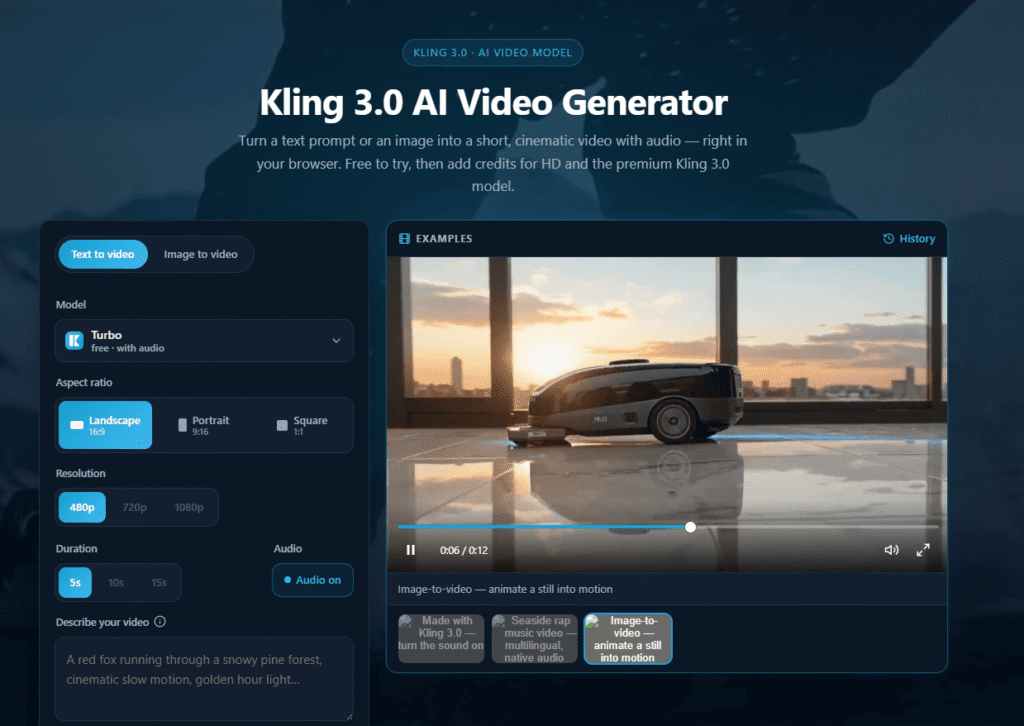
king3.online is an independent Kling 3.0-style video generator. Type a prompt or upload a still, pick duration and aspect, and download an MP4 with audio. Free daily trial. Not affiliated with Kuaishou or official Kling.
This Kling 3.0 AI Video Generator (king3.online) is an independent, browser-based tool built on the Kling 3.0 model — not Kuaishou’s official Kling app. The site is explicit about this itself, describing itself as an independent generator with no public API, model control mode, or Kling 3.0-Pro tier, and directing users who want the official app to Kuaishou’s own channels.
Functionally, it offers text-to-video and image-to-video generation through a prompt-first browser interface, with two underlying model options: Kling 3.0 Turbo (cinematic video with native audio, up to 1080p) and an in-house Turbo model (480p/720p). It markets itself around motion realism and physics-aware generation, cinematic camera motion, and consistent subjects/characters across a clip — the same strengths associated with the underlying Kling model family generally.
If your goal is simply to use the Kling model, note there’s currently no official Kling AI listing on this site — see our Kling AI guide for background on the underlying model itself. This page evaluates the independent king3.online front-end specifically, useful for readers weighing whether a browser-first, no-app third-party option suits them better than going through Kuaishou’s own official channels.
Who should think twice: anyone who specifically needs the official Kling 3.0-Pro tier, public API access, or model control mode — this site states plainly it doesn’t offer any of those, since they’re only available through Kuaishou’s official product.
Pros
Cons
Browse more in AI Tools For Video Generation →
Is this the official Kling AI app?
No. This is an independent browser-based generator built on the Kling 3.0 model — the official Kling app comes from Kuaishou (快手) directly.
Is the Kling 3.0 video generator free to use?
A free daily trial is available with no card required. Paid plans unlock higher monthly credit allowances, no watermark, and commercial-use licensing.
Does it support image-to-video?
Yes. You can generate a clip from a text prompt or from a reference image.
How long can the videos be?
Clip length depends on plan and model selection — check current duration options on the live generation page, since options like resolution and duration trade off against credit cost.
Can I download the videos?
Yes. Finished clips are exported as a plain MP4, watermark-free on paid plans.
Is Kling AI safe and legal to use here?
As with any third-party AI generation tool, review current terms of service and avoid uploading sensitive images. This site is independently operated, not Kuaishou’s own infrastructure.
What’s different between Kling 3.0 Pro and Kling 3.0 Turbo?
Per the site’s own comparison, Turbo is the in-house cinematic model available here (native audio, up to 1080p); Pro is a separate, higher tier only available through the official Kling app, not offered on this independent site.
| Criteria | Rating |
|---|---|
| Accuracy & Reliability | ⭐ 3.8/5 |
| Ease of Use | ⭐ 4.5/5 |
| Features & Functionality | ⭐ 4.1/5 |
| Performance | ⭐ 4.0/5 |
| Customization | ⭐ 3.8/5 |
| Security & Privacy | ⭐ 3.4/5 |
| Customer Support | ⭐ 3.3/5 |
| Value for Money | ⭐ 4.2/5 |
| Integrations | ⭐ 3.0/5 |

Pika is an AI video generation platform, built by Pika Labs, around its Pika 2.5 model — letting…
Captions is an AI-powered video creation and editing platform that helps creators produce professional-quality videos faster using advanced…
wan3video.art markets itself as a browser-based studio offering access to “WAN 3.0 Video” generation — creating video clips…

InVideo AI is an AI-powered video creation platform that enables users to generate professional-quality videos from simple text…
Magica AI is an all-in-one AI platform that combines the world’s leading AI models into a single intelligent…

Dream by WOMBO is an AI-powered image and video generation platform for creating unique artwork, illustrations, characters, and…

DFIRST.AI is an AI-powered marketing platform that helps businesses create consistent, on-brand campaigns by understanding their unique brand…

Runway AI is an advanced AI-powered creative platform that enables creators to generate, edit, and enhance videos, images,…

Ella by Novella is a browser-based AI video editor and creator workspace that runs directly inside the Chrome…
VEED.IO is an all-in-one AI-powered online video editing platform that enables creators, businesses, educators, and marketing teams to…
aiAllure is an AI companion platform designed for more personalized, ongoing interactions. Users can explore AI companions and…
PixVerse AI is an AI-powered video creation platform built for generating high-quality videos from text prompts and images.…
