Edit photos with a prompt — no sign-up needed to start
Last updated August 28, 2026
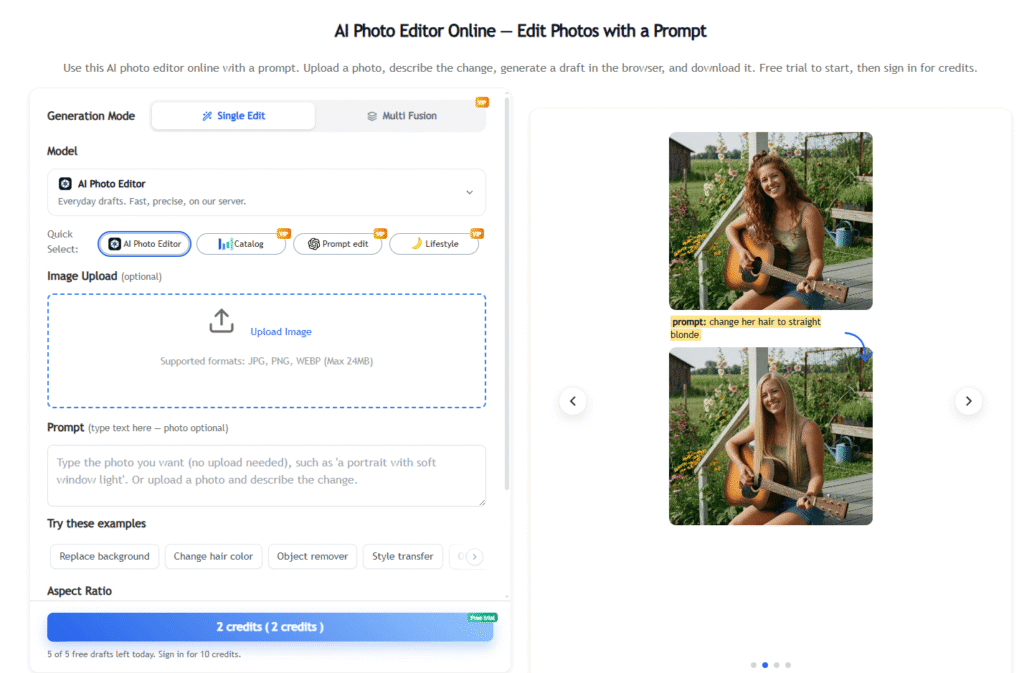
AI Photo Editor is a browser-based tool for editing and generating photos from a text prompt — upload an image, describe the change you want (a new background, a different scene, a swapped object), and get a draft back without installing software or creating an account first. It supports both a “Single Edit” mode for modifying an existing photo and a “Multi Fusion” mode for combining elements across images.
The free tier runs on an in-house house model with a daily credit allowance; a one-time-payment VIP tier unlocks access to additional models — including GPT-based image generation, Nano Banana, and Seedream — plus a longer 7-day draft library instead of the free tier’s 24-hour window. The platform is explicitly positioned around prompt-first, no-friction editing: no locked “unlimited free” upsell tricks, credits deducted only on successful generations, and a guest trial available before signing up at all.
Use cases center on product and lifestyle photography — swapping backgrounds and scenes for e-commerce listings, adjusting lighting and staging for catalog-to-lifestyle shots, and generating social-ready variations of a single product photo — aimed at sellers, marketers, and content creators who need fast draft edits rather than a full professional retouch.
Pros
Cons
Browse more in AI Tools For Image Editing →
Is this a free AI photo editor?
Yes. A free tier includes daily credits on the house model, plus a no-sign-up guest trial (5 drafts/day). A one-time-payment VIP tier unlocks additional models and a longer draft library.
Can I use this AI photo editor with no sign-up?
Yes. A guest trial (5 drafts/day) is available before creating an account; credits stay tied to the site during the guest session.
Can I run this AI photo editor with a text prompt?
Yes. The core workflow is prompt-based — describe the edit or scene you want and the tool generates a draft from your uploaded image and prompt.
Is this a free AI image editor for product editing?
Yes. Product and e-commerce photo editing (background changes, scene swaps, lifestyle staging) is one of the platform’s primary use cases.
Do files from this AI photo editor have a watermark?
Check the current free vs. VIP terms on the live pricing page — credit-based AI tools commonly reserve watermark-free export for paid tiers, though this wasn’t explicitly confirmed in the material reviewed.
Can I change a background with this AI photo editor?
Yes. Background and scene changes are a core demonstrated use case, shown throughout the site’s own examples (product photography, lifestyle staging).
Do I need an app for iPhone or Android?
No. The tool runs entirely in-browser — no app install required.
Does “no restrictions” or AI unlimited mean free with no limits?
No. Free tier access is limited by daily credits and a 24-hour draft library; “unlimited” claims on similar tools typically mean unlimited attempts within a credit budget, not truly unlimited generation — worth verifying current terms directly rather than assuming.
Can I make AI art here, or is this AI photo editor only?
The tool is positioned around editing/generating from an uploaded photo rather than pure from-scratch art generation — check the live tool for exactly what generation modes are currently supported.
Is this the same as Fotor’s AI photo editor?
No, they’re separate, unrelated products. See our Fotor review for a direct comparison.
Is this a Photoshop alternative, or the same as Gemini?
It’s a lighter-weight, prompt-first alternative to manual tools like Photoshop for quick draft edits, and separately offers access to models including a GPT-based option, Nano Banana, and Seedream on its VIP tier — not a rebrand of any single one of those.
How long does this AI photo editor keep my photos?
Free tier drafts are kept in a 24-hour library; VIP extends this to a 7-day library.
How do I keep editing a photo I didn’t sign up for?
Guest-trial credits and drafts stay tied to the site/session; signing up preserves your credit balance and enables the daily check-in bonus system going forward.
How do credits work after I sign up?
After signing up, checking in once a day on the editor grants +10 credits if your balance is at zero, or +5 if you still have credits remaining.
Is AI Photo Editor an independent site?
It operates its own product and account system; as with any AI tool, review current terms of service directly rather than assuming based on marketing alone.
| Criteria | Rating |
|---|---|
| Accuracy & Reliability | ⭐ 4.2/5 |
| Ease of Use | ⭐ 4.7/5 |
| Features & Functionality | ⭐ 4.1/5 |
| Performance | ⭐ 4.3/5 |
| Customization | ⭐ 3.9/5 |
| Security & Privacy | ⭐ 3.8/5 |
| Customer Support | ⭐ 3.6/5 |
| Value for Money | ⭐ 4.5/5 |
| Integrations | ⭐ 3.2/5 |
Deep Dream Generator is an AI-powered creative platform for generating images, artwork, videos, and other visual content. It…
AIApply is an AI-powered job search platform designed to help professionals land their next job faster. It combines…

Akool AI is an enterprise-grade AI content creation platform that helps businesses generate professional videos, AI avatars, product…
Casablanca is an AI-powered virtual camera that creates natural eye contact during video calls, making online conversations feel…

Copysmith is the company behind three connected AI platforms built to help content rank on Google, get cited…

AI Interior Design is an intelligent home design platform that creates realistic room transformations using AI while preserving…
Fotor is an all-in-one online photo editor that combines everyday editing tools with AI-powered features — background removal,…
Stable Commerce is an AI-powered eCommerce platform that helps Etsy sellers build, manage, and grow their own independent…

DigiBouquet AI is a digital gifting tool that lets you send a flower bouquet gift as a personalized,…

VidMage is an AI-powered face swap platform that lets you instantly swap faces in photos, videos, and GIFs…
EarnDraft is an AI ebook creator that turns a one-line idea into a complete outline, five written chapters,…

Vibeo is an AI-powered video testimonial platform that helps businesses collect, edit, and showcase authentic customer testimonials to…
