Free tools that run on your own computer — no account, no upload, no bill
Last updated September 5, 2026
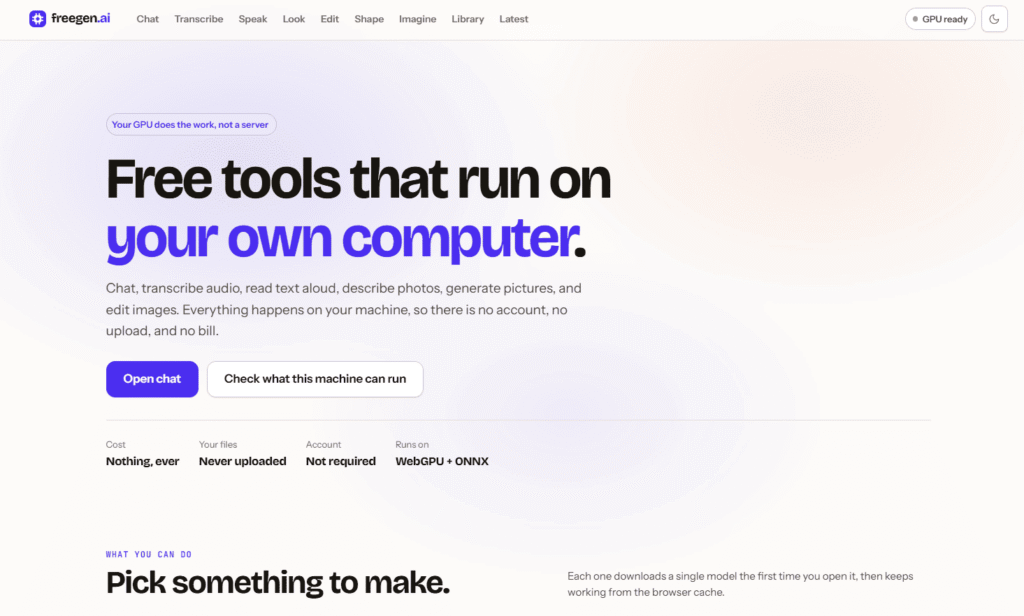
FreeGen.ai is a collection of free AI tools that run entirely in-browser on your own GPU, using WebGPU and the ONNX Runtime rather than sending anything to a server. It covers a genuinely broad set of tasks — chat, speech-to-text transcription, text-to-speech, image understanding, image editing, 3D model generation, and text-to-image generation — with no account, no file upload, and no cost for any of it.
Each tool (“studio”) downloads a single open model the first time you open it — sourced directly from Hugging Face under its own license — then caches it in the browser so it works offline afterward with no network requirement and no usage limit. FreeGen.ai includes a built-in “Capability Check” that scans your specific machine’s WebGPU support, float16 capability, storage headroom, and measured throughput, then sizes which models will actually run well on your hardware before you commit to downloading one.
The project is explicit about being “a thin layer over other people’s excellent work” — built on WebGPU, ONNX Runtime, Transformers.js, and openly licensed (Apache 2.0/MIT) community models, rather than claiming proprietary AI of its own. Because processing happens locally, prompts, audio, and images never leave your browser.
Pros
Cons
What is FreeGen.ai?
FreeGen.ai is a collection of free AI tools — chat, transcription, text-to-speech, image understanding, image editing, 3D model generation, and image generation — that run entirely in your browser on your own GPU, with no account or file upload required.
Is FreeGen.ai really free?
Yes. There’s no cost, no account requirement, and no usage limit once a model has downloaded and cached in your browser.
Does FreeGen.ai upload my files or prompts?
No. Processing happens locally using WebGPU and the ONNX Runtime; prompts, audio, and images never leave your browser.
What hardware do I need to run FreeGen.ai?
It depends on the tool — lighter tools like chat and transcription run on modest hardware, while image generation is marked “Heavy” and needs a more capable GPU. Use the built-in Capability Check to see what your specific machine can handle before downloading a model.
Where do the AI models come from?
Models are downloaded directly from Hugging Face under their own open licenses (Apache 2.0 or MIT), not built or trained by FreeGen.ai itself.
Can I use FreeGen.ai offline?
Yes, after the first model download for a given tool, it runs entirely from browser cache with no network requirement.
| Criteria | Rating |
|---|---|
| Accuracy & Reliability | ⭐ 4.2/5 |
| Ease of Use | ⭐ 4.4/5 |
| Features & Functionality | ⭐ 4.6/5 |
| Performance | ⭐ 3.9/5 |
| Customization | ⭐ 4.0/5 |
| Security & Privacy | ⭐ 4.9/5 |
| Customer Support | ⭐ 3.3/5 |
| Value for Money | ⭐ 5.0/5 |
| Integrations | ⭐ 3.6/5 |

Helo.ai is an enterprise-grade CPaaS (Communications Platform as a Service) built for businesses that need to engage customers at scale…
vivago.ai is an all-in-one AI creative platform that helps users generate, edit, and enhance images, videos, and 3D…

DeepSeek is an advanced AI platform developed by DeepSeek AI, offering powerful large language models (LLMs) for chat,…
HappySRT is an AI-powered subtitle generation and transcription platform that helps creators automatically generate, edit, and export accurate…

ChatGPT, built by OpenAI, remains the most widely used AI assistant in the world — the default most…

VidiRelay is an AI-powered video transcription tool that converts YouTube, TikTok, Instagram, and Facebook videos — or your…

WUI.AI is an AI-powered video repurposing platform that transforms long-form videos into engaging short clips for TikTok, Instagram…

Grok AI is a next-generation conversational AI assistant developed by xAI. Designed to provide accurate, up-to-date responses, Grok…
Wonder Studio is an AI-powered visual effects platform that automates one of the most time-consuming parts of filmmaking—animating,…

Bing AI, now integrated into Microsoft Copilot, is an AI-powered assistant that combines web search, content generation, coding…

Filmora is an AI-powered video editing software developed by Wondershare that enables creators, marketers, educators, and businesses to…
VEED.IO is an all-in-one AI-powered online video editing platform that enables creators, businesses, educators, and marketing teams to…
