Last updated July 28, 2026
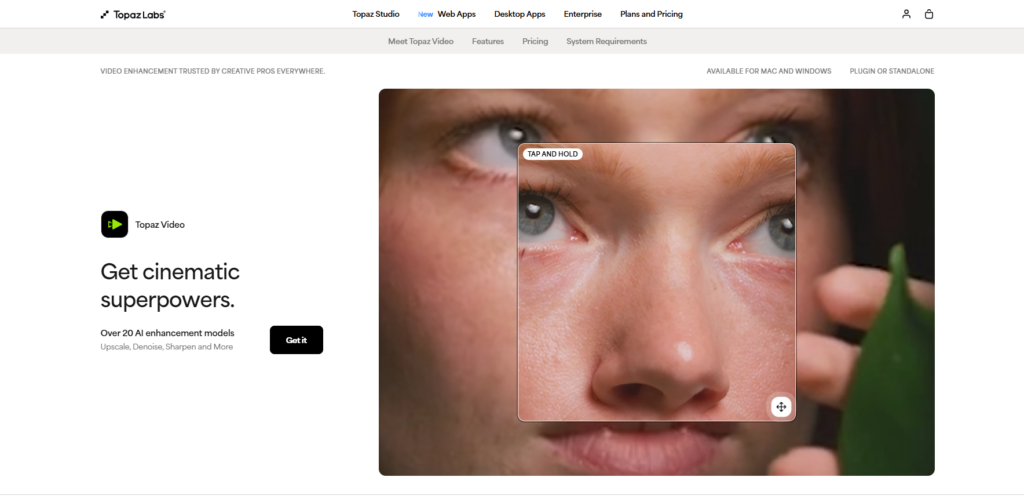
Topaz Video AI is a powerful AI-powered video enhancement software developed by Topaz Labs that helps creators improve video quality with advanced upscaling, denoising, stabilization, frame interpolation, and restoration features. Whether you’re restoring old footage, enhancing low-resolution videos, or creating smooth slow-motion clips, Topaz Video AI uses deep learning models to deliver professional-quality results with minimal manual effort.
Designed for filmmakers, video editors, content creators, photographers, and production studios, Topaz Video AI supports resolutions up to 16K, making it one of the most advanced AI video enhancement tools available today.
Increase video resolution up to 16K while preserving fine details and minimizing artifacts.
Remove digital noise, grain, and compression artifacts while maintaining natural image quality.
Generate smooth slow-motion videos and convert frame rates using AI-powered frame interpolation.
Reduce camera shake and stabilize handheld footage without sacrificing image quality.
Automatically detects and enhances faces throughout a video for improved clarity and realism.
Restore old, damaged, or low-quality videos using advanced AI enhancement models.
Recover details from blurry or motion-affected footage for sharper results.
Use Topaz Video AI as a standalone application or integrate it into professional editing workflows.
Optimized for NVIDIA, AMD, Intel GPUs, and Apple Silicon for faster rendering.
Topaz Video AI is ideal for:
Topaz Video AI stands apart from traditional video editing software by using deep learning models trained specifically for video enhancement. Rather than applying generic filters, it intelligently reconstructs lost details, removes noise, restores clarity, and enhances every frame individually.
Its ability to upscale videos to 16K, perform realistic frame interpolation, stabilize shaky footage, and enhance facial details makes it one of the industry’s leading AI video enhancement solutions.
Topaz Video AI supports:
If you’re considering other AI video enhancement tools, you can also explore:
| Category | Rating |
|---|---|
| Features | ⭐⭐⭐⭐⭐ (4.9/5) |
| Ease of Use | ⭐⭐⭐⭐☆ (4.6/5) |
| AI Enhancement | ⭐⭐⭐⭐⭐ (4.9/5) |
| Performance | ⭐⭐⭐⭐⭐ (4.8/5) |
| Video Quality | ⭐⭐⭐⭐⭐ (4.9/5) |
| Value for Money | ⭐⭐⭐⭐☆ (4.5/5) |
| Customer Support | ⭐⭐⭐⭐☆ (4.6/5) |

MakeHalftone is a free browser-based halftone generator that converts any photo or image into a print-ready dot pattern…

Lumen5 is an AI-powered video creation platform that transforms blog posts, articles, scripts, and other text-based content into…

M3U8 Player is a free, browser-based player for M3U8 and HLS streams, supporting both live and video-on-demand content…
HappySRT is an AI-powered subtitle generation and transcription platform that helps creators automatically generate, edit, and export accurate…
Vmake is an AI-powered video creation and enhancement platform built for creators, marketers, and businesses producing short-form videos.…
Twelve Labs is an advanced AI video understanding platform that helps businesses search, analyze, classify, and generate insights…

Vimeo AI is an AI-powered video creation and hosting platform that helps individuals, businesses, educators, and marketing teams…

Riverside is an all-in-one AI podcast and video production platform designed to help creators produce professional-quality content without…
Kaiber is an AI-powered creative platform that enables users to generate high-quality videos, animations, and visual content from…
Vidext is an AI-powered video creation and editing platform that helps businesses, marketers, educators, and content creators produce…

AI Baby Generator is an advanced AI-powered future baby prediction tool that creates realistic images of your potential…
EbSynth is an AI-assisted video editing and visual effects (VFX) tool that transforms videos by allowing you to…
