
AI-powered design and image creation for social posts, invitations, graphics, and more.
Last updated August 29, 2026
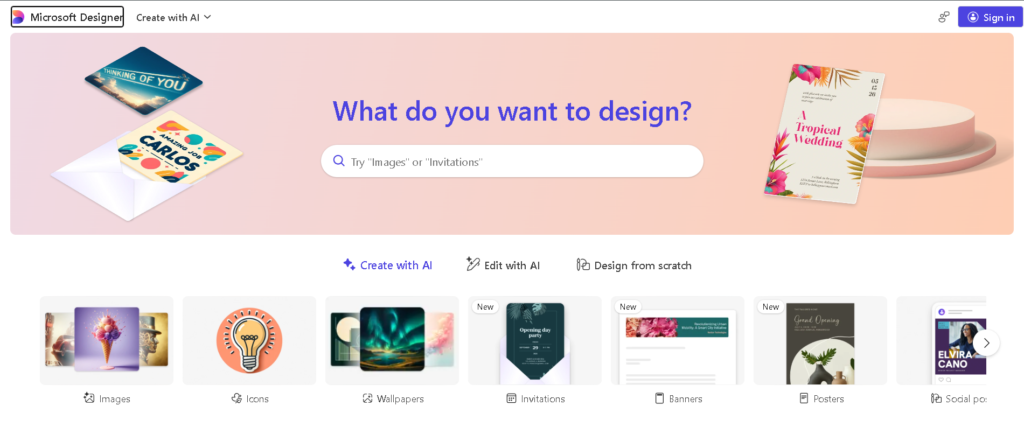
Microsoft Designer is an AI-powered graphic design platform that helps users create images, social media graphics, invitations, posters, banners, digital postcards, stickers, and other visual content from simple ideas or prompts. It combines generative AI with templates and editing tools, making it possible to create professional-looking designs without advanced design experience.
Designer is particularly useful for people who want to quickly turn an idea into a visual, personalize existing images, or create social-ready graphics without working through complex professional design software.
Uncommon Use Cases: Users can create custom coloring pages, personalized avatars, themed wallpapers, greeting cards, digital postcards, and visual concepts from simple text prompts.
Microsoft Designer stands out by combining generative AI, image editing, templates, and graphic design workflows in one easy-to-use platform. Instead of starting with a blank canvas, users can describe what they want and let AI generate visual concepts that can then be refined.
Microsoft also integrates Designer into parts of its broader ecosystem, allowing users to create and edit visuals through Microsoft products and services.
This is the most searched question about Microsoft Designer. Here’s the direct answer:
| Feature | Microsoft Designer | Canva |
|---|---|---|
| Price | Free (personal use) | Free / $15/mo (Pro) |
| AI image generation | ✅ Yes (DALL-E powered) | ✅ Yes (Magic Media) |
| Template library | Good (growing) | ⭐ Excellent (1M+ templates) |
| Brand kit | ⚠️ Limited on free | ✅ Yes (Pro) |
| Social media sizing | ✅ Yes | ✅ Yes (more platforms) |
| Background removal | ✅ Yes | ✅ Yes (Pro) |
| Video editing | ❌ Limited | ✅ Yes (Pro) |
| Team collaboration | ✅ Via Microsoft 365 | ✅ Yes (Teams plan) |
| Commercial use | ⚠️ Personal use only (free tier) | ✅ Yes (paid plans) |
| Microsoft 365 integration | ✅ Native | ❌ No |
| Offline use | ❌ No | ❌ No |
| Best for | Microsoft 365 users, personal projects | Professional design, marketing teams |
Verdict: Canva wins on template variety, commercial licensing clarity, and overall design breadth. Microsoft Designer wins on price (free), AI generation quality (DALL-E), and Microsoft 365 integration. If you’re already in the Microsoft ecosystem, Designer is the obvious free starting point. If you need professional marketing design, Canva Pro is more complete.
Microsoft has significantly expanded Designer’s capabilities in 2025–2026:
Best fit:
Not the best fit:
Microsoft Designer is an AI-powered graphic design and image-editing tool that helps users create images, social media graphics, invitations, posters, banners, and other visual content.
Yes. Microsoft states that Designer is free to use, although users who want to create more frequently may require a subscription.
Yes. Users can describe an image they want to create and Designer can generate AI-powered visual content from the description.
Yes. Designer provides AI-powered image editing features including background removal or blurring, erasing unwanted elements, cropping, enhancement, and other editing capabilities.
Yes. Designer can be used to create social media graphics, promotional visuals, greeting cards, invitations, and other digital content.
Yes. Microsoft currently requires users to sign in with a Microsoft account to use Designer.
Yes. Designer can generate personalized invitations from ideas and templates.
Yes. Designer capabilities are integrated into parts of Microsoft 365 and Copilot, although availability depends on the specific subscription and platform.
Yes. Designer includes AI-powered tools for removing or blurring image backgrounds.
Microsoft’s current FAQ states that the Designer consumer experience is licensed for personal, non-commercial use, so businesses should check Microsoft’s current licensing terms before using it commercially.
| Criteria | Rating |
|---|---|
| Accuracy & Reliability | ⭐ 4.5/5 |
| Ease of Use | ⭐ 4.8/5 |
| Features & Functionality | ⭐ 4.6/5 |
| Performance | ⭐ 4.5/5 |
| Customization | ⭐ 4.3/5 |
| Security & Privacy | ⭐ 4.4/5 |
| Support & Resources | ⭐ 4.6/5 |
| Value for Money | ⭐ 4.7/5 |
| Integration Capabilities | ⭐ 4.7/5 |
Artbreeder is an AI-powered creative platform for generating, mixing, and exploring unique images and artwork. It gives creators…
Gemini AI is Google’s advanced multimodal artificial intelligence assistant developed by Google DeepMind. It can understand and generate…
WeryAI is an all-in-one AI creative platform that brings together leading AI models for video generation, image creation,…
Grok AI is a next-generation conversational AI assistant developed by xAI. Designed to provide accurate, up-to-date responses, Grok…
Deep Dream Generator is an AI-powered creative platform for generating images, artwork, videos, and other visual content. It…
AIBase is an independent AI image and video generation workspace that brings text to image, image to image, text to…
Leonardo.Ai is a generative AI platform built for creators who want to create and transform visual content across…
PixPix is an AI-powered creative workspace built for brands, e-commerce sellers, and creative teams who need professional-grade image and video…
NightCafe is an AI-powered creative platform for generating and exploring AI artwork. It provides access to multiple AI…

Headshotsly is an AI headshot generator that turns one selfie into a professional-quality photo in about 2 minutes…
Luna Lisa is an AI image generation and photo editing platform built around its VIP Luna Lisa image…
Craiyon is an AI image generator that turns text prompts into original images and artwork. It is designed…
