Free browser-local theme builder for Codex Desktop — turn any wallpaper into a readable custom theme.
Last updated September 4, 2026
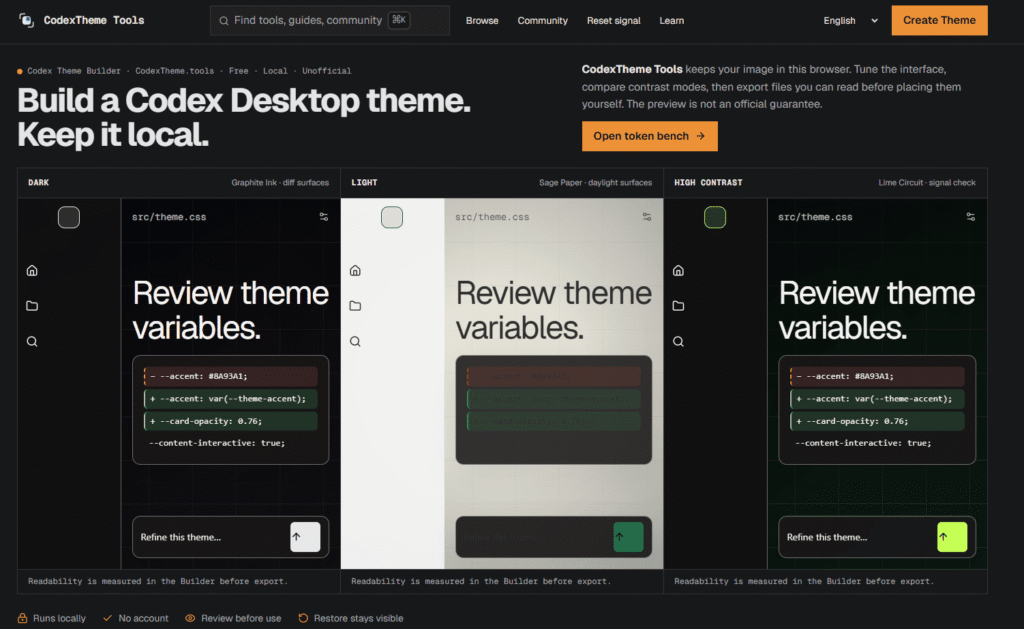
CodexTheme Tools is a free, browser-based theme builder for OpenAI’s Codex desktop app — upload a wallpaper or image, and it extracts a color palette and generates a theme that follows Codex’s actual UI structure (dark, light, and high-contrast variants), rather than just a moodboard of colors that may not translate cleanly into the real interface. You can preview the theme live against a mockup of the Codex UI, adjust individual accent/background/foreground colors manually, and export as a Theme v1 import string, a .tmTheme file for the Codex CLI, or as CSS tokens.
Important to know: this is an independent, community-run project and is explicitly not affiliated with OpenAI. It builds against an unofficial, community-proposed theme format (created in collaboration with the OpenAI/Codex open-source community, per the tool’s own disclosure), which the official Codex app may accept, reject, or render differently — and themes built with it can break after a Codex update, since there’s no guarantee from OpenAI that the format stays compatible.
.tmTheme syntax export for Codex CLI usersPros
.tmTheme, CSS tokens, wallpaper) cover different real workflowsCons
What is CodexTheme Tools?
CodexTheme Tools is a free, browser-based theme builder for OpenAI’s Codex desktop app, generating a custom color theme from an uploaded image and exporting it in formats Codex can import.
Is CodexTheme Tools affiliated with OpenAI?
No. It’s an independent, community-run project, explicitly not affiliated with or an official part of OpenAI or Codex.
Is my wallpaper uploaded to a server?
No. Processing happens locally in your browser — your image isn’t sent to a server as part of building a theme.
Why does a theme sometimes break after a Codex update?
Because CodexTheme Tools builds against an unofficial, community-proposed theme format that Codex isn’t contractually guaranteed to keep supporting — an update can change how the app renders custom themes.
Does CodexTheme Tools work on macOS and Windows?
The tool itself runs in your browser, so it isn’t platform-locked; check the site’s specific compatibility notes for how exported themes behave on each OS’s Codex app.
Is the builder free?
Yes. No pricing tiers or paywalls were found on the site — theme building and export are free to use.
| Criteria | Rating |
|---|---|
| Accuracy & Reliability | ⭐ 4.2/5 |
| Ease of Use | ⭐ 4.4/5 |
| Features & Functionality | ⭐ 3.4/5 |
| Performance | ⭐ 4.3/5 |
| Customization | ⭐ 3.5/5 |
| Security & Privacy | ⭐ 4.8/5 |
| Customer Support | ⭐ 3.0/5 |
| Value for Money | ⭐ 4.6/5 |
| Integrations | ⭐ 2.5/5 |
Tabnine is the original enterprise AI coding platform — trusted by millions of developers and thousands of companies worldwide,…

AIAgentSkills is a free, community-run index of “AI Agent Skills” — reusable capability packages (also known as Claude…
Cursor is an AI-powered coding agent built by Anysphere — now part of SpaceX — that turns ideas into working software through autonomous…
Youware is an AI-powered “vibe coding” platform that lets you build fully functional websites, apps, games, and dashboards…

Qodo is an AI code review and governance platform built for engineering teams shipping software at the speed AI…

Devin is the world’s first AI software engineer, built by Cognition for engineering teams that need more than autocomplete. Where most…
Replit AI is an advanced AI-powered software development platform that enables anyone to build websites, mobile apps, dashboards,…
Grok AI is a next-generation conversational AI assistant developed by xAI. Designed to provide accurate, up-to-date responses, Grok…

Luna Lisa is an AI image generation and photo editing platform built around its VIP Luna Lisa image…

Grammarly is an AI-powered writing assistant that helps you write clearer, more polished, and mistake-free text across email,…

PrepGo is an AI-powered AP exam preparation platform built to make studying for Advanced Placement exams more structured,…

Microsoft Designer is an AI-powered graphic design platform that helps users create images, social media graphics, invitations, posters,…
