The AI coding agent that builds while you decide
Last updated August 31, 2026
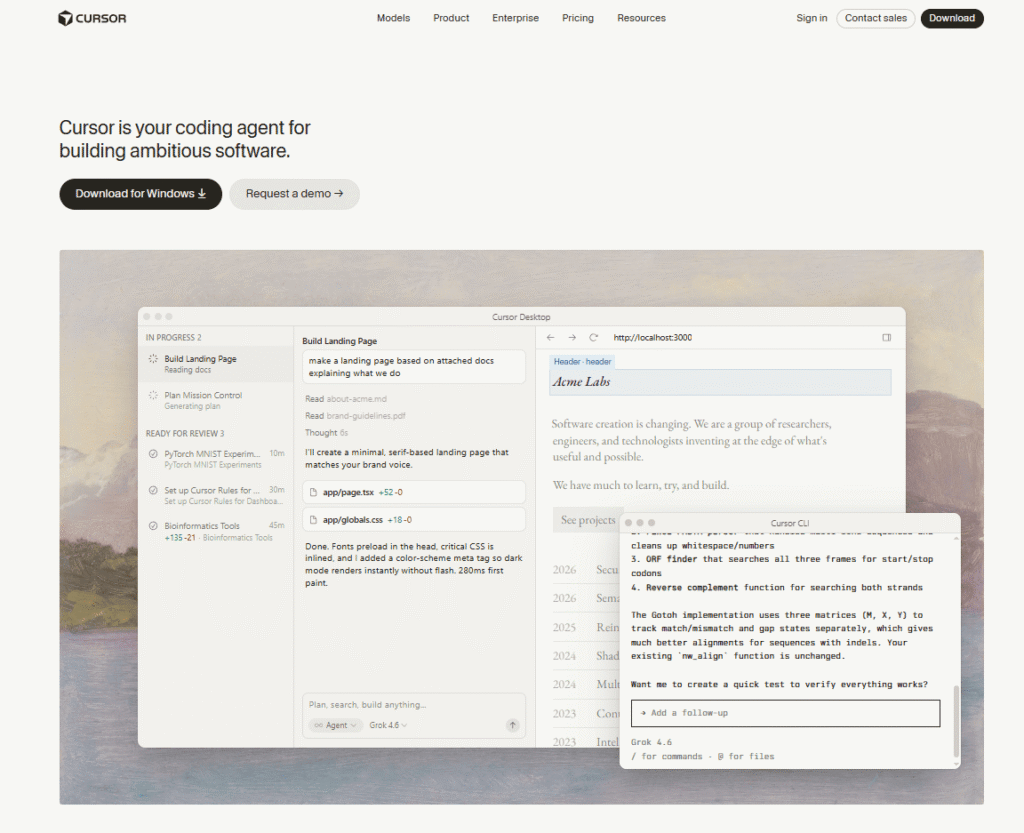
Cursor is an AI-powered coding agent built by Anysphere — now part of SpaceX — that turns ideas into working software through autonomous agents that plan, write, test, and deploy code on your behalf. It’s not just an autocomplete tool or a chatbot inside an editor. Cursor is a full agentic development environment where you hand off a task, and the AI builds it end to end while you focus on decisions.
Used every day by over half of the Fortune 500 — including NVIDIA (40,000 engineers), Stripe, and Y Combinator portfolio companies — Cursor has become the default AI coding environment for professional software teams in 2026.
The core idea is an autonomy slider: you control how much independence to give the AI. Use Cmd+K for targeted, single-line edits. Use Composer for multi-file changes across a codebase. Or launch Cloud Agents — fully autonomous agents that use their own computers to build, test, and demo entire features end to end, running in parallel for hours or days without you guiding every step.
Cursor runs in your desktop IDE, your terminal via CLI, your Slack workspace, and reviews pull requests in GitHub — making it the first AI coding tool that works across every stage of the development workflow, not just inside the editor.
It supports every major frontier model — Grok 4.6, GPT-5, Claude Opus 5, Gemini 3.1 Pro, Fable 5, Composer 2.5 — and lets you choose the best model for each task. SOC 2, ISO 27001, ISO 42001, and AIUC-1 certified.
Pros
Cons
Individual developers — If you’re building solo projects, side projects, or freelance work, Cursor’s Pro plan ($20/month) gives you access to frontier models and cloud agents that can dramatically accelerate development.
Engineering teams — The Teams plan adds centralized billing, shared agent context, team marketplace for internal rules and skills, usage analytics, and Bugbot for agentic PR reviews — everything a professional team needs to standardize AI-assisted development.
Enterprise engineering organizations — Over half the Fortune 500 use Cursor. The Enterprise plan adds pooled usage, SCIM seat management, audit logs, repository and model access controls, and an AI code tracking API for compliance and governance.
Startup founders and indie hackers — Launch fleets of cloud agents to build MVPs faster. Cursor’s autonomy slider lets non-engineers hand off entire features while retaining control over decisions.
DevOps and platform teams — Automations let you set up always-on agents that run on schedules or triggers to fix CI failures, rotate tokens, invalidate caches, and handle repetitive infrastructure tasks automatically.
Uncommon use cases: Bioinformatics researchers using Cursor agents to implement complex algorithms (Gotoh’s affine gap alignment); research teams building interactive data dashboards connected to Snowflake; teams using Cursor’s Slack integration to assign coding tasks directly from team channels.
| Feature | Cursor | GitHub Copilot | Replit AI |
|---|---|---|---|
| Type | Full AI coding agent | AI code completion + chat | AI-powered online IDE |
| Autonomous agents | ✅ Yes — Cloud Agents | ❌ No | ⚠️ Limited |
| Parallel agents | ✅ Yes — fleets of agents | ❌ No | ❌ No |
| Multi-model support | ✅ Yes — Grok, GPT-5, Claude, Gemini, Fable | ⚠️ Limited (GPT-4o, Claude) | ⚠️ Limited |
| CLI support | ✅ Yes — full agent in terminal | ✅ Yes (limited) | ❌ No |
| Slack integration | ✅ Yes | ❌ No | ❌ No |
| PR review (Bugbot) | ✅ Yes | ✅ Yes (Copilot PR review) | ❌ No |
| MCP support | ✅ Yes | ❌ No | ❌ No |
| Team marketplace | ✅ Yes | ❌ No | ❌ No |
| Privacy mode | ✅ Yes | ✅ Yes | ⚠️ Limited |
| SOC 2 certified | ✅ Yes | ✅ Yes | ✅ Yes |
| Free plan | ✅ Yes (Hobby) | ✅ Yes (limited) | ✅ Yes |
| Individual paid from | $20/mo (Pro) | $10/mo | $18/mo |
| Teams paid from | $40/user/mo | $19/user/mo | Custom |
| Best for | Autonomous agentic development | Code completion inside existing IDE | Browser-based development |
Choose Cursor if: You want the most capable AI coding agent available — especially Cloud Agents that work autonomously for hours, multi-model flexibility, and a tool that works across IDE, CLI, Slack, and GitHub in one ecosystem.
Choose GitHub Copilot if: You’re already deep in the GitHub ecosystem, want the lowest-cost individual plan ($10/month), and primarily need AI code completion and chat inside VS Code or JetBrains — without the complexity of full agentic workflows.
Choose Replit if: You want a browser-based development environment with AI assistance and don’t need to install anything locally — especially useful for learning, quick prototypes, and education.
Step 1: Download and install
curl https://cursor.com/install -fsS | bashStep 2: Open your project
Step 3: Choose your interaction mode
Step 4: Pick your model
Step 5: Set up integrations (optional)
| Plan | Price | Best For |
|---|---|---|
| Hobby | Free | Trying Cursor, limited agent requests, Composer access |
| Pro | $20/mo | Individual developers — extended agent limits, frontier models, cloud agents, MCPs |
| Pro+ | Higher than Pro | Daily agent power users — 3x Pro limits on Agent |
| Ultra | Premium | Agent power users — 20x Pro limits, priority access to new features |
| Teams Standard | $40/user/mo | Professional teams — centralized billing, team marketplace, Bugbot, SSO |
| Teams Premium | Above Standard | High-usage teams — 5x Standard agent limits |
| Enterprise | Custom | Fortune 500 — pooled usage, SCIM, audit logs, AI code tracking API, priority support |
What’s included on every paid plan:
Usage-based pricing note: Every plan includes a set amount of model usage. On-demand usage allows you to continue using models after your included amount is consumed, billed in arrears. Heavy agent usage can add to your monthly bill beyond the base subscription.
Annual billing: Annual plans available at a discount — check cursor.com/pricing for current rates.
Verdict: Yes — the most capable AI coding agent available, and the clear choice for serious developers and engineering teams.
Cursor has moved well beyond being an “AI autocomplete tool.” Cloud Agents that work autonomously for hours, parallel agent fleets, multi-model flexibility, Slack integration, and automated PR reviews make it a fundamentally different category of tool from GitHub Copilot or any other coding assistant.
The endorsements from Jensen Huang (NVIDIA, 40,000 engineers), Patrick Collison (Stripe), Andrej Karpathy, and Greg Brockman (OpenAI) aren’t marketing fluff — they reflect genuine, large-scale adoption by the most technically demanding organizations in the world.
Best for: Professional developers and engineering teams who want the most capable AI coding agent available — especially those who want to hand off entire features to autonomous agents rather than just getting autocomplete suggestions.
Skip it if: You’re a casual developer who only needs basic code completion and don’t want to pay 10/month covers that use case at half the price.
| Criteria | Rating |
|---|---|
| Accuracy & Reliability | ⭐ 4.9/5 |
| Ease of Use | ⭐ 4.6/5 |
| Features & Functionality | ⭐ 5.0/5 |
| Performance & Speed | ⭐ 4.9/5 |
| Customization | ⭐ 4.8/5 |
| Security & Privacy | ⭐ 5.0/5 |
| Customer Support | ⭐ 4.5/5 |
| Value for Money | ⭐ 4.7/5 |
| Integrations | ⭐ 4.9/5 |
What is Cursor?
Cursor is an AI coding agent built by Anysphere (now part of SpaceX) that lets developers hand off coding tasks to autonomous AI agents that plan, write, test, and deploy software end to end. It’s used by over half the Fortune 500 including NVIDIA and Stripe.
Is Cursor free?
Yes — Cursor has a free Hobby plan with limited agent requests and access to Composer. No credit card is required to start. Paid plans start at $20/month (Pro) for extended limits and full cloud agent access.
How much does Cursor cost?
Cursor’s Pro plan is 40/user/month. Pro+ and Ultra tiers offer higher agent limits. Enterprise pricing is custom. All plans include usage-based billing for on-demand model usage beyond included limits.
What is a Cursor Cloud Agent?
Cloud Agents are fully autonomous AI agents that use their own computers to build, test, and demo features end to end — without you guiding every step. They run in parallel and can work for hours or days on ambitious tasks. Available on Pro and above.
How is Cursor different from GitHub Copilot?
GitHub Copilot is primarily an AI code completion and chat tool inside your existing IDE. Cursor is a full agentic development environment — with autonomous Cloud Agents, multi-model support, Slack integration, automated PR reviews, and MCP connections. Cursor is more capable but more expensive (10/month for individuals).
What AI models does Cursor support?
Cursor supports Grok 4.6, GPT-5.6 Sol, Claude Opus 5, Gemini 3.1 Pro, Fable 5, Composer 2.5, and more. You can use Auto mode to let Cursor pick the best model per task, or manually select your preferred model.
Is Cursor safe for enterprise use?
Yes — Cursor is SOC 2, ISO 27001, ISO 42001, and AIUC-1 certified. Privacy mode ensures code data is not used for training by Cursor or model providers. Enterprise plans add SAML/OIDC SSO, SCIM seat management, audit logs, and repository/model access controls.
Does Cursor work in the terminal?
Yes — Cursor CLI brings full agent capabilities to your terminal. Install with curl https://cursor.com/install -fsS | bash and run agents directly from the command line.
Can Cursor integrate with Slack?
Yes — Cursor integrates with Slack, allowing teams to assign coding tasks directly from Slack channels. Cursor agents complete the work and open pull requests, reporting back in the channel.
What is Cursor Bugbot?
Bugbot is Cursor’s agentic code review tool that automatically reviews pull requests in GitHub, identifying bugs, security issues, and code quality problems. Available on Teams plans and on usage-based billing for individual plans.
What is Cursor Composer?
Composer is Cursor’s multi-file AI editing mode — describe a feature, fix, or refactor and Cursor makes coordinated changes across multiple files in your codebase in one session. It’s the middle ground between targeted Cmd+K edits and fully autonomous Cloud Agents.
Is Cursor part of SpaceX?
Yes — as of August 14, 2026, Cursor (built by Anysphere) joined SpaceX. The product continues to operate independently with the same team, now with SpaceX’s research and infrastructure backing.
Does Cursor work without an existing repository?
Yes — as of August 27, 2026, Cursor supports starting from scratch without a repo. You can begin a new project from a blank slate and let agents build the initial codebase.

Optimizely is an AI-powered platform designed to help businesses create, manage, experiment with, and optimize digital experiences. The…

Youware is an AI-powered “vibe coding” platform that lets you build fully functional websites, apps, games, and dashboards…

Tomorrow Terminal is an AI-powered trading terminal that covers 8,400+ active US tickers — scanning the market every…

PagerGPT is a no-code AI agent platform that helps businesses build intelligent AI assistants for customer support, sales,…

Copy.ai is an AI-native go-to-market platform designed to help marketing, sales, and revenue teams automate repetitive workflows and…

AIAgentSkills is a free, community-run index of “AI Agent Skills” — reusable capability packages (also known as Claude…

n8n is a visual workflow automation platform built for connecting AI agents to your existing tools and infrastructure…
CodexTheme Tools is a free, browser-based theme builder for OpenAI’s Codex desktop app — upload a wallpaper or…

LivePerson is an enterprise conversational AI platform built for large-scale customer experience (CX) operations — orchestrating both human…

Manus AI is an autonomous general-purpose AI agent — you give it a goal, not just a prompt,…
Replit AI is an advanced AI-powered software development platform that enables anyone to build websites, mobile apps, dashboards,…

Automater is a free system tray app that sits across all your AI coding agents and CLIs —…
