Your One-Stop Vibe Coding Platform
Last updated August 29, 2026
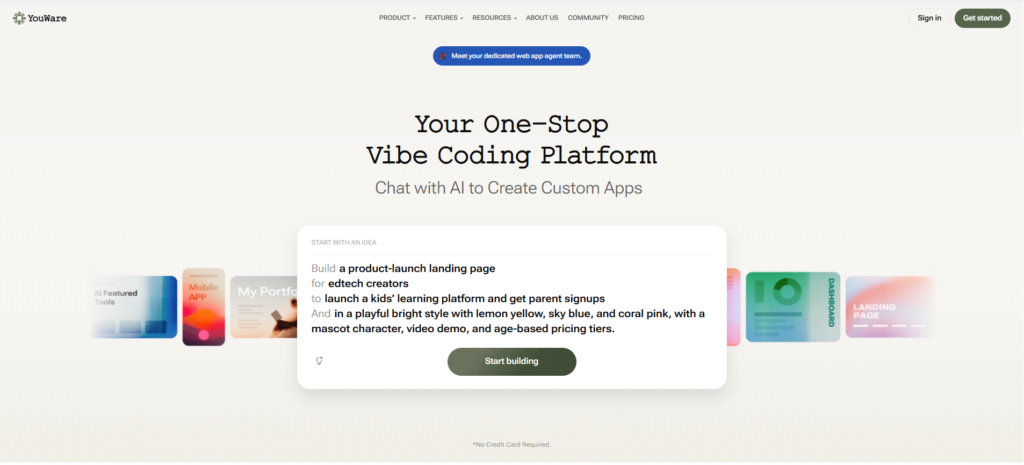
Youware is an AI-powered “vibe coding” platform that lets you build fully functional websites, apps, games, and dashboards by describing what you want in plain language — no coding knowledge required. Rather than generating a static mockup, Youware’s AI coding agents assemble the actual layout, logic, database schema, authentication, and full-stack functionality behind the scenes, so what you get is a working product, not just a design.
The platform runs on a built-in backend system called YouBase, which handles authentication, database, storage, and secrets in one workflow — removing the need to separately wire up services like Supabase or Firebase. Youware supports model switching between leading AI coding models (including Claude Sonnet and GPT-5-Codex-class models), Figma-to-code conversion for turning existing designs into working apps, and one-click browser deployment at zero credit cost per deploy.
Launched in Shenzhen and reaching roughly 500,000 users within six months, Youware has grown a large community-driven ecosystem — over 300,000 projects that users can remix, learn from, and build on. It’s positioned specifically for non-developers who need production-ready applications, differentiating it from developer-focused tools like Cursor and prototyping-focused tools like Bolt.new.
Pros
Cons
This is the most common question for anyone evaluating YouWare. Here’s the honest breakdown:
| Feature | YouWare | Replit | Bolt.new |
|---|---|---|---|
| Target user | Non-developers, founders | Developers + beginners | Developers, rapid prototyping |
| Built-in backend | ✅ YouBase (auth, DB, storage) | ✅ Yes (Replit DB) | ⚠️ Limited |
| No-code / vibe coding | ✅ Primary focus | ⚠️ Partial | ⚠️ Partial |
| Figma-to-code | ✅ Yes | ❌ No | ❌ No |
| Voice prompting | ✅ Yes | ❌ No | ❌ No |
| Code export | ✅ React export | ✅ Full code access | ✅ Yes |
| Deployment | ✅ One-click, zero credit cost | ✅ Yes | ✅ Yes |
| Community/remixing | ✅ 300K+ projects | ✅ Large community | Limited |
| Free plan | ✅ 300 credits/month | ✅ Yes | ✅ Limited |
| Paid from | $17/month (Builder) | $18/month | ~$20/month |
| Best for | Non-devs building full-stack apps | Developers learning and building | Fast prototyping for developers |
When to choose YouWare: You’re a non-developer or founder who wants a working full-stack app (not just a front-end mockup) without hiring a developer. YouBase handling auth, database, and storage out of the box is the key differentiator.
When to choose Replit: You’re a developer or learning to code and want a full IDE experience with AI assistance. Replit gives you more direct code control.
When to choose Bolt.new: You’re a developer who wants fast front-end prototyping with AI generation but will handle backend yourself.
What is Youware?
Youware is an AI-powered “vibe coding” platform that lets you build fully functional websites, apps, games, and dashboards by describing your idea in natural language, without needing coding knowledge.
Is Youware free?
Youware doesn’t offer a permanent free plan — it offers a free trial that requires credit card details, then paid plans starting at $20/month (Pro).
How much does Youware cost?
Youware has two paid tiers: Pro at $20/month (3,000 credits, YouBase backend, custom domains, code download) and Ultra at $200/month (36,000 credits, unlimited and private projects).
Does Youware require coding knowledge?
No. Youware is built specifically for non-developers — you describe what you want in plain language or voice, and its AI coding agents handle the technical implementation, including backend logic and database setup.
Can I export my Youware project’s code?
Yes. Youware lets you export clean, editable React code and deploy it anywhere, rather than locking you into its own hosting.
How is Youware different from Cursor or Bolt.new?
Youware is positioned specifically for non-developers who want production-ready applications, while Cursor is built for developers working directly with code, and Bolt.new leans more toward fast prototyping. Youware’s built-in YouBase backend (auth, database, storage) is also more complete out of the box than most prototyping-focused tools.
| Criteria | Rating |
|---|---|
| Accuracy & Reliability | ⭐ 3.0/5 |
| Ease of Use | ⭐ 4.3/5 |
| Features & Functionality | ⭐ 3.8/5 |
| Performance | ⭐ 3.5/5 |
| Customization | ⭐ 4.0/5 |
| Security & Privacy | ⭐ 3.2/5 |
| Customer Support | ⭐ 3.5/5 |
| Value for Money | ⭐ 3.3/5 |
| Integrations | ⭐ 3.4/5 |
Replit AI is an advanced AI-powered software development platform that enables anyone to build websites, mobile apps, dashboards,…

AIAgentSkills is a free, community-run index of “AI Agent Skills” — reusable capability packages (also known as Claude…
CodexTheme Tools is a free, browser-based theme builder for OpenAI’s Codex desktop app — upload a wallpaper or…
Devin is the world’s first AI software engineer, built by Cognition for engineering teams that need more than autocomplete. Where most…
Cursor is an AI-powered coding agent built by Anysphere — now part of SpaceX — that turns ideas into working software through autonomous…

Qodo is an AI code review and governance platform built for engineering teams shipping software at the speed AI…
Tabnine is the original enterprise AI coding platform — trusted by millions of developers and thousands of companies worldwide,…

ClearCRM is an all-in-one AI-powered CRM platform designed to help growing businesses manage sales, marketing, customer service, projects,…

CodeDesign.ai is an AI website builder that helps individuals, startups, agencies, and businesses create professional websites without coding.…

FaceMod is an AI-powered face swapping and image editing platform that lets users create realistic face swaps, AI…

MagicSlides AI is an AI-powered presentation generator that helps users create professional PowerPoint presentations from almost any content…
Text Blaze is a productivity and text automation tool designed to eliminate repetitive typing and streamline everyday communication.…
