Remove watermarks without wrecking the photo — precise, mask-first cleanup
Last updated September 5, 2026
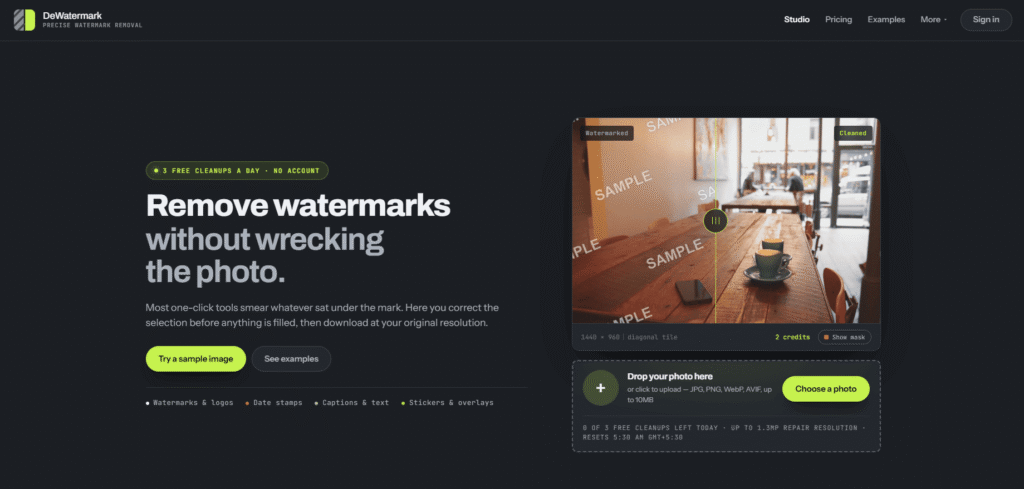
DeWatermark is a precision-focused watermark removal tool that positions itself against “one-click” removers that smear whatever was underneath the mark. Its mask-first workflow lets you correct the selection before anything gets filled — Auto Clean handles obvious overlays automatically, while Magic Wand, uploaded masks, and manual brush refinement take over when the edge needs a human eye — then exports at the original resolution rather than a downscaled result.
DeWatermark’s own materials draw an important, explicit line: its platform-specific guides for cleaning up assets from Shutterstock, iStock, Getty Images, and Adobe Stock are each scoped to legitimate scenarios — your own uploads, images you’ve already licensed, or paid downloads where you only have a watermarked comp version — not a way to use a stock photo before paying for it. The tool states this directly rather than marketing itself as a blanket bypass for stock-site licensing protections, and worth repeating here plainly: removing a stock agency’s watermark from an image you haven’t licensed is a copyright and terms-of-service violation regardless of what tool is used to do it.
Beyond watermarks specifically, DeWatermark handles logos, date stamps, captions, stickers, and small overlays through the same mask-first workflow, with a developer API for repeat cleanup jobs, private per-account history (no public gallery or shared feed), and a credit-based paid image upscaler built into the same account system.
Who should not use this: anyone trying to remove a stock photo agency’s watermark from an image they haven’t purchased or licensed — that’s a copyright and terms-of-service violation regardless of which tool performs the removal, and DeWatermark’s own guides are explicit that this isn’t the intended use.
Pros
Cons
Browse more in AI Tools For Watermark Removal →
What do I get for free?
Three Balanced cleanups per UTC day, signed in or not. Larger images are resized for repair, then composited back into the export with original pixel dimensions. No added watermark.
Can I remove text or logos too?
Yes. The same mask-first workflow handles watermarks, logos, date stamps, stickers, and small overlays.
Does the API support batch work?
The API supports repeat jobs now — call cleanup and detection endpoints and spend account credits. A web batch queue is planned for Pro users and larger workflows, not yet fully live.
Is there a developer API?
Yes. Signed-in users can create hash-only API keys, call cleanup and detection endpoints, and spend account credits.
Is it legal to remove watermarks from stock photos with this tool?
Only for images you’ve already licensed or purchased — for example, cleaning a watermarked comp version of an asset you’ve paid for. Removing a stock agency’s watermark from an image you haven’t licensed is copyright infringement and a terms-of-service violation, regardless of which tool performs the removal.
Does DeWatermark work on video?
The TikTok-specific guide covers your own uploaded videos and stills — check the live guide for current video support scope.
| Criteria | Rating |
|---|---|
| Accuracy & Reliability | ⭐ 4.4/5 |
| Ease of Use | ⭐ 4.5/5 |
| Features & Functionality | ⭐ 4.3/5 |
| Performance | ⭐ 4.4/5 |
| Customization | ⭐ 4.5/5 |
| Security & Privacy | ⭐ 4.6/5 |
| Customer Support | ⭐ 3.7/5 |
| Value for Money | ⭐ 4.4/5 |
| Integrations | ⭐ 3.9/5 |
Gemini Watermark Remover is a free browser-based tool that removes the visible Gemini AI watermark from supported Gemini-generated…
AI Text Watermark Remover is a browser-based tool for cleaning text pasted from ChatGPT, Claude, Gemini, and other…

Mangools is an SEO toolkit built around ease of use and value for money — designed for solopreneurs,…

Elicit is the AI research assistant built specifically for scientific research — trusted by over 5 million researchers at leading pharmaceutical…

GirlfriendGPT is an AI companion platform designed for users who want to interact with customizable virtual characters through…
AI Text Cleaner is a text-hygiene tool built around four functions: removing invisible/non-printing Unicode characters, cleaning up leftover…
Casablanca is an AI-powered virtual camera that creates natural eye contact during video calls, making online conversations feel…

SendX is an AI-powered email marketing and marketing automation platform built for businesses that want higher email deliverability,…

Kaiber is an AI-powered creative platform that enables users to generate high-quality videos, animations, and visual content from…

Nectar AI is an AI companion platform that lets users create and interact with highly customizable virtual characters.…

king3.online is an independent Kling 3.0-style video generator. Type a prompt or upload a still, pick duration and…

Koala AI is an AI growth platform built for content creators, bloggers, niche site owners, and SEO professionals who…
