
Get ahead of your inbox with AI-powered email organization, replies, and meeting notes.
Last updated August 21, 2026
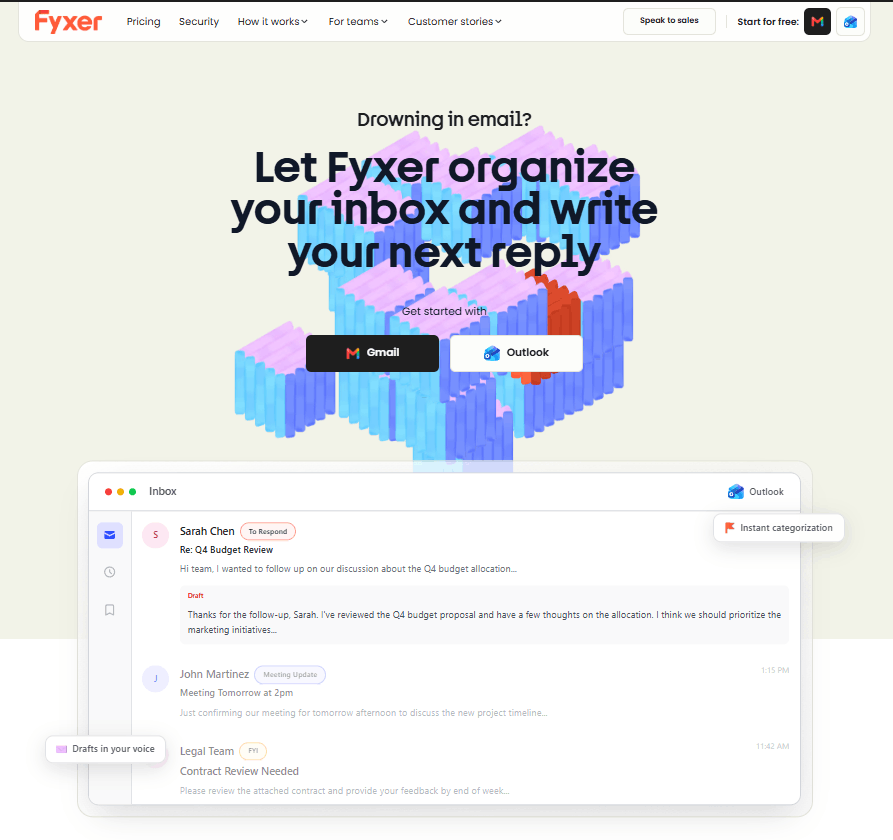
Fyxer is an AI-powered email assistant designed to help professionals take control of their inbox, meetings, and daily communication. It works with Gmail and Outlook to organize emails, identify messages that need attention, and generate personalized email drafts in your voice.
Fyxer automatically highlights emails that require attention and helps prioritize the most important conversations. Its AI draft writer uses your previous conversations to understand your tone and create responses that sound natural and consistent with your communication style.
Beyond email management, Fyxer also works as a meeting companion. It can join meetings, take notes, and use important meeting context to help make your email drafts more relevant. Users can also schedule meetings, ask questions about information from their inbox and meeting notes, and connect Fyxer with supported business tools such as HubSpot.
Whether you’re managing sales leads, client communications, business inquiries, or internal conversations, Fyxer helps reduce repetitive inbox work so you can focus on higher-value tasks.
Fyxer is particularly useful for:
Reduce inbox clutter and quickly identify emails that require a response.
Stay on top of important lead emails and create faster follow-up responses.
Generate personalized replies while maintaining your usual writing style.
Automatically capture meeting notes and use them when handling follow-up communication.
Reduce repetitive email and administrative work so you can focus on higher-value activities.
Coordinate meetings across multiple people and time zones.
Fyxer is an AI-powered email assistant that organizes inboxes, prioritizes important emails, drafts replies in your writing style, and takes notes during meetings.
Yes. Fyxer supports Gmail and can connect to your Gmail account to help organize emails and generate AI-powered replies.
Yes. Fyxer supports Outlook as well as Gmail.
Yes. Fyxer can generate email drafts using the context of your conversations and your previous writing style.
Fyxer uses previous conversations to help generate replies that match your tone and communication style.
Yes. Fyxer can join meetings and create meeting notes that can be used as additional context for your workflow.
Yes. The Professional plan includes meeting scheduling across teams and time zones.
Yes. Fyxer offers a 7-day free trial on its Starter and Professional plans.
Fyxer’s Starter plan costs $30 per user per month, while the Professional plan costs $50 per user per month. Annual billing reduces the prices to $22.50 and $37.50 respectively.
Fyxer is suitable for professionals, sales teams, real estate agents, consultants, executives, agencies, and businesses that manage large volumes of emails and meetings.
| Criteria | Rating |
|---|---|
| Accuracy & Reliability | ⭐ 4.7/5 |
| Ease of Use | ⭐ 4.8/5 |
| Features & Functionality | ⭐ 4.9/5 |
| Performance | ⭐ 4.7/5 |
| Customization | ⭐ 4.5/5 |
| Security & Privacy | ⭐ 4.7/5 |
| Customer Support | ⭐ 4.5/5 |
| Value for Money | ⭐ 4.4/5 |
| Integrations | ⭐ 4.8/5 |

VidiRelay is an AI-powered video transcription tool that converts YouTube, TikTok, Instagram, and Facebook videos — or your…

gpu.fund is an independent, live cloud GPU price index that tracks rental prices across 15 cloud providers, 49…

Qodo is an AI code review and governance platform built for engineering teams shipping software at the speed AI…

Taskade is an all-in-one AI productivity platform that transforms a single prompt into fully functional apps, AI agents,…
Wispr Flow is an AI-powered speech-to-text and voice productivity tool designed to let users speak naturally instead of…
Helo.ai is an enterprise-grade CPaaS (Communications Platform as a Service) built for businesses that need to engage customers at scale…

ClearCRM is an all-in-one AI-powered CRM platform designed to help growing businesses manage sales, marketing, customer service, projects,…

PagerGPT is a no-code AI agent platform that helps businesses build intelligent AI assistants for customer support, sales,…

Zanus AI is a private, on-premise AI operating system built for enterprises, government agencies, healthcare providers, law firms, and…

Zendesk is an AI-powered customer service and engagement platform that helps businesses manage customer conversations, automate support, empower…

CodeDesign.ai is an AI website builder that helps individuals, startups, agencies, and businesses create professional websites without coding.…

Grammarly is an AI-powered writing assistant that helps you write clearer, more polished, and mistake-free text across email,…
