
Create AI videos, automate workflows, use agents, and more.
Last updated August 19, 2026
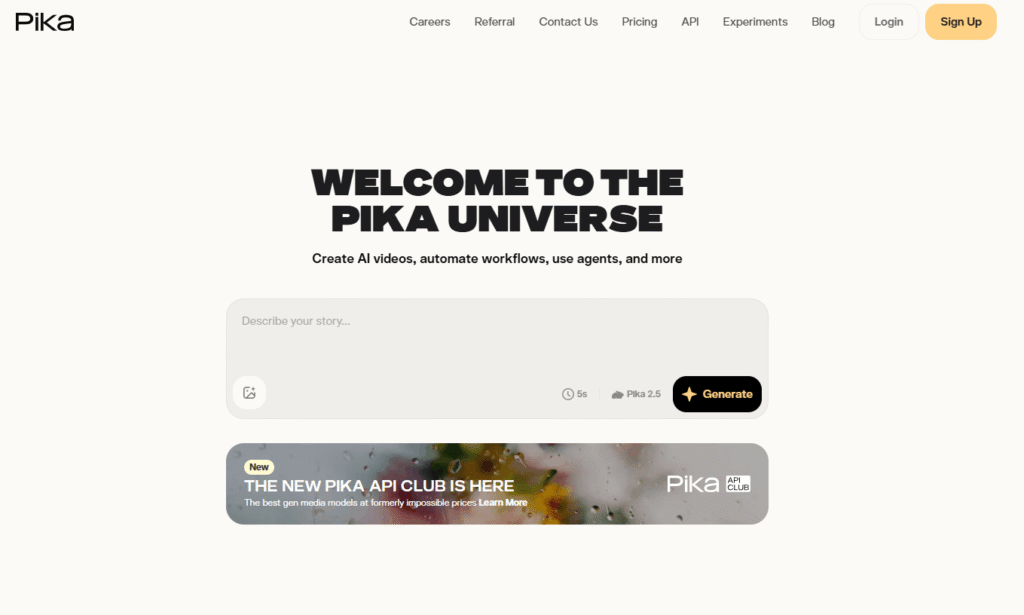
Pika is an AI video generation platform, built by Pika Labs, around its Pika 2.5 model — letting you turn a text prompt or image into a short AI video, plus a growing set of “Pika-” branded effects and tools that go beyond basic generation: scene remixing, object swaps, keyframe-based control, and a set of exaggerated physics effects (Pikaffects) that turn any photo into something like a squish, melt, or “cake-ify” transformation.
Beyond video generation itself, Pika has expanded into a broader “Pika universe” — Pika Agent (a conversational AI creative partner with access to multiple models), Pika MCP (giving other AI agents access to Pika’s creative tools), and a new Pika API Club offering access to generative media models at lower prices via API.
Pros
Cons
If you’re comparing Pika against other AI video generation tools:
Browse more in AI Tools for Text-to-Video and AI Tools for Video Generation.
What is Pika?
Pika is an AI video generation platform, built by Pika Labs, around its Pika 2.5 model, offering text-to-video and image-to-video generation along with scene remixing, object editing, and a set of playful physics-based effects called Pikaffects.
Is Pika the same as Pika Labs?
Yes. Pika Labs is the company behind the product, and “Pika” is the name most people use for the platform itself — they refer to the same thing.
Is Pika free?
Yes. Pika’s Free plan includes 80 monthly video credits and watermark-free downloads, though it’s limited to 480p resolution and doesn’t include commercial use rights.
How much does Pika cost?
Pika’s paid plans start at $10/month (Standard, 700 credits) and go up to $35/month (Pro, 2,300 credits) and $95/month (Fancy, 6,000 credits), with all paid tiers including full resolution and commercial use.
What are Pikaffects?
Pikaffects are exaggerated, physics-bending video effects — like squishing, melting, or “cake-ifying” a photo — applied to an image with one tap to turn it into a short, reality-bending video.
Can I use Pika videos commercially?
Commercial use is included on Standard, Pro, and Fancy plans. The Free plan does not include commercial use rights.
What is Pika Agent?
Pika Agent is a conversational AI creative partner with access to multiple generative models, built for open-ended collaboration rather than a single prompt-to-video workflow.
| Criteria | Rating |
|---|---|
| Accuracy & Reliability | ⭐ 4.6/5 |
| Ease of Use | ⭐ 4.6/5 |
| Features & Functionality | ⭐ 4.8/5 |
| Performance | ⭐ 4.5/5 |
| Customization | ⭐ 4.7/5 |
| Security & Privacy | ⭐ 4.4/5 |
| Customer Support | ⭐ 4.2/5 |
| Value for Money | ⭐ 4.3/5 |
| Integrations | ⭐ 4.4/5 |
Lucent AI is a creative AI platform designed specifically for performance marketers, agencies, and brands looking to scale…
ReelFork is an innovative AI video creation platform designed for interactive storytelling. Unlike traditional AI video generators that…

aiAllure is an AI companion platform designed for more personalized, ongoing interactions. Users can explore AI companions and…
Funy AI is a powerful AI creative platform designed for creators, marketers, businesses, and social media users who…

Vibeo is an AI-powered video testimonial platform that helps businesses collect, edit, and showcase authentic customer testimonials to…

Freebeat AI is an all-in-one AI music video creation platform designed for musicians, content creators, DJs, dancers, marketers,…

Ella by Novella is a browser-based AI video editor and creator workspace that runs directly inside the Chrome…

MiniMax H3 AI Video Generator, at minimaxh3.lol, is an independent, third-party website — not MiniMax’s or Hailuo’s own…

CloneViral AI is an advanced AI video generation platform that enables creators to produce professional videos through a…

Vidalgo AI is an AI-powered video creation platform designed to help creators produce viral short-form videos for TikTok,…

Runway AI is an advanced AI-powered creative platform that enables creators to generate, edit, and enhance videos, images,…
Vmake is an AI-powered video creation and enhancement platform built for creators, marketers, and businesses producing short-form videos.…
