
Zanus AI Pricing Breakdown: Is This Private Enterprise AI Worth the Cost? (2027)
If you have been searching for Zanus AI pricing and hitting a wall — you are not alone.…
Read →Kling AI has become one of the most talked-about names in AI video generation in 2026 — and also one of the most confusing to actually get started with, thanks to a credit system that trips up almost every new user. If you’ve searched “what is Kling AI” or “how much is Kling AI,” this guide covers all of it in one place: what it is, who built it, exact pricing and credits, how to use it for text-to-video and image-to-video, how to write prompts that actually work, and how to download your finished clips.
📌 Quick answer: Kling AI is a text-to-video and image-to-video generator built by Kuaishou. It’s known for realistic motion and character consistency, offers 66 free credits every day, and paid plans start at roughly $7–$10/month.
In this guide:
Kling AI is a text-to-video and image-to-video generator built by Kuaishou, one of China’s largest short-video platforms. Type a written prompt, or upload a still photo, and Kling turns it into a short video clip with notably realistic motion, lighting, and physics — it first launched in June 2024 and has moved through several major model versions since, with Kling 3.0 as the current flagship as of 2026.
What Kling is best known for compared to other generative video tools:
It’s used heavily for social content (Reels, TikTok, Shorts), narrative-style AI shorts, product and brand videos, and by creators who need believable human motion rather than abstract or stylized animation. It competes directly with Hailuo AI, Runway, and other players in the text-to-video category.
Kling AI is owned and developed by Kuaishou Technology, a Chinese tech company best known for operating one of the country’s largest short-video and livestreaming platforms — a rival to Douyin (TikTok’s Chinese counterpart). Kuaishou is publicly listed and has been investing heavily in generative AI research since well before Kling’s 2024 launch, drawing on years of expertise processing and recommending short-form video at massive scale.
Kling sits inside Kuaishou’s broader AI product line, positioned as a standalone creative tool rather than a feature buried inside the main Kuaishou app — which is part of why it’s grown into a global competitor to tools like Runway, Sora, and Hailuo AI rather than staying a China-only product.
Kling AI uses a tiered subscription model, and — like most credit-based AI tools — the sticker price only tells half the story. Here’s the general structure as of 2026:
Annual billing typically knocks a meaningful percentage off the monthly rate on every paid tier. Exact prices and credit allocations change fairly often, so always check the live pricing page in your account before subscribing rather than relying on any number you read here or elsewhere.
This is where most new users get confused, so here’s the plain version:
Because credit costs shift between model versions, the most reliable way to know exactly how many videos your plan gets you is to check the live credit cost shown next to each mode inside your Kling AI dashboard before you generate.
Sign up on Kling’s official site with your email or a linked account. You’ll land on the main dashboard with your prompt box and mode tabs across the top.
Kling typically separates modes into tabs — Video Generation (text-to-video and image-to-video), Motion Control, Lip Sync, Elements (character reference), and Image Generation. Pick the one that matches what you’re making.
Choose a model version, resolution, duration, and whether to enable native audio. Newer, higher-quality modes cost more credits per generation, so match the setting to how the clip will actually be used.
Type a detailed text prompt, upload a reference photo, or both — Kling supports combining a written prompt with a still image for more control over the result.
Submit the generation and wait for it to render. Review the result carefully before spending more credits — if the motion or subject is off, revise the prompt rather than regenerating identically.
Once you’re happy with the clip, download it directly from your project (full steps below) or push it straight to a connected social account if that option is available on your plan.
For a full text-to-video workflow rather than a quick test:
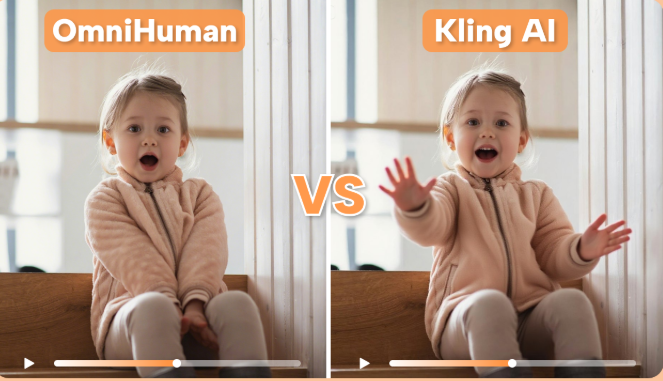
Image-to-video lets you animate a still photo instead of generating a scene entirely from text:
This workflow is especially popular for turning static product photography into short-form video ads, and for bringing illustrations or AI-generated stills to life without touching traditional animation software. If your source image needs cleanup first, an AI image editor can help before you animate it.
Since failed generations still burn credits, a good prompt is the single biggest lever you have over your real cost per video. A few practical rules:
Once your clip is generated:
Free-tier downloads are typically watermarked; removing the watermark generally requires a paid plan.
What is Kling AI used for?
Generating short AI videos from text prompts or images — commonly for social content, narrative shorts, product videos, and branded ads that need realistic motion.
How much does Kling AI cost?
Kling AI offers a free plan with 66 daily credits, then paid tiers roughly in the $7–$180/month range depending on credit volume and features. Exact pricing changes periodically, so check the live pricing page before subscribing.
How many videos can I make with 66 free credits?
Enough for a small handful of short, basic-mode clips per day — typically a few silent, standard-resolution generations rather than longer, high-resolution, audio-enabled ones, which cost more credits each.
Who owns Kling AI?
Kuaishou Technology, a major Chinese short-video and livestreaming company.
Can Kling AI generate video from an image?
Yes — upload a photo, describe the motion you want, and Kling animates it into a video clip.
Do failed generations use up credits?
Yes, generally. There typically isn’t a refund for a generation that doesn’t match your prompt, which is why writing a clear, specific prompt upfront matters.
Can I download my Kling AI videos?
Yes, directly from your project/creation history as an MP4 file. Free-tier downloads are usually watermarked.
Comparing Kling AI against other options before you commit? Explore more picks in our directory:
Want to see how Kling AI stacks up against other tools in our directory? Browse the complete AI tools directory.
👉 Ready to try text-to-video? Start with our top-rated pick, Hailuo AI →

If you have been searching for Zanus AI pricing and hitting a wall — you are not alone.…
Read →Searching “free AI video generator no watermark no sign up” usually turns up a wall of listicles promising…
Read →Three tools. Three completely different answers to the same question. The question is: what does “best AI video…
Read →