Free two-minute no-disassembly check for pressure washers with low, pulsing, or no working pressure.
Last updated September 4, 2026
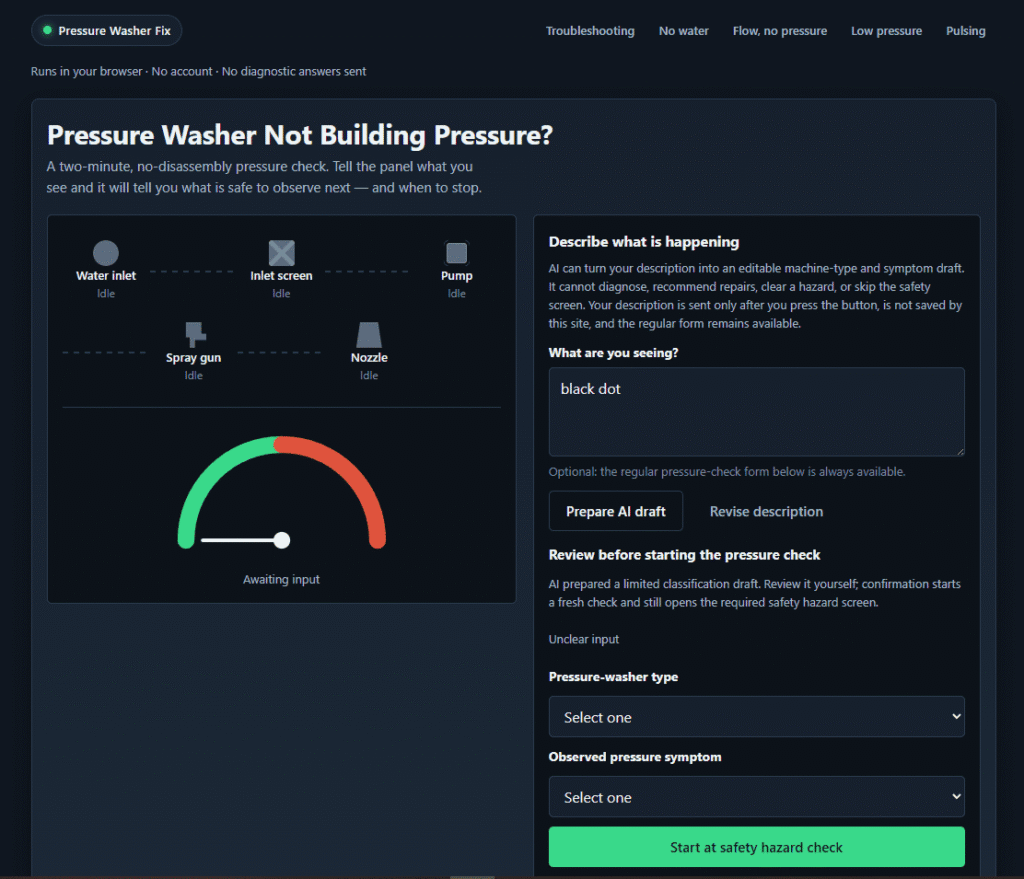
Pressure Washer Fix is a free, browser-based interactive decision aid for diagnosing why a pressure washer isn’t building pressure — covering no water, weak/low pressure, pulsing pressure, and general troubleshooting. It runs entirely in the browser with no account required, walking through a fixed, consumer-safe sequence: machine type, symptom, a mandatory safety hazard screen, then a series of external-only checks (water supply, removable inlet screen, removable nozzle, visible leak check, and restart behavior).
An optional “Prepare AI draft” feature lets you describe what you’re seeing in plain language, which the tool turns into an editable machine-type and symptom draft to speed up the intake step. The page is explicit and specific about this feature’s limits: it cannot diagnose, recommend repairs, clear a safety hazard, or skip the required safety screen — the AI only pre-fills a starting draft that you review and confirm, and your description is sent only after you press the button, never saved by the site.
The tool maintains a hard, stated safety boundary: it never guides pump, unloader, bypass-valve, engine, fuel, or energized electrical repair, and any positive hazard answer during the check ends the flow immediately with a stop result. It’s built as general guidance that defers to the user’s exact manufacturer manual, not a substitute for one, and doesn’t cover commercial equipment or claim a universal PSI/GPM standard across machines.
Who should think twice: anyone hoping for internal repair guidance — the tool explicitly won’t touch pump, unloader, engine, fuel, or electrical work, and will stop the check entirely if any hazard sign is present.
Pros
Cons
Why is my pressure washer not building pressure but water flows?
This usually points to a restricted supply, a clogged external inlet screen, or a clogged/damaged removable nozzle — the most common consumer-safe causes on the path from spigot to nozzle. Causes past those points (pump, unloader, engine, fuel system, electrical housing) aren’t safe to diagnose without a professional.
My pressure washer has low pressure — can I fix the unloader myself?
No — the unloader is explicitly outside this tool’s safety boundary and isn’t a consumer-safe DIY repair; if external checks (supply, inlet screen, nozzle, leaks) come back clear, that points toward an internal fault requiring professional service.
My pressure washer pulses low pressure. What does that mean?
Pulsing pressure commonly points to air at the inlet, a supply restriction, or a clogged nozzle. If a pump or unloader cause is suspected after clear external checks, that’s an internal issue needing a service provider.
How do I check for leaks safely?
By sight only, with the machine off and pressure released — never touch a pressurized line or fitting directly. Damaged, bulging, or leaking high-pressure hose, or any leak at the spray gun or pump area, means stop and service rather than continuing to check further.
Does this work for both electric and gas pressure washers?
Yes. Pressure-washer type is selected at the start of the check, since it determines which hazard checks apply.
Does this diagnostic send my answers anywhere?
No, by default. Your description is sent only if you use the optional “Prepare AI draft” feature, and only after you press the button — it isn’t saved by the site, and the regular form-based check doesn’t require it at all.
| Criteria | Rating |
|---|---|
| Accuracy & Reliability | ⭐ 4.2/5 |
| Ease of Use | ⭐ 4.4/5 |
| Features & Functionality | ⭐ 3.4/5 |
| Performance | ⭐ 4.3/5 |
| Customization | ⭐ 3.5/5 |
| Security & Privacy | ⭐ 4.8/5 |
| Customer Support | ⭐ 3.0/5 |
| Value for Money | ⭐ 4.6/5 |
| Integrations | ⭐ 2.5/5 |

My Personal Arcane is a free online Personal Arcana calculator that helps users discover which of the 22…

FineVoice is an advanced AI voice generation platform that helps creators, businesses, educators, and developers produce natural-sounding voiceovers…
Replit AI is an advanced AI-powered software development platform that enables anyone to build websites, mobile apps, dashboards,…

AutoShorts.ai is an AI-powered faceless video automation platform that creates, schedules, and publishes short-form videos automatically across TikTok,…
FreeGen.ai is a collection of free AI tools that run entirely in-browser on your own GPU, using WebGPU…

Dubly.AI is an AI-powered video dubbing and lip-sync platform that helps creators translate videos into multiple languages while…
BeadPattern is an AI-powered pattern generator built specifically for physical bead crafting — Perler, Hama, Fuse, and Artkal…
ElevenLabs is an advanced AI audio platform that enables creators, businesses, and developers to generate ultra-realistic voices, AI…

A2E AI Videos is an all-in-one AI video generation platform that enables creators, businesses, and developers to create…

AIAgentSkills is a free, community-run index of “AI Agent Skills” — reusable capability packages (also known as Claude…
ZeroGPT is an AI content detector built to identify text generated by ChatGPT, GPT-5, Gemini, Grok, DeepSeek, Claude,…

Semrush is one of the largest and longest-running SEO and competitive intelligence platforms, built on a dataset of…
