AI Text to Speech & Voice Cloning
Last updated August 19, 2026
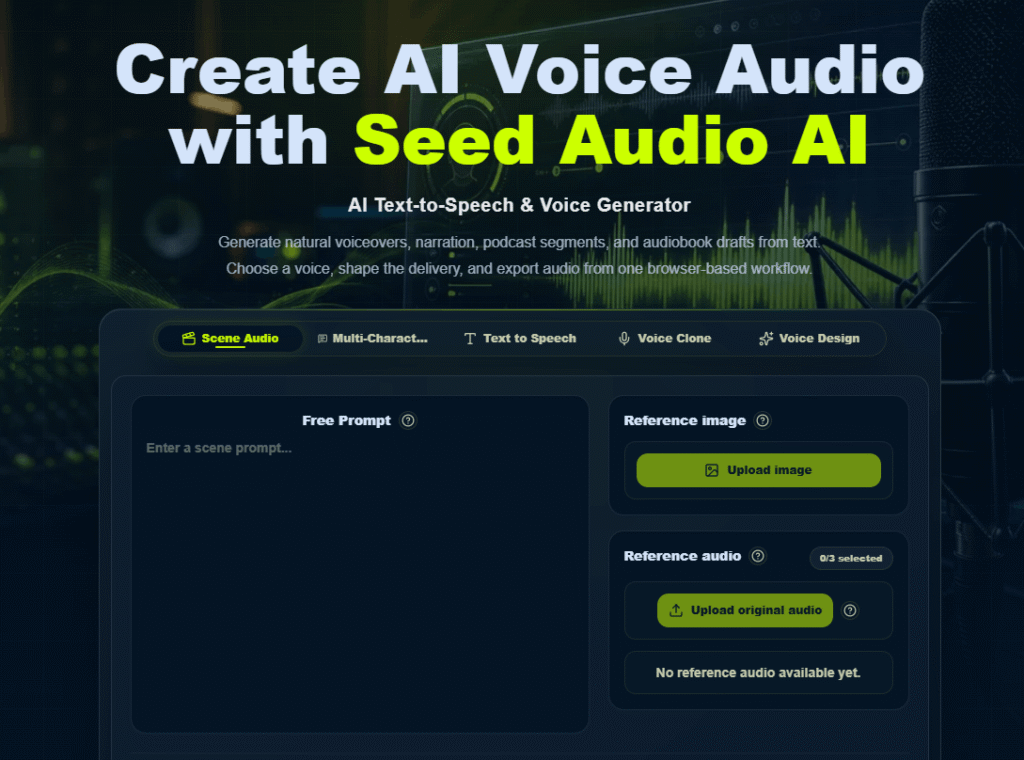
Seed Audio AI is a text-to-speech and voice cloning platform built to replace traditional voice recording bottlenecks — studio time, retakes, and manual editing — with AI-generated voice audio you can produce directly from a script. Beyond generation, it also bundles in six free music utilities (MP3 to MIDI, BPM and key detection, chord detection, and stem splitting) alongside its core voice tools.
The platform is built around a simple four-step workflow — input script, choose a voice, shape delivery, then generate and export — and covers use cases from short-form video voiceovers to audiobook production, podcast episodes, and advertising and promo audio.
A note on voice cloning: only clone voices you have the rights or explicit consent to use — Seed Audio AI’s plans reference commercial workflows “where your rights and plan allow,” which is worth reading carefully before cloning anyone’s voice other than your own or a voice you have clear permission and licensing to use.
Pros
Cons
If you’re comparing Seed Audio AI against other AI voice and text-to-speech tools:
Browse more in AI Tools for Text-to-Voice.
What is Seed Audio AI?
Seed Audio AI is a text-to-speech and voice cloning platform that generates AI voice audio from a script, along with six free music utilities like MP3-to-MIDI conversion and BPM/key detection.
Is Seed Audio AI affiliated with ByteDance or Volcengine’s Seed models?
No. Seed Audio AI is an independent product; despite the shared naming, it’s worth checking their site directly for their specific disclosure on this, since “Seed” is also used as a model family name by other companies.
How do Seed Audio AI credits work?
Credits are consumed based on usage — text-to-speech and voice cloning draw from the same monthly credit pool, which is included with your subscription tier and expires 30 days after being issued.
Can I download my generated audio as MP3?
Yes. Seed Audio AI includes an MP3 download workflow across its plans.
Can I clone my own voice or someone else’s?
Voice cloning is a core feature, but only clone voices you have the rights or explicit consent to use — review Seed Audio AI’s terms on commercial use and voice rights before cloning any voice other than your own.
What’s the difference between the Creator, Pro, and Studio plans?
Creator suits individual content creators with lighter usage, Pro adds priority processing and long-form narration workflows for professionals, and Studio adds team-oriented batch narration and shared audio history for studios and teams.
| Criteria | Rating |
|---|---|
| Accuracy & Reliability | ⭐ 4.4/5 |
| Ease of Use | ⭐ 4.6/5 |
| Features & Functionality | ⭐ 4.5/5 |
| Performance | ⭐ 4.4/5 |
| Customization | ⭐ 4.3/5 |
| Security & Privacy | ⭐ 4.2/5 |
| Customer Support | ⭐ 4.1/5 |
| Value for Money | ⭐ 4.5/5 |
| Integrations | ⭐ 3.8/5 |
Speak AI is an AI-powered voice intelligence platform that helps businesses capture, transcribe, analyze, and automate insights from…
ElevenLabs is an advanced AI audio platform that enables creators, businesses, and developers to generate ultra-realistic voices, AI…
Tunii is an AI vocal remover and stem-splitting tool that isolates vocals from any song, creating clean instrumental…
Mubert AI is a real-time AI music generator that creates original, royalty-free soundtracks for videos, podcasts, games, apps,…
FineVoice is an advanced AI voice generation platform that helps creators, businesses, educators, and developers produce natural-sounding voiceovers…
LOVO AI is a powerful AI voice generator and text-to-speech platform that helps creators produce realistic voiceovers in…
Murf AI is a text-to-speech and AI voice platform built around three products: Murf Studio (voiceover creation for…
Wispr Flow is an AI-powered speech-to-text and voice productivity tool designed to let users speak naturally instead of…

FineShare is an AI-powered multimedia platform that provides a collection of tools for voice generation, voice changing, voice…

CapCut is a powerful AI-powered video editing platform that helps creators produce professional-quality videos quickly and easily. Developed…
Dubly.AI is an AI-powered video dubbing and lip-sync platform that helps creators translate videos into multiple languages while…
Camb.ai is an advanced AI-powered voice translation and video dubbing platform that helps creators, businesses, educators, and media…
