
7 Best AI Chatbots for Customer Support Under $50 a Month (2027)
The challenge is knowing which tool actually fits your situation. Per-conversation pricing sounds cheap until your volume spikes.…
Read →If you’ve seen “n8n” mentioned in an automation or AI agent tutorial and wondered what it actually is (or how you’re even supposed to say it), this guide covers everything — what n8n does, whether it’s really free, what it actually costs when it isn’t, and how to get your first workflow and AI agent running.
Quick answer: n8n is a visual workflow automation platform that lets you connect apps, data, and AI agents together — similar in spirit to Zapier or Make, but with a genuine free self-hosted option and the ability to write custom code inside your workflows when the visual builder isn’t enough. For the full pricing breakdown and feature comparison, see our n8n review.
n8n is a workflow automation platform that lets you build automations — including AI agents — using a visual, node-based canvas. Each step in a workflow is a “node”: a trigger, an action, a data transformation, or an AI model call. You connect nodes together to build anything from a simple two-step automation to a complex multi-agent AI system, and you can drop into custom JavaScript or Python code inside any node when you need more control than the visual builder gives you.
It’s built by a Berlin-based company (n8n GmbH, founded 2019 by Jan Oberhauser) and is used by technical teams at companies including Microsoft, Meta, NVIDIA, and Vodafone for internal automation and AI agent workflows.
n8n is pronounced “n-eight-n.” It’s short for “nodemation” — a blend of “node” and “automation” — shortened using a naming pattern called a numeronym, where the eight letters between the first and last letter of a word get replaced with the number 8 (the same pattern used in “i18n” for internationalization, or “k8s” for Kubernetes). According to founder Jan Oberhauser, the shortened name came from wanting something quicker to type into a command-line interface than “nodemation” every time.
n8n is used to automate repetitive tasks and connect tools that don’t natively talk to each other, including:
Yes — genuinely, not just a limited trial. n8n’s Community Edition is free and open source, and you can self-host it on your own server with no execution limits and no feature restrictions that affect most users. This is a real point of difference from most workflow automation tools, which are cloud-only and charge based on usage from day one.
If you’d rather not manage your own hosting, n8n also offers paid cloud plans (fully managed by n8n) starting at €24/month — see the full pricing breakdown below.
Yes. n8n’s core is open source, licensed under the Sustainable Use License, and the code is publicly available on GitHub. This is what makes free self-hosting possible — you’re running the same underlying software n8n’s paid cloud plans run, just on your own infrastructure instead of theirs.
If you use the free self-hosted Community Edition, n8n costs nothing beyond your own server hosting. For n8n’s managed cloud plans:
| Plan | Price | Executions/month |
|---|---|---|
| Starter | €24/mo | 2,500 |
| Pro | €60/mo | 10,000 |
| Business | €800/mo | 40,000 |
| Enterprise | Custom | Custom |
Pricing is billed monthly, with roughly 17% savings available on annual billing. For the full feature breakdown by plan, see our complete n8n pricing guide.
Every n8n workflow starts with a trigger — something that kicks the workflow off, like a webhook, a scheduled time, or a new row in a spreadsheet. From there, you add nodes for each step: pulling data, transforming it, calling an AI model, sending a message, updating a record, and so on. Nodes connect in a visual flow you can see and follow from start to finish, which is what n8n means when it says its automations are ones “you can see and control” rather than a black box.
You can test and re-run individual steps without re-running the whole workflow, which makes debugging significantly faster than tools that only let you test end-to-end.
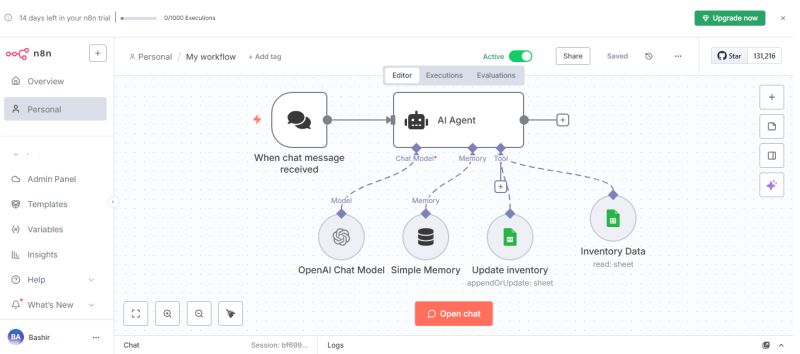
n8n supports building AI agents directly inside a workflow, including multi-agent setups and RAG systems. At a high level, building an AI agent in n8n involves:
This human-in-the-loop approach — letting rules and logic guide what the AI is allowed to do — is one of n8n’s more differentiated features compared to fully autonomous agent platforms.
Realistically, almost anything that involves moving data between systems or triggering actions based on events — from simple “new email → add row to spreadsheet” automations to complex AI agent pipelines that research a topic, summarize findings, and post the result to Slack. n8n’s 500+ integrations cover most common business tools, and custom API connections cover the rest.
n8n maintains a large public library of workflow templates — pre-built automations you can import and customize instead of building from scratch, covering common use cases across sales, marketing, IT, and AI agents. The platform’s core code is also hosted on GitHub, where the open-source Community Edition lives alongside active development and community contributions — a useful resource if you want to see how a workflow is actually built under the hood, or contribute back to the project.
You have two main paths:
Cloud (fastest to start): Sign up for an n8n Cloud plan and start building immediately — no server setup required, fully managed by n8n.
Self-hosted (free, more control):
n8n’s own documentation covers the exact commands for your specific environment (Docker, npm, or Kubernetes), since setup details vary by hosting choice.
Self-hosting is what unlocks n8n’s free Community Edition. Beyond the basic Docker install above, self-hosting gives you full control over your data (nothing leaves your own infrastructure), no execution limits, and no per-task fees — the tradeoff is that you’re responsible for your own uptime, updates, and security, rather than n8n managing that for you on a cloud plan.
n8n, Zapier, and Make (formerly Integromat) all solve a similar problem — connecting apps and automating workflows — but differ in a few real ways:
If you want the fastest possible setup with zero technical overhead, Zapier or Make may suit you better. If you want full control, self-hosting, and deeper AI agent capability, n8n is generally the stronger pick.
What is n8n?
n8n is a visual workflow automation platform that lets users build automations and AI agents by connecting nodes on a canvas, with support for both self-hosted and cloud deployment.
What does n8n stand for?
n8n stands for “nodemation,” a blend of “node” and “automation,” shortened using a numeronym naming pattern (the same style as “k8s” for Kubernetes).
How do you pronounce n8n?
n8n is pronounced “n-eight-n.”
Is n8n free?
Yes. n8n’s Community Edition is free and open source for self-hosted use, with no execution limits for most users. Paid cloud plans are also available starting at €24/month for teams that don’t want to manage their own hosting.
Is n8n open source?
Yes, n8n’s core is open source under the Sustainable Use License, with the code publicly available on GitHub.
How much does n8n cost?
Self-hosting is free. n8n’s managed cloud plans start at €24/month for Starter and scale to €60/month, €800/month, and custom Enterprise pricing depending on usage and features needed.
How do I build an AI agent with n8n?
Add an AI Agent node to a workflow, connect a language model, give the agent tools (other nodes it can call), optionally add memory, set rule-based guardrails, and test the agent step by step before connecting it to a live trigger.
What’s the difference between n8n and Zapier?
n8n offers genuine self-hosting, inline custom code, and deeper AI agent capabilities, while Zapier is simpler to learn but cloud-only and more limited for custom or technical workflows.

The challenge is knowing which tool actually fits your situation. Per-conversation pricing sounds cheap until your volume spikes.…
Read →Instagram Reels is the most competitive short-form video format in 2027. Over 200 billion Reels are played every…
Read →Posting consistently on LinkedIn is one of those things everyone agrees matters and almost nobody actually sustains —…
Read →