
Zanus AI Pricing Breakdown: Is This Private Enterprise AI Worth the Cost? (2027)
If you have been searching for Zanus AI pricing and hitting a wall — you are not alone.…
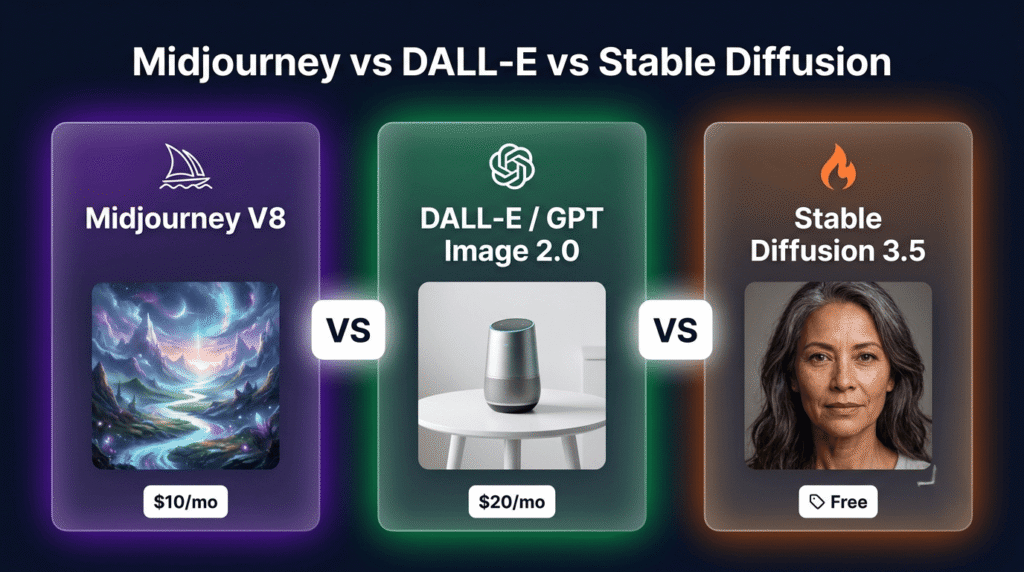
Read →Three tools. Three completely different philosophies. All claiming to be the best AI image generator in 2026.
Midjourney produces the most aesthetically stunning images available at any price point — but has no free plan, no API, and forces you to work inside a Discord-style interface. DALL-E 3 is technically retired — OpenAI replaced it with GPT Image 2.0 in May 2026, though most people haven’t noticed the change. Stable Diffusion is completely free, runs locally on your own hardware, and gives you total control over every parameter — but requires technical setup that will stop most non-developers cold.
They are not competing for the same user. The mistake most people make is treating this as a quality comparison when it is actually a workflow fit decision.
Here is the honest breakdown — with 2026 pricing, the latest model updates, and a clear answer for every use case.
For the best image quality and artistic output: Midjourney V8.2
For the easiest experience inside a tool you already use: ChatGPT with GPT Image 2.0 (formerly DALL-E)
For total control, privacy, and zero ongoing cost: Stable Diffusion 3.5
For the best photorealism at any price point: FLUX 2 (the new challenger worth knowing about)
| Midjourney V8.2 | GPT Image 2.0 (DALL-E) | Stable Diffusion 3.5 | |
|---|---|---|---|
| Latest model | V8.2 (July 2026) | GPT Image 2.0 (May 2026) | SD 3.5 (2025) |
| Free plan | ❌ None | ✅ Via ChatGPT free | ✅ Fully free |
| Starting price | $10/month | 20/month Plus | $0 (open source) |
| Image quality | ⭐ Best artistic | Excellent — best text rendering | Very good (model-dependent) |
| Ease of use | Medium — Discord/web app | ⭐ Easiest | Hard — requires setup |
| Customisation | Limited | Very limited | ⭐ Maximum |
| Runs locally | ❌ No | ❌ No | ✅ Yes |
| Commercial rights | ✅ Paid plans | ✅ Yes | ✅ Open licence |
| Text in images | Good | ⭐ Best | Poor |
| Photorealism | Good | Very good | Good (FLUX 2 is better) |
| API access | ❌ No | ✅ Yes | ✅ Yes |
| Privacy | ❌ Images public (Basic/Standard) | Limited | ⭐ Full — runs offline |
| Best for | Art, design, marketing | Quick generation, text, workflow | Developers, full control, volume |
Before comparing features, here is what actually changed this year — because most comparison articles are still describing 2024 versions of these tools.
Midjourney V8.2 became the default model on July 24, 2026. It produces native 2K HD images and generates roughly 5x faster than V7. The web app has improved significantly — you no longer need to use Discord to access Midjourney, though the Discord interface still exists. V8.2 is the most aesthetically refined AI image model available at any price point in 2026.
DALL-E 3 is retired. OpenAI deprecated DALL-E 3 in May 2026 and replaced it with GPT Image 2.0 — a fundamentally different model architecture. Where DALL-E 3 was a diffusion model, GPT Image 2.0 uses visual autoregressive modelling, giving it a much deeper understanding of language and context. The result: significantly better text rendering in images, more accurate prompt following, and better handling of complex multi-element scenes. If you have a ChatGPT Plus subscription, you are already using GPT Image 2.0 — not DALL-E 3.
Stable Diffusion 3.5 is the current stable release. The open-source ecosystem around it — LoRA models, ControlNet, ComfyUI, Automatic1111 — continues to grow. The community has produced thousands of fine-tuned models for specific styles, subjects, and use cases. The base model is free. The ecosystem is free. The only cost is your hardware.
FLUX 2 — worth mentioning even though it is not in the headline comparison. Black Forest Labs released FLUX 2 in 2026 and it has become the photorealism benchmark that Midjourney and Stable Diffusion are now measured against. FLUX 2 Klein is Apache 2.0 licensed — fully free for commercial use. If photorealism is your primary requirement, FLUX 2 deserves a look alongside these three.
This is the question everyone asks first. The honest answer is that all three produce excellent images in 2026 — but they excel at different things.
Midjourney produces the most visually striking, artistically coherent images of the three. The V8.2 model has a distinctive aesthetic — rich colours, strong composition, cinematic lighting, and a painterly quality that makes outputs feel intentional rather than generated. For marketing visuals, concept art, editorial illustration, and brand imagery, Midjourney’s output quality is unmatched at this price point.
The limitation: Midjourney has a strong house style. If you want images that look like Midjourney, it is perfect. If you want images that look like something very specific that deviates from its aesthetic preferences, you will fight the model. Customisation options exist — style parameters, aspect ratios, chaos settings — but they are limited compared to Stable Diffusion.
Best for: Marketing visuals, concept art, editorial illustration, social media content, brand imagery, anything where aesthetic quality is the primary requirement.
GPT Image 2.0’s biggest advantage over both competitors is text rendering. It handles text inside images better than any other AI image model available in 2026 — logos, signs, labels, captions, infographics. If your image needs readable text, GPT Image 2.0 is the only reliable choice.
The second advantage is prompt accuracy. GPT Image 2.0 follows complex, multi-element prompts more faithfully than Midjourney. If you describe a scene with five specific elements, GPT Image 2.0 is more likely to include all five correctly. Midjourney will produce something beautiful that may or may not match your brief.
The third advantage is workflow integration. GPT Image 2.0 lives inside ChatGPT — you can generate images as part of a conversation, iterate with natural language, combine image generation with writing and research, and use the same subscription for everything. For users who already pay for ChatGPT Plus, image generation is included at no extra cost.
Best for: Images with text, accurate prompt following, product mockups, infographics, users who already use ChatGPT Plus, quick generation without a separate subscription.
Stable Diffusion’s value proposition is fundamentally different from the other two. It is not competing on ease of use or out-of-the-box quality. It is competing on control, privacy, and cost at scale.
Run it locally on your own hardware and you pay nothing per image — ever. Generate 10,000 images in a month and the cost is your electricity bill. For developers, researchers, and high-volume producers, this is a decisive advantage that no subscription model can match.
The customisation depth is unmatched. LoRA models let you fine-tune the output for specific styles, characters, or subjects. ControlNet gives you precise control over composition, pose, and structure. The community has produced thousands of specialised models — anime, architecture, product photography, medical illustration, fashion — each optimised for its specific domain.
The honest limitation: getting good results from Stable Diffusion requires technical knowledge. Installing it, configuring it, finding the right models, writing effective prompts, and understanding the parameter system all have learning curves. For non-technical users, the barrier to entry is real.
Best for: Developers, researchers, high-volume image production, privacy-sensitive workflows, users who want full control over every parameter, anyone who needs to run generation offline.
| Plan | Monthly | Annual | What You Get |
|---|---|---|---|
| Basic | $10/mo | $8/mo | ~200 generations/month, no Relax Mode, no Stealth Mode, images public |
| Standard | $30/mo | $24/mo | 15 hrs Fast GPU + unlimited Relax Mode, no Stealth Mode |
| Pro | $60/mo | $48/mo | 30 hrs Fast GPU + unlimited Relax Mode + Stealth Mode (private images) |
| Mega | $120/mo | $96/mo | 60 hrs Fast GPU, 12 concurrent jobs, Stealth Mode, maximum throughput |
Important caveat: Companies earning over $1,000,000 USD in annual revenue must be on the Pro or Mega plan to use images commercially. For everyone else, all paid plans include full commercial rights.
No free plan. No free trial (occasional limited trials appear but are inconsistent). If you want to test Midjourney before paying, you cannot reliably do so.
| Plan | Price | Image Generation |
|---|---|---|
| Free | $0 | Limited GPT Image 2.0 access |
| Plus | $20/mo | Full GPT Image 2.0 access included |
| Pro | $100/mo | Higher usage limits |
| API | Per image | Variable — check OpenAI pricing page |
The key point: If you already pay $20/month for ChatGPT Plus for writing, coding, or research, image generation is included at no extra cost. For existing ChatGPT users, GPT Image 2.0 is effectively free.
| Option | Cost | Notes |
|---|---|---|
| Local (own hardware) | $0 | Free forever — GPU required |
| Cloud (Replicate) | Cents per generation | Pay-as-you-go |
| Cloud (RunwayML) | Monthly plans | Variable |
| Stability AI API | Variable | Enterprise agreements available |
The key point: Stable Diffusion itself is free. The cost is your hardware (GPU) for local use, or cloud compute for hosted use. At high volume, local Stable Diffusion is dramatically cheaper than any subscription model.
| Usage Level | Midjourney | GPT Image 2.0 | Stable Diffusion |
|---|---|---|---|
| Casual (50 images/month) | $10/mo | $0 (free tier) | $0 |
| Regular (200 images/month) | $10/mo | $20/mo (Plus) | $0 |
| Professional (500 images/month) | $30/mo | $20/mo (Plus) | $0 (local) |
| High volume (2,000+ images/month) | 120/mo | API costs escalate | $0 (local) |
GPT Image 2.0 wins on ease of use — and it is not close. If you have a ChatGPT account, you already have access. Type what you want in plain English, get an image back, iterate with natural language. No new interface to learn, no Discord server to join, no model parameters to understand.
Midjourney V8.2 has improved significantly with its web app. You no longer need Discord to use it — though the Discord interface still exists and many power users prefer it. The web app is clean and accessible. The parameter system (aspect ratios, style weights, chaos settings) has a learning curve but is well-documented. For most users, Midjourney is approachable within an hour.
Stable Diffusion requires the most setup. Installing the software (Automatic1111, ComfyUI, or another frontend), downloading models, configuring settings, and understanding the prompt syntax all take time. For non-technical users, this is a genuine barrier. For developers and technical users, the setup is straightforward and the payoff in control and cost is significant.
Stable Diffusion offers the deepest customisation of any AI image tool available. LoRA fine-tuning, ControlNet for composition control, inpainting, outpainting, img2img, custom checkpoints, negative prompts, CFG scale, sampling methods — the level of control is comparable to professional image editing software. If you need to produce images that match a very specific brief consistently, Stable Diffusion is the only tool that gives you the precision to do it.
Midjourney offers useful but limited customisation. Aspect ratio, style weight, chaos (variation), weird (surrealism), tile (seamless patterns), and character reference (–cref) are the main levers. The V8.2 model also supports style references — you can feed it an image and ask it to match the aesthetic. For most creative workflows, this is enough. For precise technical control, it is not.
GPT Image 2.0 offers the least customisation. Everything is automated — you describe what you want in natural language and the model interprets it. There are no parameter controls, no style weights, no sampling settings. What you gain in simplicity you lose in precision. For users who want to describe an image and get a good result without learning a parameter system, this is a feature rather than a limitation.
All three platforms allow commercial use — but with important differences.
Midjourney: Full commercial rights on all paid plans. Companies earning over 10/month) have commercial rights for personal and small business use.
GPT Image 2.0: Full commercial rights subject to OpenAI’s content policy. No revenue threshold. Images generated via ChatGPT Plus or the API can be used commercially.
Stable Diffusion 3.5: Open community licence — commercial use is permitted with some restrictions for very large companies. The specific terms depend on the model version and any fine-tuned models you use. FLUX 2 Klein (Apache 2.0) is the cleanest commercial licence in the open-source space — use it for anything.
The practical rule: For most businesses and creators, all three platforms allow commercial use without restriction. Check the specific licence terms before using images in high-stakes commercial contexts.
This matters more than most comparison articles acknowledge.
Midjourney Basic and Standard plans: Your images are public — they appear in the Midjourney gallery and are visible to other users. If you are generating images for client work, unreleased products, or sensitive commercial projects, this is a significant problem. Stealth Mode (private images) requires the Pro plan at $60/month.
GPT Image 2.0: Images are not publicly displayed, but OpenAI’s data practices apply. Review OpenAI’s privacy policy before generating sensitive commercial content.
Stable Diffusion (local): Complete privacy. Images never leave your machine. No data is sent to any server. For regulated industries, sensitive client work, or any situation where image privacy is non-negotiable, local Stable Diffusion is the only option.
| Use Case | Best Choice | Runner-Up | Why |
|---|---|---|---|
| Marketing visuals | Midjourney | GPT Image 2.0 | Best aesthetic quality |
| Social media content | Midjourney | GPT Image 2.0 | Most visually striking output |
| Images with text | GPT Image 2.0 | — | Only reliable text rendering |
| Product mockups | GPT Image 2.0 | Stable Diffusion | Accurate prompt following |
| Concept art | Midjourney | Stable Diffusion | Artistic coherence |
| Photorealism | FLUX 2 | GPT Image 2.0 | Best-in-class photorealism |
| High-volume production | Stable Diffusion | — | Zero per-image cost |
| Privacy-sensitive work | Stable Diffusion | — | Runs fully offline |
| Developer / API integration | Stable Diffusion | GPT Image 2.0 | Full API, open source |
| Beginners / casual users | GPT Image 2.0 | Midjourney | Easiest to start |
| Budget-conscious users | Stable Diffusion | GPT Image 2.0 (free tier) | Free forever |
| Client work (private) | Midjourney Pro or Stable Diffusion | — | Stealth Mode or local |
| Fine-tuned custom styles | Stable Diffusion | — | LoRA, ControlNet |
| Existing ChatGPT users | GPT Image 2.0 | — | Already included in Plus |
Here is what experienced AI image creators have figured out that most comparison articles miss.
The best results come from knowing which tool to use for which job — not from picking one and forcing it to do everything.
Use Midjourney for hero images, campaign visuals, and anything where the aesthetic quality of the output directly affects how your work is perceived.
Use GPT Image 2.0 for images that need text, for quick iterations inside a ChatGPT workflow, and for situations where prompt accuracy matters more than artistic flair.
Use Stable Diffusion for high-volume production, privacy-sensitive work, fine-tuned custom styles, and any workflow where you need to run generation programmatically or offline.
Running Midjourney Standard (20/month, which includes GPT Image 2.0) costs $50/month total — less than most professional design software subscriptions — and covers virtually every image generation use case a creator or marketing team will encounter.
Which is the best AI image generator in 2026 — Midjourney, DALL-E, or Stable Diffusion?
Midjourney V8.2 produces the best artistic and aesthetic output. GPT Image 2.0 (which replaced DALL-E 3 in May 2026) is the easiest to use and best for images with text. Stable Diffusion is the best for total control, privacy, and zero cost at scale. There is no single best — the right choice depends on your use case, budget, and technical comfort level.
Is DALL-E 3 still available in 2026?
No. OpenAI deprecated DALL-E 3 in May 2026 and replaced it with GPT Image 2.0 — a fundamentally different model architecture. If you use ChatGPT Plus, you are already using GPT Image 2.0. DALL-E 3 is listed as a previous-generation deprecated model in OpenAI’s documentation.
Does Midjourney have a free plan in 2026?
No. Midjourney has no free plan and no reliable free trial as of August 2026. Occasional limited free trials appear but are inconsistent. Paid plans start at $10/month for the Basic plan.
Is Stable Diffusion really free?
Yes. Stable Diffusion is open-source and free to download and run locally. The only cost is your hardware — a capable GPU is required for local use. Cloud-hosted versions charge per generation. For high-volume use on your own hardware, the ongoing cost is effectively zero.
Which AI image generator is best for commercial use?
All three allow commercial use on paid plans. Midjourney requires a paid plan (Basic or above) and companies earning over $1M annually must be on Pro or Mega. GPT Image 2.0 allows commercial use subject to OpenAI’s content policy. Stable Diffusion’s community licence allows commercial use with some restrictions for very large companies. FLUX 2 Klein (Apache 2.0) has the cleanest commercial licence in the open-source space.
Which is best for beginners?
GPT Image 2.0 via ChatGPT is the easiest starting point — no new tools to learn, no Discord server, no parameter system. Just describe what you want in plain English. Midjourney’s web app is also accessible for beginners. Stable Diffusion requires technical setup and is not recommended for non-technical beginners.
Can Midjourney generate images with text?
Midjourney can generate images with text but it is not reliable — text often appears distorted or misspelled. GPT Image 2.0 is significantly better at text rendering and is the recommended choice for any image that needs readable text, logos, signs, or labels.
What is FLUX 2 and how does it compare?
FLUX 2 is an AI image model by Black Forest Labs released in 2026. It produces the best photorealism of any model currently available — surpassing Midjourney, GPT Image 2.0, and Stable Diffusion for photorealistic output. FLUX 2 Klein is Apache 2.0 licensed — fully free for commercial use. It runs locally like Stable Diffusion. If photorealism is your primary requirement, FLUX 2 is worth evaluating alongside the three main platforms.
Which AI image generator is best for marketing teams?
Midjourney is the strongest choice for marketing teams that need high-quality visual assets for campaigns, social media, and brand content. GPT Image 2.0 is the better choice for product mockups, infographics, and images that need text. Many marketing teams use both — Midjourney Standard (20/month) covers virtually every marketing image use case.
Is Midjourney worth paying for in 2026?
Yes — if image quality is your primary concern and you generate enough images to justify the subscription. Midjourney V8.2 produces the most aesthetically refined AI images available at any price point. The Basic plan at 30/month is the right choice for regular professional use. If you only generate a handful of images per month, GPT Image 2.0 via ChatGPT Plus is better value.
Also read: ChatGPT vs Claude vs Gemini 2026 → | Best Free AI Image Generators Without Watermark → | Grok vs ChatGPT 2026 → | HeyGen vs Synthesia →

If you have been searching for Zanus AI pricing and hitting a wall — you are not alone.…
Read →Searching “free AI video generator no watermark no sign up” usually turns up a wall of listicles promising…
Read →Three tools. Three completely different answers to the same question. The question is: what does “best AI video…
Read →