
Real US phone number + email for your AI Chief of Staff
Last updated September 30, 2026
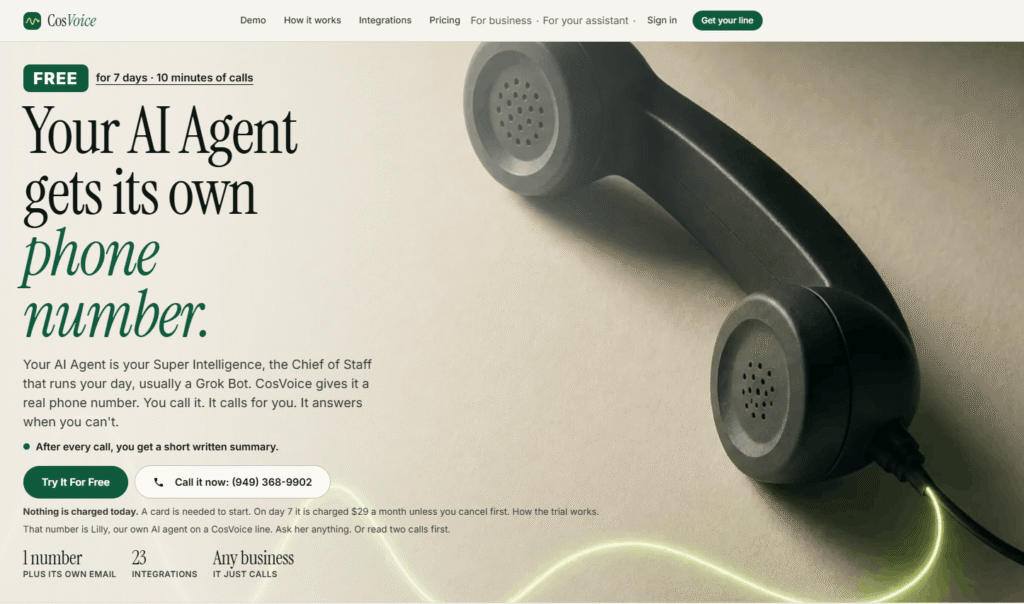
CosVoice is a real phone number for your AI agent — the missing piece that turns a text-based AI assistant into a Chief of Staff that can actually pick up the phone.
Most people who use AI assistants like Grok Bot, Claude, or ChatGPT have discovered that these tools are remarkably capable at planning, writing, researching, and organising — but they live entirely on a screen. They cannot call a restaurant to book a table. They cannot answer the contractor’s callback. They cannot wait on hold and put you through when a person finally answers. CosVoice fixes that.
The concept is simple: you get a real US phone number in your area code, with its own email address. Your AI assistant connects to it with a single URL paste. From that moment, your assistant can make outbound calls on your behalf, answer inbound calls when you cannot, and send you a short written summary after every call — the outcome, the key details, and the one decision that is waiting on you.
CosVoice is built by MimesisIQ LLC and is designed specifically for the person whose AI assistant already runs their day. It is not a call centre platform, not a business phone system, and not a general-purpose AI receptionist. It is one line, for one assistant, for the person that assistant works for.
The product’s own framing is precise: thin phone products sell minutes. CosVoice sells a phone your assistant answers, and the trail of finished work behind it.
CosVoice gives your AI assistant a phone number that works in three distinct directions:
01 — You Call It
Save the CosVoice number as a contact in your phone — name it after your assistant. From the car, the school pickup line, or between meetings, call or text it the way you would chat with it at your desk. “Move my 3pm.” “Remind me to call Mom.” “Book us a table Friday at 7:30.” Same assistant, now by voice.
02 — It Calls for You
Tell your assistant what you need — in chat, by voice, or by text — and it makes the call. It introduces itself as your assistant, handles the conversation, works out the details, and reports back. It never gives out your card number, never commits you to a payment, and never pretends to be you. The most it commits you to on a call is a booking or an appointment.
03 — It Answers When You Can’t
Give out the CosVoice number, or forward the calls you miss on your mobile to it. When the contractor calls back, your assistant answers, asks what you would ask — the price, what is included, when they can start, how long the quote holds — and writes it all down. You get the details, not “please call back.”
After every call, a short written summary lands in your inbox and in your assistant’s chat. Read it in ten seconds.
Step 1 — Pick a number. Choose your area code and select the number you want from a short list. It comes with its own email address: yourname@bot.cosvoice.com. Live in about a minute.
Step 2 — Save it as a contact. Name it whatever you like — your assistant’s name, “Chief of Staff,” whatever fits. CosVoice recognises your mobile number, so when you call, it knows it is you and takes instructions.
Step 3 — Start talking. Call it. Text it. Or ask your Grok Bot, Claude, or ChatGPT to make a call for you. After each call, the written summary lands in your inbox.
CosVoice publishes two scripted demonstration calls on its homepage that show exactly what the product does in practice:
Call 1 — Booking a Restaurant
Lloyd (the AI assistant) calls Osteria Mozza on behalf of Graham. The host says 7:30 is full and offers 7:00 or 8:15. Lloyd takes 8:15, books it under Graham’s name, and gives the CosVoice line number for callbacks. The whole call takes 1 minute 48 seconds.
Call 2 — Taking the Contractor’s Callback
Marco from Coastline Plumbing calls back about a water heater quote. Lloyd answers, identifies itself as Graham’s assistant, and asks exactly the right questions: the price, what is included, the unit model, how long the quote holds, the earliest start date, and whether there are any open decisions. The whole call takes 2 minutes 31 seconds.
The difference CosVoice makes explicit: voicemail tells you “Marco called.” Your Chief of Staff tells you the price, what is included, the start date, how long the quote holds, and the one decision that is yours to make.
Every CosVoice line comes with a real US phone number in your chosen area code and its own email address (yourname@bot.cosvoice.com). The email works both ways — your assistant reads what arrives and can write back from it. Canada is next on the roadmap.
CosVoice connects to any AI assistant that supports MCP (Model Context Protocol) with a single URL paste: https://cosvoice.com/mcp. A CosVoice authorisation page opens, you click Allow, and your assistant is connected. No API key to copy, no developer setup required.
Supported assistants:
Switch on Bot Push and CosVoice wakes your assistant the moment something happens — a text instruction arrives, an email lands, a call finishes. No polling, no hourly check-in, nothing waiting. Your assistant acts on the task immediately rather than discovering it on the next scheduled check.
Every call ends with a structured written summary delivered to your inbox and your assistant’s chat. The summary includes:
One email per day — at the hour you choose — covering what the line handled since yesterday, bookings in play, and anything waiting on you. Quiet days send nothing. Your assistant gets a copy if it reads an inbox.
Forward the calls you miss on your mobile to your CosVoice line. Settings shows your carrier’s forwarding code with your number already filled in. Callers reach your assistant instead of a beep. It takes real notes. The summary is marked “Missed on mobile.”
Ask your assistant for a call and say you want to be connected once a person answers. Your line works the phone menu, waits through the hold music, and when someone who can help is on the line it says “one moment” and rings your mobile. You pick up already talking to the right person. If you do not pick up, the line apologises and arranges a callback.
Choose from 38 voices in two sets — new voices and classic voices. New voices can be interrupted mid-sentence (the way a person can), sound more natural, and suit back-and-forth conversations. Classic voices are the clearest on a phone line and the quickest to answer (usually under a second), best for a busy front desk. Switch any time in Settings.
A short list of approved callers gets a warmer welcome. Their message reaches you in writing as soon as the call ends. Everyone else gets a polite assistant that never shares your details.
Any call in your dashboard has a Share button. It creates a public card with the outcome, summary, and details — phone numbers hidden unless you include them, transcript only if you add it. Stop sharing at any time.
Name the line after your company, paste your prices, hours, and rules into its standing instructions, and give out the number or forward missed calls to it. It answers as your business, takes the caller’s details, quotes from your rate card if you allow it, and sends you a written note after every call. Available from $29/month.
CosVoice connects to 23 services across food delivery, reservations, calendar, email, travel, and more. “Live by phone” means the assistant calls the business directly — which works with any restaurant or office that has a phone number, not just those with an app.
| Integration | Status | Category |
|---|---|---|
| Instacart | Live | Groceries |
| Uber Eats | Live | Food delivery |
| DoorDash | Live by phone | Food delivery |
| OpenTable | Live by phone | Reservations |
| Resy | Live by phone | Reservations |
| Tock | Live by phone | Reservations |
| Yelp | Coming | Local search |
| Google Calendar | Live | Calendar |
| Gmail | Live | |
| Calendly | Live | Scheduling |
| Zoom | Live | Meetings |
| Uber | Live | Transport |
| Kiwi.com flights | Live | Travel |
| Booking.com | Coming | Travel |
| Shopify stores | Live | E-commerce |
| Kroger | Coming | Groceries |
| Zocdoc | Coming | Healthcare |
| Google Maps | Coming | Local search |
| Ticketmaster | Coming | Events |
| UPS | Coming | Shipping |
| Pharmacy callbacks | Live by phone | Healthcare |
| Airlines & hotels | Live by phone | Travel |
| Home services | Live by phone | Home |
CosVoice names five specific things your assistant does on the phone:
Book a table — Say the place and the time. Your assistant calls, works the slot, and books under your name.
Hold and connect — Your line works the phone menu and the hold music. When a person answers, it rings your mobile.
Contractor callback — Forward missed calls. When they call back, your assistant asks what you would ask and writes it down.
Morning brief — One email a day with what the line handled, bookings in play, and what is waiting on you. Quiet days send nothing.
Share card — Any call becomes a page you can send: outcome, summary, details, with phone numbers hidden unless you include them.
CosVoice is explicit about four hard rules that apply on every call:
For the technical reader: every record is scoped to your line, sign-in is by magic link with no passwords, phone webhooks are signature-verified, and API keys are stored hashed.
CosVoice is priced like a phone line, not like an assistant. Every plan includes the number, the email address, the assistant connection, and every integration. Plans differ only in how many minutes of calls you get. A typical call takes three to four minutes.
| Plan | Price | Minutes/Month | Approx. Calls | Key Extras |
|---|---|---|---|---|
| Free Trial | $0 for 7 days | 10 minutes | — | 1 US number + email |
| Starter | $29/month | 100 minutes | ~25 calls | Full feature set |
| Plus | $79/month | 300 minutes | ~75 calls | VIP callers, custom voice & greeting |
| Pro | $199/month | 1,000 minutes | ~250 calls | Hands-on setup, first access to new features |
Extra minutes: $0.25 each on every paid plan, rounded up per call. Texts and email: Never use minutes. Change plans: Any time. Cancel: Number is released at end of paid period.
Referral programme: When someone you refer has paid for 2 months, you get 200 off.
| CosVoice | AI Receptionists (Catch, Pally) | Developer Platforms (Retell, Vapi) | Google Voice | |
|---|---|---|---|---|
| For personal AI assistant | ✅ Built for this | ❌ Business-focused | ❌ Developer-focused | ❌ No AI |
| MCP integration | ✅ One paste | ❌ None | ❌ Custom build | ❌ None |
| Written summaries | ✅ Every call | ✅ Varies | ❌ Build yourself | ❌ None |
| Never pretends to be human | ✅ Hard rule | ✅ Varies | ❌ Configurable | N/A |
| Hold and connect | ✅ Yes | ❌ Rare | ❌ Build yourself | ❌ No |
| Starting price | $29/month | 300+/month | Usage-based | Free |
| Setup time | ~1 minute | 30–60 minutes | Hours/days | Minutes |
What is CosVoice?
CosVoice is a real phone number for your AI assistant. Your Chief of Staff — usually a Grok Bot, but it works with Claude, ChatGPT, OpenAI dots, Cursor, and any MCP assistant — gets a real US number in your area code and its own email address. You can call it, it can call people for you, it can answer when you cannot, and after every call it sends you a short written summary.
Do I need a Grok Bot to use CosVoice?
No. The line works on its own — call it, text it, and ask it to make calls from your dashboard. If you have a Grok Bot or another MCP-compatible assistant, connecting it lets your assistant make calls and read summaries automatically. But the line is useful without any assistant connection.
Does CosVoice work with Claude, ChatGPT, or Cursor?
Yes. Any assistant that supports MCP connects with one URL paste: https://cosvoice.com/mcp. Grok Bot, OpenAI dots, Claude, ChatGPT, and Cursor all connect this way. Meta’s Muse uses an API key connection via CosVoice’s published OpenAPI spec.
Will it pretend to be me or a human?
No. CosVoice introduces itself as your assistant and says it is an AI whenever anyone asks. It never claims to be you or a person. This is a hard rule, not a setting.
Can it spend money on my behalf?
On a call, no. It never gives out a card number or agrees to a charge. The most it commits you to on a call is a booking or an appointment. App orders (dinner, groceries) go through only after you confirm.
How does the free trial work?
Seven days, 10 minutes of calls, a real US number with its own email address. A card is required to start but nothing is charged on day one. On day 7 your card is charged $29 for Starter unless you cancel first. Cancel in Settings in a few seconds. One free trial per person.
Can it replace my voicemail?
Yes. Forward the calls you miss on your mobile to your CosVoice line. Settings shows your carrier’s forwarding code with your number already filled in. Callers reach your assistant instead of a beep, and you get structured notes — not “please call back.”
Can it be the front desk for my small business?
Yes. Name the line after your company, paste your prices, hours, and rules into its standing instructions, and give out the number or forward missed calls to it. It answers as your business, takes the caller’s details, quotes from your rate card if you allow it, and sends you a written note after every call. Available from $29/month.
| Criteria | Rating |
|---|---|
| Accuracy & Reliability | ⭐ 4.2/5 |
| Ease of Use | ⭐ 4.6/5 |
| Features & Functionality | ⭐ 4.0/5 |
| Performance | ⭐ 4.3/5 |
| Customization | ⭐ 4.4/5 |
| Security & Privacy | ⭐ 3.8/5 |
| Customer Support | ⭐ 3.5/5 |
| Value for Money | ⭐ 4.5/5 |
| Integrations | ⭐ 4.1/5 |

HeyGen is an AI-powered video generation platform trusted by over 1,000,000 developers and leading organisations — from solo creators and…

ChatGPT, built by OpenAI, remains the most widely used AI assistant in the world — the default most…

Bing AI, now integrated into Microsoft Copilot, is an AI-powered assistant that combines web search, content generation, coding…

Casablanca is an AI-powered virtual camera that creates natural eye contact during video calls, making online conversations feel…

gpu.fund is an independent, live cloud GPU price index that tracks rental prices across 15 cloud providers, 49…

Grammarly is an AI-powered writing assistant that helps you write clearer, more polished, and mistake-free text across email,…

Copy.ai is an AI-native go-to-market platform designed to help marketing, sales, and revenue teams automate repetitive workflows and…
Chatbase is an AI-powered customer experience platform that enables businesses to build intelligent AI agents for customer support,…

Magica AI is an all-in-one AI platform that combines the world’s leading AI models into a single intelligent…

Smartlead is an AI-native cold email and outbound sales platform trusted by over 100,000 businesses — from solo founders and lead…

Zanus AI is a private, on-premise AI operating system built for enterprises, government agencies, healthcare providers, law firms, and…
Actor (Actor.do) is a privacy-focused AI work assistant built to automate email management and daily agenda planning —…
