
7 Best AI Chatbots for Customer Support Under $50 a Month (2027)
The challenge is knowing which tool actually fits your situation. Per-conversation pricing sounds cheap until your volume spikes.…
Read →If you’re evaluating Zanus AI as an AI call center solution or virtual receptionist, you’re in the right place. This guide covers exactly what Zanus AI’s voice agent does, what it costs, what hardware you need, and whether it’s the right fit for your organization — based on the platform’s own documentation and publicly available information.
Quick answer for the most common questions:
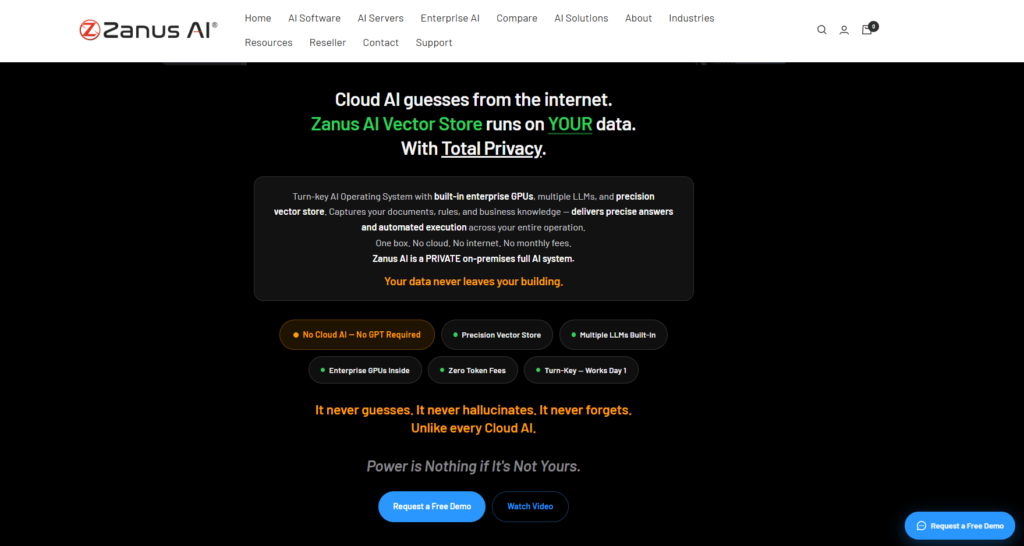
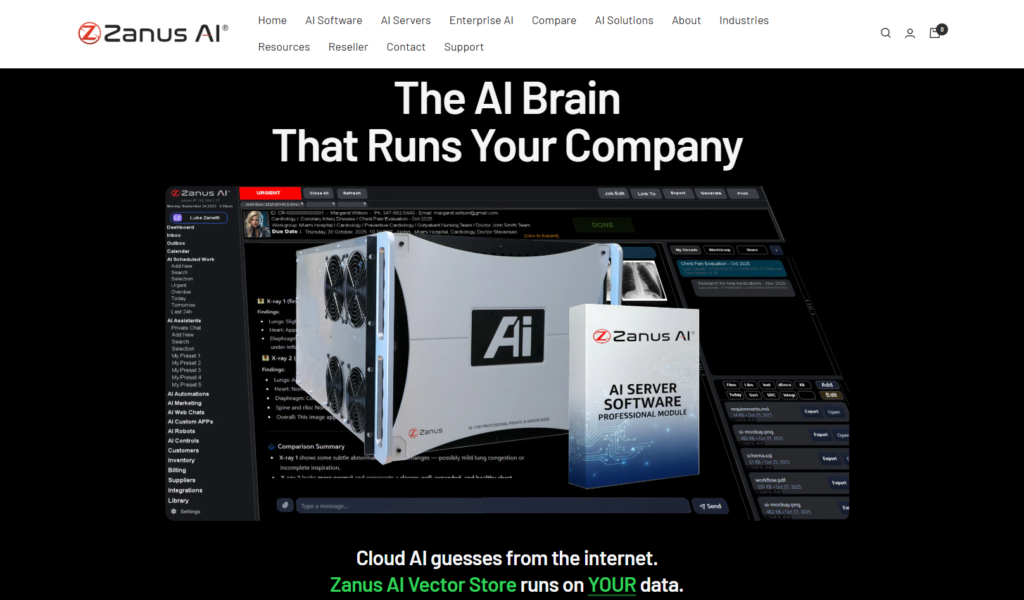
Zanus AI is a private, on-premise AI operating system — not a cloud subscription. It ships as enterprise hardware with built-in GPUs and pre-installed large language models, deployed inside your own building or private data center.
The voice agent is one of its core modules. Unlike cloud-based AI phone systems (which send every call to an external server for processing), Zanus AI processes voice conversations locally — meaning call recordings, transcripts, and customer data stay inside your infrastructure.
This is the defining difference for healthcare, legal, financial, and government organizations where sending call data to a third-party cloud creates compliance risk.
This is the most searched use case for Zanus AI, and it’s one the platform is specifically built for.
Inbound call handling: Zanus AI’s voice agent answers inbound calls and holds natural, multi-turn conversations — not a static phone tree or press-1-for-sales menu. It understands context, remembers what was said earlier in the call, and responds based on your organization’s own knowledge base.
Appointment booking: The voice agent can book, reschedule, and cancel appointments directly, syncing with your existing scheduling systems. No human needed for routine booking calls.
Lead qualification and routing: For sales teams, the voice agent qualifies inbound leads based on criteria you define, then routes qualified prospects to the right team member — or logs them in your CRM automatically.
FAQ handling from your own data: Instead of generic AI answers, Zanus AI responds using your organization’s actual documents, policies, and procedures stored in its local vector database. Answers reflect your real company information.
Internal help desk: Employees can call or message the AI to get answers from internal documentation — HR policies, IT procedures, product manuals — without waiting for a human to respond.
Human escalation: When a conversation goes outside what the AI can confidently handle, it escalates to a human agent automatically, with a summary of the conversation so the agent doesn’t start from scratch.
Most AI voice and assistant platforms depend on:
Zanus AI instead emphasizes:
That combination is what makes it relevant to businesses handling confidential or regulated information, where sending customer conversations to an external cloud provider isn’t an option.
Zanus AI’s core architecture runs on dedicated, GPU-equipped hardware installed within the customer’s own environment — an on-premise AI server rather than a shared cloud instance. Locally-running LLMs handle language understanding and generation directly on that hardware, so core AI functions like conversation handling, document search, and workflow automation continue working even without an active internet connection.
This is the piece that differentiates a private AI deployment like Zanus AI from a typical local LLM hobbyist setup: it’s not just a model running on a single machine, but a full AI operating system layered on top — combining the model, an organization’s own knowledge base (via a vector database), role-based access controls, and pre-built integrations, all packaged as a turnkey enterprise system rather than something IT has to assemble from open-source parts.
For organizations evaluating on-premise AI versus cloud AI, the tradeoff is straightforward: more control and lower recurring cost after deployment, in exchange for a bigger upfront hardware and setup investment (more in the Pros & Cons section below).
For businesses replacing a human receptionist or an outsourced answering service, Zanus AI’s voice agent covers the core receptionist functions:
| Receptionist Task | Zanus AI Handles It? |
|---|---|
| Answer inbound calls 24/7 | ✅ Yes |
| Book and manage appointments | ✅ Yes |
| Answer FAQs about your business | ✅ Yes (from your own data) |
| Route calls to the right person | ✅ Yes |
| Take messages and log interactions | ✅ Yes |
| Handle multiple calls simultaneously | ✅ Yes |
| Work without internet connection | ✅ Yes |
| Keep call data on your servers | ✅ Yes |
The compliance advantage: For medical practices, law firms, and financial advisors, a human receptionist or cloud-based answering service still routes call data through external systems. Zanus AI keeps everything local — which matters when calls contain protected health information (PHI), privileged legal communications, or confidential financial data.
Zanus AI does not publish fixed pricing — this is the most common frustration for people evaluating the platform. Here’s what we know about how pricing works for voice agent and call center deployments specifically:
What drives the cost:
| Factor | Impact on Price |
|---|---|
| Call volume | More concurrent calls = more GPU capacity needed = higher hardware cost |
| Number of locations | Multi-site deployments require additional hardware per site |
| Industry compliance package | Healthcare (HIPAA), legal, and finance packages include extra compliance tooling |
| Integration complexity | Connecting to existing phone systems, CRM, and scheduling tools |
| Support level | Ongoing IT support, updates, and monitoring |
Realistic cost context: On-premise AI server hardware with enterprise GPU capacity typically starts in the 50,000–150,000+ range for a single-site deployment, based on current market pricing for enterprise AI infrastructure. Multi-site or high-volume deployments scale from there. This is a capital investment, not a monthly subscription.
The financial case: If your organization currently pays for a cloud-based AI phone system, an outsourced call center, or multiple human receptionists, the math can favor Zanus AI over a 2–3 year horizon — because there are no recurring per-call or per-minute fees after deployment.
To get an actual quote, contact Zanus AI directly at zanusai.com with your expected call volume, number of locations, and industry.
Zanus AI does not publish fixed, public pricing — it’s sold on an enterprise/custom pricing model, similar to most on-premise AI infrastructure vendors. That’s a real difference from cloud AI tools with flat monthly subscriptions, and it’s the main reason “zanus ai pricing” and “zanus ai cost” are commonly searched without a clear public answer.
What typically drives the final cost of a deployment like this:
Because pricing is quote-based, the most reliable way to get an actual number is to request a quote directly from Zanus AI with your expected call volume and use case. If you’re comparing costs against a cloud AI subscription, remember the tradeoff: higher upfront cost, but no recurring token/usage fees once deployed — which can make it cheaper over a multi-year horizon for high-volume use, even though it’s a bigger initial commitment than a $20/month SaaS tool.
No — Zanus AI is broader than a chatbot. A chatbot is typically a single-purpose text (or sometimes voice) interface for answering questions. Zanus AI is a full AI operating system: it includes a voice agent, but also workflow automation, document intelligence, role-based access control, CRM-ready integrations, and multiple built-in LLMs, all running on infrastructure the organization controls.
If what you’re specifically looking for is a simple embeddable website chatbot, Zanus AI is likely more platform than you need. It’s built for organizations that want an AI system handling multiple functions (voice, workflows, internal knowledge, automation) under one private deployment — not a single chat widget.
Because Zanus AI runs on-premise rather than in the cloud, hardware planning is a real part of adoption — this is the tradeoff for keeping data local. In general, deployments require:
This is why Zanus AI is generally a better fit for organizations with a long-term AI adoption strategy and the internal IT capacity to support on-prem infrastructure, rather than a business that just wants to test AI voice automation with minimal setup. Exact specifications depend on deployment size and are typically scoped during the sales/quoting process.
Zanus AI also offers industry-specific packages for healthcare, legal services, finance, education, manufacturing, government, retail, logistics, and engineering — each tuned with relevant compliance and workflow templates for that sector.
Zanus AI is positioned for industries where data privacy and regulatory compliance are top priorities:
Because the platform runs on-premise, these organizations can keep proprietary documents, call records, and operational knowledge inside their own infrastructure rather than a third-party cloud environment.
| Feature | Zanus AI | ChatGPT | Microsoft Copilot | Claude | Gemini |
|---|---|---|---|---|---|
| Primary Purpose | Private Enterprise AI Platform & Voice Agent | General AI Assistant | Microsoft Workplace AI | Enterprise AI Assistant | Google’s Multimodal AI Assistant |
| AI Voice Agent | ✅ Yes | ⚠️ Voice Mode (consumer) | ⚠️ Limited | ❌ No native voice agent | ✅ Gemini Live |
| On-Premise Deployment | ✅ Yes | ❌ No | ❌ No | ❌ No | ❌ No |
| Cloud Dependency | ❌ No (Private deployment) | ✅ Yes | ✅ Yes | ✅ Yes | ✅ Yes |
| Offline AI Processing | ✅ Yes | ❌ No | ❌ No | ❌ No | ❌ No |
| Data Stored in Your Infrastructure | ✅ Yes | ❌ No | ❌ No | ❌ No | ❌ No |
| Enterprise Knowledge Base | ✅ Yes | Limited via GPTs | Microsoft Graph | Projects & Knowledge | Workspace Integration |
| Custom AI Agents | ✅ Yes | GPTs | Copilot Agents | Claude Projects | Gems |
| Voice Calling Automation | ✅ Yes | Limited | Limited | No | Limited |
| Workflow Automation | ✅ Yes | Limited | Microsoft 365 Workflows | Limited | Google Workspace |
| CRM Integration | ✅ Yes | Via APIs | Microsoft Dynamics | API Based | API Based |
| Document Intelligence | ✅ Yes | Yes | Yes | Yes | Yes |
| Multiple LLM Support | ✅ Yes | OpenAI Models | Microsoft/OpenAI | Claude Models | Gemini Models |
| Internet Required | ❌ No (Core deployment) | ✅ Yes | ✅ Yes | ✅ Yes | ✅ Yes |
| Pricing Model | Enterprise / Custom | Subscription | Microsoft 365 Plans | Subscription | Google AI Plans |
Quick take: Zanus AI’s biggest strength is private, on-premise infrastructure — it’s built for enterprises, healthcare, government, banking, and manufacturing. ChatGPT wins on general-purpose flexibility, Copilot on Microsoft 365 integration, Claude on long-document writing and analysis, and Gemini on native Google Workspace integration.
For a deeper side-by-side, see our full Zanus AI vs Claude AI comparison.
Pros
Cons
For organizations where data privacy, regulatory compliance, and long-term cost control matter more than getting started in five minutes, Zanus AI’s private, on-premise model is a genuinely different option from the cloud-first AI assistants most businesses default to. It’s a strong fit for healthcare providers, law firms, financial institutions, and government agencies specifically because it keeps sensitive call data and documents off third-party servers entirely.
It’s a weaker fit for small teams that just want a quick chatbot or don’t have IT resources to support on-prem hardware — the upfront investment and setup only pays off with sustained, high-volume use. If your organization is choosing between “cloud AI subscription” and “private AI infrastructure,” Zanus AI is worth an evaluation call specifically when compliance or data control is a hard requirement, not just a nice-to-have.
Can Zanus AI work as an AI call center?
Yes. Zanus AI’s voice agent handles inbound calls, appointment booking, lead qualification, FAQ responses from your own knowledge base, and automatic escalation to human agents — all processed locally on your own hardware.
Can Zanus AI replace a human receptionist?
For routine receptionist tasks — answering calls, booking appointments, routing inquiries, handling FAQs — yes. Zanus AI handles these 24/7 without internet dependency. For complex, judgment-heavy interactions, it escalates to a human with a conversation summary.
How much does Zanus AI cost for a call center deployment?
Zanus AI uses custom enterprise pricing. Cost depends on call volume, number of locations, industry compliance requirements, and integration scope. There is no public price list — request a quote from Zanus AI directly.
Does Zanus AI send call recordings to the cloud?
No. Because Zanus AI processes voice conversations locally on your own hardware, call recordings and transcripts stay inside your infrastructure. They are not sent to external servers.
What industries use Zanus AI for voice AI?
Healthcare (HIPAA-compliant patient calls), legal (privileged client communications), financial services (regulated customer interactions), government (classified or sensitive data), and any enterprise where call data privacy is a compliance requirement.
Does Zanus AI require an internet connection to handle calls?
No. Core voice processing runs locally. Internet is not required for the AI to answer calls, book appointments, or access your knowledge base.
What is the difference between Zanus AI and a cloud AI phone system?
Cloud AI phone systems (like Dialpad AI, Google CCAI, or Amazon Connect) send call audio to external servers for processing. Zanus AI processes everything locally. The tradeoff: Zanus AI requires upfront hardware investment but offers complete data control and no per-call fees.
Is Zanus AI good for small businesses?
Zanus AI is primarily designed for enterprises, healthcare organizations, law firms, and government agencies with the IT resources to manage on-premise hardware. Small businesses that just need a basic AI answering service would likely find cloud-based alternatives faster and cheaper to deploy.

The challenge is knowing which tool actually fits your situation. Per-conversation pricing sounds cheap until your volume spikes.…
Read →Instagram Reels is the most competitive short-form video format in 2027. Over 200 billion Reels are played every…
Read →Posting consistently on LinkedIn is one of those things everyone agrees matters and almost nobody actually sustains —…
Read →