
7 Best AI Chatbots for Customer Support Under $50 a Month (2027)
The challenge is knowing which tool actually fits your situation. Per-conversation pricing sounds cheap until your volume spikes.…
Read →Building a website no longer requires years of coding experience. Thanks to AI-powered development platforms like Replit, anyone can create, edit, and host a professional website within minutes using natural language prompts.
Whether you’re launching a startup, creating a portfolio, building an online store, or developing a SaaS application, Replit combines coding, AI, deployment, and cloud hosting into one powerful platform.
In this complete guide, you’ll learn how to create and host a website on Replit, explore its AI features, discover deployment options, and understand why thousands of developers and beginners are switching from traditional development environments.
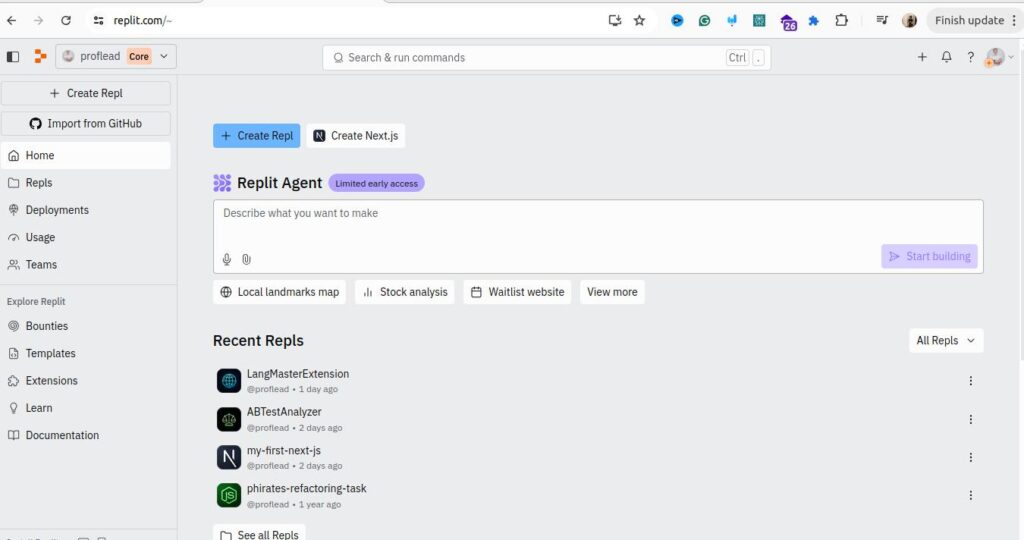
Replit is an AI-powered cloud development platform that allows users to build websites, applications, dashboards, APIs, mobile apps, and software directly from a browser.
Unlike traditional IDEs that require installing software locally, Replit provides everything in one place:
The biggest advantage is that you can describe what you want in plain English, and Replit AI generates the project for you.
Replit is becoming one of the most popular AI coding platforms because it combines development and hosting into one workspace.
Benefits include:
Some standout features include:
Before creating your website, you’ll need:
Visit Replit and sign up using:
After verification, you’ll reach your dashboard.
Click Create Repl.
You’ll see options for:
Choose the framework that matches your project.

Popular choices include:
Perfect for:
Best for:
Ideal for:
Suitable for:
One of Replit’s biggest strengths is AI-powered development.
Instead of writing hundreds of lines of code, simply describe your project.
Example prompt:
Create a modern digital marketing agency website with a homepage, services section, testimonials, pricing, and contact form.
Within seconds, Replit AI generates the initial project structure.
Once the AI generates your project, you can customize:
You can also ask AI to make changes.
Example:
Make the hero section darker and add animated buttons.
Replit provides a live preview window where you can instantly see changes without refreshing manually.
This makes development much faster than traditional workflows.
Ensure your website works on:
Adjust layouts if needed to provide a smooth mobile experience.
If you want a professional website, connect your own domain.
Examples:
A custom domain improves branding and SEO.
Once you’re satisfied, deploy your project.
Replit automatically hosts your website in the cloud.
Deployment typically takes just a few clicks, allowing you to publish updates without managing servers.
After deployment, share your website with:
You can continue making edits and redeploying as your project evolves.
Replit provides built-in cloud hosting, eliminating the need to configure separate hosting services for many projects.
Key benefits include:
You can create:
To improve search engine rankings:
✅ Beginner-friendly
✅ AI-assisted coding
✅ No local setup required
✅ Fast website deployment
✅ Browser-based IDE
✅ Collaboration features
✅ Supports multiple programming languages
✅ Great for rapid prototyping

Replit offers:
Choose a plan based on your project size and development needs.
| Feature | Replit | WordPress |
|---|---|---|
| AI Coding | ✅ | Limited |
| Custom Coding | Excellent | Moderate |
| Hosting | Built-in | Usually separate |
| Plugins | Code-based | Plugin ecosystem |
| Best For | Developers & AI builders | Bloggers & CMS users |
| Feature | Replit | GitHub Pages |
|---|---|---|
| AI Development | ✅ | ❌ |
| Live Coding | ✅ | ❌ |
| Hosting | Built-in | Static only |
| Backend Support | Yes | No |
| Feature | Replit | Vercel |
|---|---|---|
| AI Coding | Excellent | Limited |
| Deployment | Easy | Easy |
| IDE | Built-in | External |
| Hosting | Built-in | Built-in |
| Feature | Replit | YouWare |
|---|---|---|
| AI Website Generation | ✅ | ✅ |
| Full Coding IDE | ✅ | Limited |
| Deployment | Built-in | Built-in |
| Best For | Developers & startups | Rapid website creation |
If you’re exploring similar AI coding platforms, consider:
Replit is one of the easiest ways to build and host websites with AI in 2026. Its browser-based IDE, intelligent coding assistant, and integrated deployment tools make it suitable for beginners, freelancers, startups, educators, and professional developers alike.
If you want to create a website quickly without managing complex local environments or hosting setups, Replit offers an efficient all-in-one solution.
Yes. Replit offers a free plan with optional paid plans that include advanced AI and collaboration features.
Yes. Replit’s AI assistant and browser-based interface make it beginner-friendly.
Yes. Replit provides built-in cloud hosting for supported projects.
Yes. You can connect a custom domain to your deployed project.
Yes. Replit is widely used for rapid prototyping, MVPs, SaaS products, and internal tools.
Ready to build your first AI-powered website?
👉 Explore Replit on HeloAITools: https://www.heloaitools.com/ai-tools/replit/
Looking for alternatives to Replit or other AI development platforms?
👉 Browse the complete AI Coding Tools directory:
https://www.heloaitools.com/ai-tools/

The challenge is knowing which tool actually fits your situation. Per-conversation pricing sounds cheap until your volume spikes.…
Read →Instagram Reels is the most competitive short-form video format in 2027. Over 200 billion Reels are played every…
Read →Posting consistently on LinkedIn is one of those things everyone agrees matters and almost nobody actually sustains —…
Read →