Organize ChatGPT Conversations, Prompts & Workflows in One AI Workspace
Last updated August 5, 2026
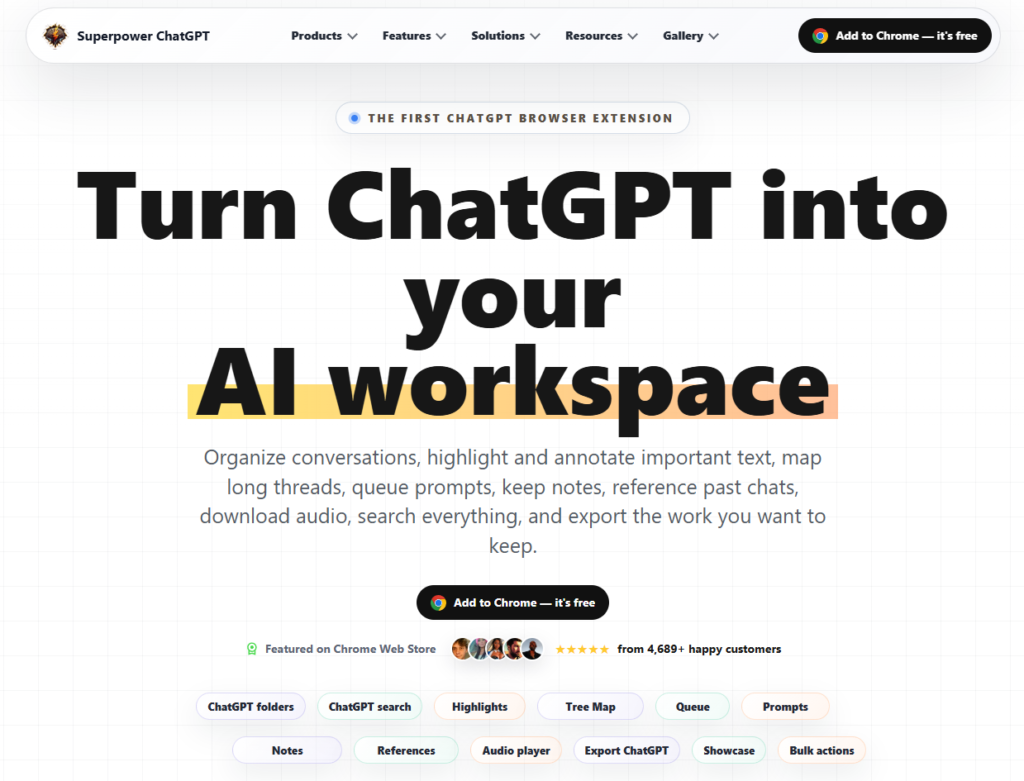
Superpower ChatGPT is an AI productivity extension that transforms ChatGPT into a complete workspace for organizing conversations, managing prompts, taking notes, and improving research workflows. Designed for professionals, students, marketers, developers, writers, and researchers, it adds powerful productivity features like folders, prompt management, conversation search, annotations, exports, and workflow automation directly inside ChatGPT.
Instead of scrolling through endless chat history, Superpower ChatGPT helps users organize projects, quickly find past conversations, reuse prompts, and build a structured AI workspace for everyday productivity.
Create folders and subfolders to organize ChatGPT conversations by projects, clients, research topics, or personal work. Easily move chats using drag-and-drop functionality and bulk actions.
Instantly search conversations, prompts, notes, folders, highlights, and exported content from one centralized search bar.
Save frequently used prompts, organize prompt libraries, build prompt chains, and queue multiple prompts to automate repetitive ChatGPT workflows.
Highlight important responses, add annotations, create personal notes, and quickly revisit key information without rereading entire conversations.
Visualize long ChatGPT conversations with a Tree Map and Mini Map, making it easy to navigate large discussion threads.
Export conversations as PDF, Markdown, TXT, JSON, images, or print-ready documents. Download generated audio from ChatGPT when available.
Reference previous chats, pin important messages, manage instruction profiles, organize image galleries, and perform bulk chat management from one interface.
Superpower ChatGPT is one of the most powerful productivity extensions available for ChatGPT users. Whether you’re organizing research, managing prompts, creating content, or building AI-powered workflows, it helps transform ChatGPT into a structured, searchable, and highly productive workspace. Its combination of folders, prompt management, annotations, exports, and workflow automation makes it an excellent choice for professionals, students, creators, and teams who rely on ChatGPT every day.
| Category | Rating |
|---|---|
| Accuracy & Reliability | ⭐ 4.8/5 |
| Ease of Use | ⭐ 4.8/5 |
| Features & Functionality | ⭐ 4.9/5 |
| Performance & Speed | ⭐ 4.7/5 |
| Customization & Flexibility | ⭐ 4.6/5 |
| Data Privacy & Security | ⭐ 4.7/5 |
| Support & Resources | ⭐ 4.8/5 |
| Cost Efficiency | ⭐ 4.8/5 |
| Integration Capabilities | ⭐ 4.6/5 |

Claude AI is a next-generation conversational AI assistant created by Anthropic. Built to help individuals, teams, and businesses,…
Gemini AI is Google’s advanced multimodal artificial intelligence assistant developed by Google DeepMind. It can understand and generate…

CosVoice is a real phone number for your AI agent — the missing piece that turns a text-based…
Actor (Actor.do) is a privacy-focused AI work assistant built to automate email management and daily agenda planning —…

Grok AI is a next-generation conversational AI assistant developed by xAI. Designed to provide accurate, up-to-date responses, Grok…

DeepSeek is an advanced AI platform developed by DeepSeek AI, offering powerful large language models (LLMs) for chat,…

ChatGPT, built by OpenAI, remains the most widely used AI assistant in the world — the default most…
Wispr Flow is an AI-powered speech-to-text and voice productivity tool designed to let users speak naturally instead of…

Vidext is an AI-powered video creation and editing platform that helps businesses, marketers, educators, and content creators produce…

Notion AI is the AI layer built into Notion, the all-in-one workspace used for notes, docs, wikis, and…

Casablanca is an AI-powered virtual camera that creates natural eye contact during video calls, making online conversations feel…
Text Blaze is a productivity and text automation tool designed to eliminate repetitive typing and streamline everyday communication.…
