
Write with confidence, powered by AI.
Last updated August 29, 2026
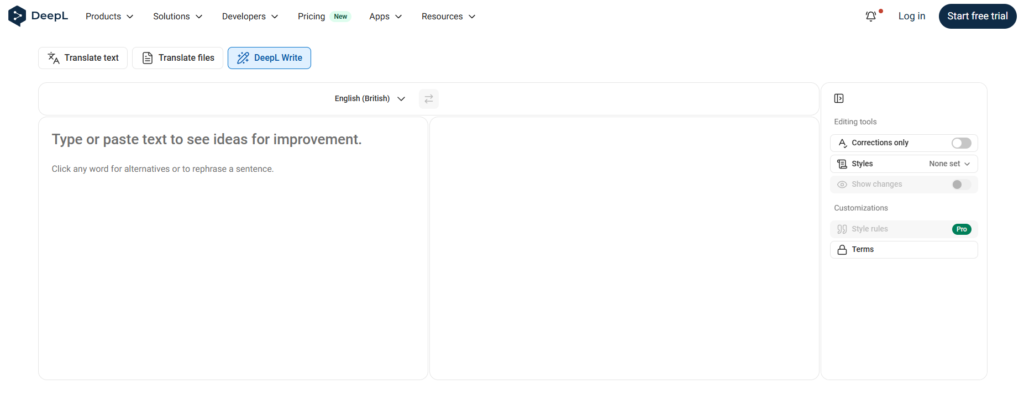
DeepL Write is an AI-powered writing assistant from DeepL, the company best known for its AI translation engine. Rather than just catching typos, DeepL Write rephrases sentences, fixes grammar and punctuation, and adjusts tone and style so your writing sounds fluent, professional, and natural — built on the same language AI that powers DeepL’s translation product.
You can start using DeepL Write’s core corrections for free directly in the browser, with no signup required. A paid Write Pro add-on (available on Individual, Team, and Business plans) unlocks deeper style customization, including custom style rules and higher usage limits.
Pros
Cons
| Feature | DeepL Write | Grammarly | QuillBot |
|---|---|---|---|
| Free plan | ✅ Yes (no signup) | ✅ Yes | ✅ Yes |
| Grammar & spelling | ✅ Yes | ✅ Advanced | ✅ Yes |
| Sentence rephrasing | ✅ Yes (strong) | ✅ Yes | ✅ Yes (best-in-class) |
| Tone adjustment | ✅ Yes | ✅ Yes | ✅ Yes (9 modes) |
| Plagiarism checker | ❌ No | ✅ Premium | ✅ Premium |
| AI content detection | ❌ No | ✅ Premium | ✅ Yes |
| AI humanizer | ❌ No | ❌ No | ✅ Yes |
| Google Docs integration | ✅ Yes | ✅ Yes | ✅ Yes |
| Gmail integration | ✅ Yes | ✅ Yes | ❌ No |
| Multi-language support | ✅ Strong (translation-grade) | ✅ 30+ languages | ✅ 20+ languages |
| Non-native English | ⭐ Best | Good | Good |
| Paid from | $10.49/mo (Individual plan) | $12/mo (Premium) | $4.17/mo (annual) |
| Best for | Non-native writers, natural phrasing | All-purpose editing, plagiarism | Paraphrasing, students |
When DeepL Write wins: You’re a non-native English speaker who wants writing that sounds genuinely natural — not just grammatically correct. DeepL’s translation-grade AI produces more fluent phrasing than grammar-only tools.
When Grammarly wins: You need an all-in-one editing layer that works everywhere (Gmail, Docs, Slack, Word) with plagiarism checking and AI detection included.
When QuillBot wins: Paraphrasing existing text is your primary need — QuillBot’s 9 rephrasing modes are the strongest in this category.
Important clarification: DeepL Write Pro is not sold as a standalone product. It’s an add-on to DeepL’s translation plans.
| Plan | Price | Write Pro Included? |
|---|---|---|
| Free | $0 | Basic corrections only |
| Individual | $10.49/mo | Add-on available |
| Team | $34.49/user/mo | Add-on available |
| Business | $68.99/user/mo | ✅ Included |
What Write Pro adds: Custom style rules, higher usage limits, and priority processing. The free tier covers grammar corrections and basic rephrasing — enough for most casual users.
Is DeepL Write free? Yes — the core corrections and rephrasing suggestions are free with no signup required. Just go to deepl.com/write and start typing.
Verdict: Yes for non-native English writers. Optional for native speakers.
DeepL Write’s free tier is genuinely useful — no signup, instant grammar corrections, and sentence rephrasing that sounds more natural than most competitors. The translation-grade AI is its real differentiator: it understands language at a deeper level than tools built purely for grammar checking.
Best for: Non-native English speakers, professionals writing in a second language, and anyone who wants a lightweight writing assistant without a subscription.
Skip it if: You need plagiarism checking, AI content detection, or a full writing platform — Grammarly covers all of those. If paraphrasing is your primary need, QuillBot is stronger.
If you’re comparing DeepL Write against other AI writing tools:
Browse more in Writing Assistant and AI Translator.
What is DeepL Write?
DeepL Write is an AI writing assistant from DeepL that corrects grammar, spelling, and punctuation, and rephrases sentences to improve tone, style, and fluency, built on the same AI that powers DeepL’s translation engine.
Is DeepL Write free?
Yes. DeepL Write’s core corrections and rephrasing suggestions are free to use directly in the browser with no signup required. A paid Write Pro add-on unlocks deeper style customization and higher usage limits.
How much does DeepL Write Pro cost?
Write Pro isn’t sold as a standalone plan — it’s available as an add-on to DeepL’s Individual ($10.49/month), Team ($34.49/user/month), or Business ($68.99/user/month) plans, and included by default on Business.
How is DeepL Write different from DeepL Translate?
DeepL Translate converts text between languages, while DeepL Write improves text within the same language — correcting grammar, adjusting tone, and rephrasing sentences for clarity and fluency.
Does DeepL Write work in Google Docs and Gmail?
Yes. DeepL Write works directly inside Google Docs and Gmail through a browser extension, letting you get suggestions and apply corrections without leaving those apps.
Is DeepL Write good for non-native English speakers?
Yes — this is one of DeepL Write’s strongest use cases, since it’s built on translation-grade language AI and is particularly good at helping non-native writers sound natural and fluent, not just grammatically correct.
Is DeepL Write better than Grammarly?
For non-native English speakers specifically, DeepL Write produces more natural-sounding phrasing. For all-purpose editing with plagiarism checking and AI detection, Grammarly has a broader feature set.
Can I use DeepL Write for free without signing up?
Yes — DeepL Write’s core corrections and rephrasing are available at deepl.com/write with no account required.
What languages does DeepL Write support?
DeepL Write supports English, German, French, Spanish, Portuguese, Italian, Dutch, Polish, and Japanese, with more languages being added. Its multi-language quality is stronger than most competitors due to DeepL’s translation heritage.
| Criteria | Rating |
|---|---|
| Accuracy & Reliability | ⭐ 4.7/5 |
| Ease of Use | ⭐ 4.8/5 |
| Features & Functionality | ⭐ 4.4/5 |
| Performance | ⭐ 4.6/5 |
| Customization | ⭐ 4.3/5 |
| Security & Privacy | ⭐ 4.7/5 |
| Customer Support | ⭐ 4.3/5 |
| Value for Money | ⭐ 4.5/5 |
| Integrations | ⭐ 4.3/5 |
Clean Paste AI is a text-cleaning utility built specifically for a common, annoying problem: copying text out of…

Grammarly is an AI-powered writing assistant that helps you write clearer, more polished, and mistake-free text across email,…
HyperWrite is an AI-powered writing and research assistant designed to help users write faster, research information, and improve…

ChatGPT, built by OpenAI, remains the most widely used AI assistant in the world — the default most…
Text Blaze is a productivity and text automation tool designed to eliminate repetitive typing and streamline everyday communication.…

Claude AI is a next-generation conversational AI assistant created by Anthropic. Built to help individuals, teams, and businesses,…

Bing AI, now integrated into Microsoft Copilot, is an AI-powered assistant that combines web search, content generation, coding…
EarnDraft is an AI ebook creator that turns a one-line idea into a complete outline, five written chapters,…

SellyAI is an AI-powered product listing generator that turns a photo, a product URL, or a few typed words…

TeamPost is an AI LinkedIn ghostwriter built for teams. Every employee gets their own AI ghostwriter that learns…

DeepSeek is an advanced AI platform developed by DeepSeek AI, offering powerful large language models (LLMs) for chat,…

QuillBot is an AI-powered writing platform built around one core strength — paraphrasing — and expanded into a…
