
The #1 All-in-One AI for Teachers. Helping you save time and improve student outcomes.
Last updated August 17, 2026
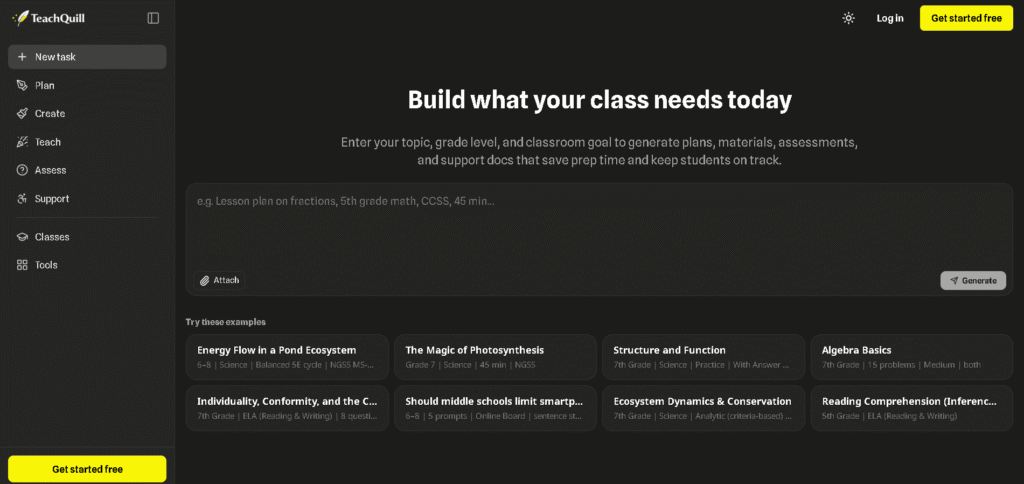
All-in-one AI teaching platform for lesson planning, classroom materials, assessments, grading, feedback, and student support.
TeachQuill is an AI-powered platform built specifically for educators to simplify everyday teaching tasks. It brings together 100+ AI tools for teachers covering lesson planning, worksheets, quizzes, classroom activities, assessments, feedback, IEP and special education support, and other classroom workflows.
Teachers can describe what they need in plain language, add information such as grade level, subject, topic, and learning objective, and generate classroom-ready drafts in seconds. TeachQuill supports standards including CCSS, NGSS, and TEKS and provides editable outputs that teachers can review, customize, export, and use in their own classrooms.
Enter your topic, grade level, subject, classroom goal, or assignment requirements in plain language.
For example:
“Create a 45-minute Grade 8 science lesson about photosynthesis aligned with NGSS.”
The platform can select or use the appropriate AI teaching tool to create a structured draft based on your requirements.
Teachers can review the generated content and make changes before using it with students.
Finished resources can be copied, downloaded, exported, printed, or shared with students and colleagues.
If you’re looking for other AI-powered education and productivity tools, explore these related tools on HeloAiTools:
TeachQuill is an AI-powered teaching platform designed to help educators create lesson plans, worksheets, quizzes, classroom activities, assessments, feedback, and student support resources. It brings more than 100 AI teaching tools together in one platform.
Yes. TeachQuill offers a free plan with daily refreshed credits and access to basic tools. Its paid Pro plan provides higher usage limits, access to all tools, faster generation, unlimited history, folders, and additional features.
TeachQuill currently promotes 100+ AI tools for classroom planning, materials, assessment, feedback, and student support.
Yes. TeachQuill can generate lesson plans based on information such as topic, grade level, subject, instructional goals, and standards. It also provides tools for unit planning, curriculum mapping, syllabi, and other planning tasks.
Yes. TeachQuill includes tools for generating worksheets, quizzes, flashcards, graphic organizers, reading materials, and other classroom resources. Materials can be differentiated by grade level and learning needs.
Yes. TeachQuill supports standards frameworks including Common Core State Standards (CCSS), Next Generation Science Standards (NGSS), and TEKS.
Yes. TeachQuill treats generated resources as editable drafts, allowing teachers to review, customize, and refine lesson plans, worksheets, rubrics, feedback, and other materials before using them.
Yes. TeachQuill includes tools for special education and student support, including IEP goals, behavior support drafts, differentiated materials, social stories, parent communication, and other support documentation.
TeachQuill states that it is FERPA compliant and that it does not store student personally identifiable information (PII). Teachers should still follow their school’s policies when entering any student-related information.
Yes. TeachQuill provides tools for Jeopardy games, review games, exit tickets, discussion questions, choice boards, debates, icebreakers, logic puzzles, and other classroom engagement activities.
| Criteria | Rating |
|---|---|
| Accuracy & Reliability | ⭐ 4.7/5 |
| Ease of Use | ⭐ 4.8/5 |
| Features & Functionality | ⭐ 4.9/5 |
| Performance | ⭐ 4.8/5 |
| Customization | ⭐ 4.7/5 |
| Security & Privacy | ⭐ 4.7/5 |
| Customer Support | ⭐ 4.5/5 |
| Value for Money | ⭐ 4.7/5 |
| Integrations | ⭐ 4.4/5 |
Orwellix is an all-in-one AI writing assistant that combines AI-powered writing, editing, grammar correction, readability analysis, plagiarism detection,…
AnkiDecks AI Flashcard Generator is an AI-powered learning platform that transforms PDFs, lecture notes, YouTube videos, textbooks, presentations,…
Genei is an AI-powered research and summarisation tool that helps students, academics, journalists, and professional writers work through background…

Perplexity AI is an intelligent AI search and research platform designed to replace traditional search engines with conversational,…
Gemini AI is Google’s advanced multimodal artificial intelligence assistant developed by Google DeepMind. It can understand and generate…

QuillBot is an AI-powered writing platform built around one core strength — paraphrasing — and expanded into a…
DETPractice AI is an AI-powered Duolingo English Test (DET) preparation platform designed to help students improve their English…

Vimeo AI is an AI-powered video creation and hosting platform that helps individuals, businesses, educators, and marketing teams…
Twelve Labs is an advanced AI video understanding platform that helps businesses search, analyze, classify, and generate insights…
Wonder Studio is an AI-powered visual effects platform that automates one of the most time-consuming parts of filmmaking—animating,…
HappySRT is an AI-powered subtitle generation and transcription platform that helps creators automatically generate, edit, and export accurate…

Elicit is the AI research assistant built specifically for scientific research — trusted by over 5 million researchers at leading pharmaceutical…
