
7 Best AI Chatbots for Customer Support Under $50 a Month (2027)
The challenge is knowing which tool actually fits your situation. Per-conversation pricing sounds cheap until your volume spikes.…
Read →If you’re an Etsy seller looking to launch your own independent store without hiring a developer, Stable Commerce is one of the faster AI-powered ways to do it — you paste your Etsy shop URL and it builds a storefront around your existing products. This guide walks through the full account setup process, from signing up to going live, plus what each plan actually includes so you don’t overpay for features you don’t need yet.
For the full feature breakdown and current pricing, see our Stable Commerce review.
Stable Commerce is an AI-powered ecommerce platform built for Etsy sellers who want to run their own independent online store alongside (or instead of) their Etsy shop. Instead of manually rebuilding a storefront, you give it your Etsy shop URL and AI agents handle the store build, product import, page design, payment setup, and ongoing SEO, email marketing, and ad management.
It’s positioned as an alternative to building a Shopify store from scratch — the pitch is that Etsy sellers already have product listings, photos, and descriptions, so Stable Commerce reuses that data instead of asking you to start over.
If you’ve seen it referred to as “the Stable Commerce agency,” that’s a bit of a misnomer worth clarifying before you sign up: Stable Commerce is a self-serve AI software platform, not a marketing or web design agency you hire directly. You don’t get an assigned human account manager on the entry-level plans — the “work” (store building, SEO, ad campaigns, email marketing) is done by AI agents inside the platform itself.
The closest thing to an “agency-style” experience is the top-tier Stable Agent plan ($599/month + 1% transaction fee), which runs your store’s operations, SEO, A/B testing, and paid advertising continuously and autonomously — effectively acting like a hands-off marketing team, just AI-driven rather than human-staffed. If what you’re actually looking for is a human agency to build and run your Etsy-to-independent-store migration, Stable Commerce isn’t that — it’s software you operate yourself (with AI doing the heavy lifting), so keep that distinction in mind when comparing options.
Visit the Stable Commerce website and start with the Free plan — it lets you build a store with up to 3 products and preview the platform before paying anything, with no credit card required.
On setup, enter your Etsy shop’s URL. Stable Commerce’s AI reads your existing listings and begins building a storefront using your current product titles, images, and descriptions as a starting point — you’re not writing store copy from scratch.
The platform uses prompt-based design, meaning it generates a store layout automatically. Review the generated pages (home, product, checkout) and use prompts to adjust styling, layout, or branding if something doesn’t match your shop’s identity.
Decide which tier matches your stage:
Most sellers moving off the free preview start with Premium and upgrade to Stable Agent later once they need hands-off, ongoing optimization.
Link or create a Stripe account inside your Stable Commerce dashboard to enable checkout. This is required before your store can accept real orders — the Free plan is preview-only.
If you want yourshopname.com instead of a default subdomain, add your custom domain in the store settings and follow the DNS instructions provided. This step matters for brand credibility and is unavailable on the Free plan.
Once your store is live, Stable Commerce’s AI agents begin working on SEO and GEO (generative engine) optimization, and can generate Google and Facebook ad campaigns. Review these before they go live if you want manual control over ad spend and messaging.
Turn on AI email marketing to start building automated flows (welcome emails, abandoned cart, promotions) using your store and product data — available from the Premium plan up.
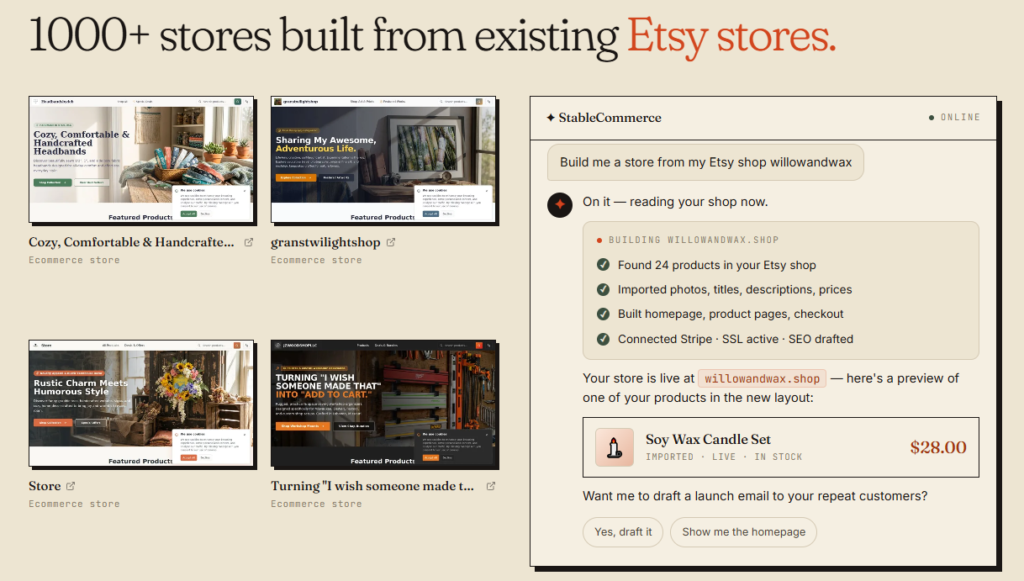
Once payments, domain, and marketing are configured, publish your store. Use the built-in store analytics to track traffic, conversion, and AI-suggested pricing optimizations, and check competitor tracking data if you’re on a plan that includes it.
| Plan | Price | Best For |
|---|---|---|
| Free | $0 | Testing the platform, up to 3 products, no credit card |
| Premium | $49/month + 1% transaction fee | Sellers ready to launch a real independent store |
| Stable Agent | $599/month + 1% transaction fee | Sellers who want fully autonomous, ongoing AI-managed operations |
What is Stable Commerce?
Stable Commerce is an AI-powered ecommerce platform that helps Etsy sellers build and manage an independent online store by importing existing Etsy products and automating store design, SEO, email marketing, and ads.
Is Stable Commerce an agency?
No. Stable Commerce is self-serve software, not a marketing agency — AI agents handle store building and marketing tasks rather than a human team. Its top-tier “Stable Agent” plan offers the most hands-off, continuously-managed experience, but it’s still AI-driven, not a staffed agency.
How do I set up a Stable Commerce account?
Sign up for the Free plan, paste your Etsy shop URL to import products, review the AI-generated store, choose a paid plan if you’re ready to launch, then connect Stripe for payments and (optionally) a custom domain.
Do I need an Etsy shop to use Stable Commerce?
Stable Commerce is built primarily for Etsy sellers migrating to an independent store, since it imports products directly from your Etsy shop URL to speed up setup.
How much does Stable Commerce cost?
Plans start at $0/month (Free, up to 3 products), $49/month + 1% transaction fee (Premium), or $599/month + 1% transaction fee (Stable Agent) for fully autonomous store operations.
Ready to migrate your Etsy shop? Read the full Stable Commerce review for the complete feature list, or compare it against similar automation tools like CodeDesign and PagerGPT in our AI Tools for Automation category.

The challenge is knowing which tool actually fits your situation. Per-conversation pricing sounds cheap until your volume spikes.…
Read →Instagram Reels is the most competitive short-form video format in 2027. Over 200 billion Reels are played every…
Read →Posting consistently on LinkedIn is one of those things everyone agrees matters and almost nobody actually sustains —…
Read →