
AI audio separation for vocals, instrumentals, stems, karaoke, remixes, and creator workflows without a subscription.
Last updated September 13, 2026
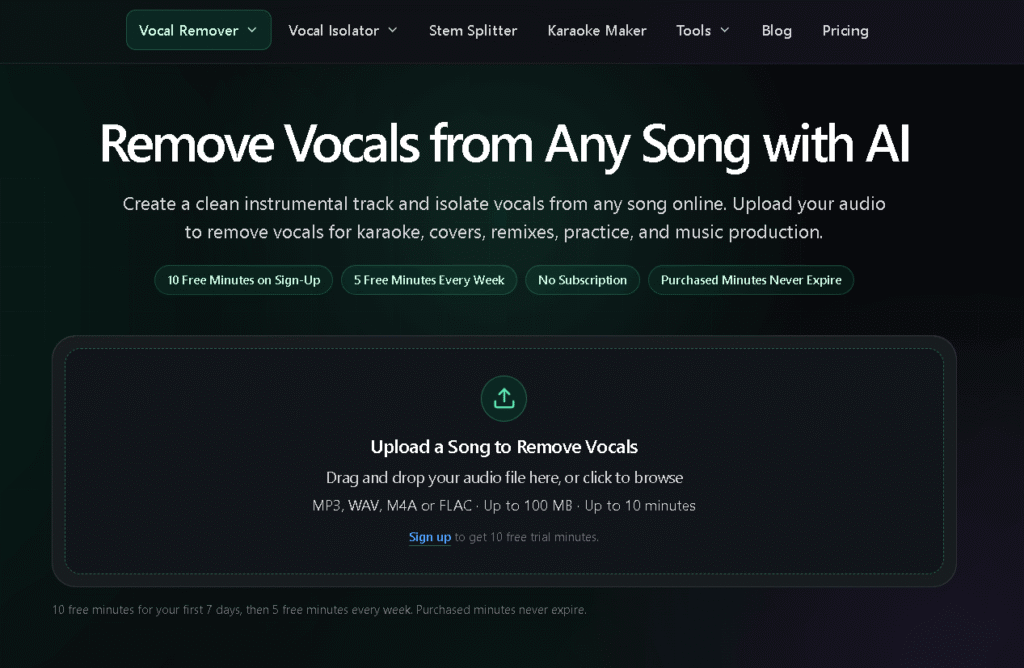
Tunii is an AI vocal remover and stem-splitting tool that isolates vocals from any song, creating clean instrumental tracks, isolated vocal stems, and split music stems for karaoke, remixes, covers, and music production. Upload an MP3, WAV, M4A, or FLAC file (up to 100MB, up to 10 minutes) and Tunii’s AI separates it into an instrumental track and isolated vocals, with a built-in player to compare the original, instrumental, and isolated versions side by side before downloading.
Beyond basic vocal removal, Tunii splits songs into individual stems (vocals, bass, guitar, piano, and other instruments) for more precise music editing and arrangement work. It’s positioned for a range of users — karaoke singers and cover artists needing an instrumental backing track, DJs and producers isolating stems for remixes, music teachers separating vocals for practice, and video creators/dancers needing clean instrumental tracks for performance or content.
Pricing is pay-once rather than subscription-based: processing minutes are purchased in packs (Starter, Creator, Studio) and don’t expire, with a free tier offering a limited number of processing minutes that reset weekly. Free users get instrumental-only output; paid packs unlock both instrumental and isolated vocal tracks, WAV/FLAC export, and priority processing.
Pros
Cons
What is an AI vocal remover?
An AI vocal remover analyzes a mixed audio file and separates the lead vocal from the instrumental. Tunii creates an instrumental track and isolated vocal track from any uploaded song.
Can I remove vocals from MP3, WAV, M4A, or FLAC files?
Yes. Tunii supports MP3, WAV, M4A, and FLAC files, with a maximum upload size of 100MB and up to 10 minutes in length.
Can Tunii separate drums, bass, guitar, piano, or other instruments?
Yes. In addition to basic vocal removal, Tunii can split a song into individual stems, including drums, bass, guitar, piano, and other arrangement elements.
Do I need an account to remove vocals?
Free users receive processing minutes on a weekly cycle without needing purchased minutes, though creating an account is typically required to track and process jobs — check the live site for exact free-tier account requirements.
What happens if an audio separation job fails?
Failed processing jobs do not consume purchased minutes — any unsuccessful job returns its minutes for available use.
How long does vocal removal take?
Processing time depends on audio length, separation type, and current demand — Tunii displays the task status while audio is processing.
How are processing minutes calculated?
Minutes are calculated from the verified duration of the original uploaded file, rounded up — for example, a 3-minute 12-second track consumes 4 minutes of processing.
Do purchased minutes expire?
No. Purchased minutes never expire and are permanently available with your account, whether processed immediately or at a later time.
Will AI vocal removal work perfectly on every song?
Results vary by track complexity — clean studio recordings typically separate better than live recordings or dense mixes with heavily overlapping instrumentation.
| Criteria | Rating |
|---|---|
| Accuracy & Reliability | ⭐ 4.3/5 |
| Ease of Use | ⭐ 4.6/5 |
| Features & Functionality | ⭐ 4.2/5 |
| Performance | ⭐ 4.4/5 |
| Customization | ⭐ 4.0/5 |
| Security & Privacy | ⭐ 4.1/5 |
| Customer Support | ⭐ 3.6/5 |
| Value for Money | ⭐ 4.7/5 |
| Integrations | ⭐ 3.3/5 |
Browse the full AI Tools For Music category → or AI Tools For Audio →

Seed Audio AI is a text-to-speech and voice cloning platform built to replace traditional voice recording bottlenecks —…
Chordgen is a free chord progression generator built for songwriters, producers, and beginners who want to start from…
Beatoven.ai is an AI-powered music generation platform that helps creators produce unique, royalty-free background music for videos, podcasts,…
Mubert AI is a real-time AI music generator that creates original, royalty-free soundtracks for videos, podcasts, games, apps,…
Wispr Flow is an AI-powered speech-to-text and voice productivity tool designed to let users speak naturally instead of…

Murf AI is a text-to-speech and AI voice platform built around three products: Murf Studio (voiceover creation for…

Loudly is an AI-powered music generation platform that helps creators, marketers, filmmakers, and businesses produce original, royalty-free music…

WolframAlpha is a computational knowledge engine from Wolfram Research — the makers of Wolfram Language and Mathematica —…
DaVinci Resolve is a professional all-in-one video editing, color grading, visual effects, motion graphics, and audio post-production software…

FirstAISearch is an AI SEO and content platform positioned as a self-serve alternative to hiring a marketing agency,…
WeryAI is an all-in-one AI creative platform that brings together leading AI models for video generation, image creation,…

Casablanca is an AI-powered virtual camera that creates natural eye contact during video calls, making online conversations feel…
