
The full-stack creative canvas — move fast in the right direction on an AI-native canvas.
Last updated November 10, 2026
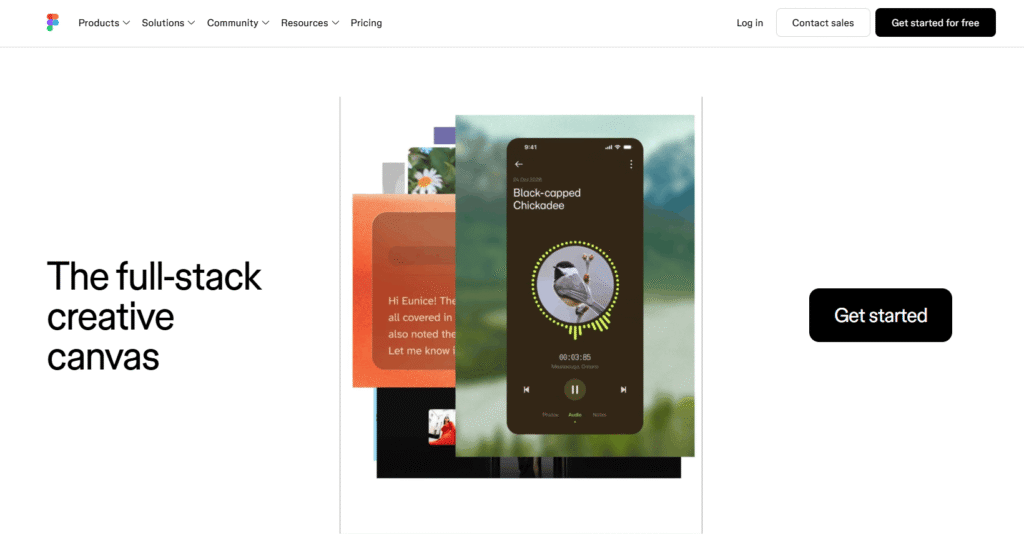
Figma is the world’s leading collaborative design platform — used by 95% of the Fortune 500 and trusted by millions of designers, developers, and product teams globally. It is the full-stack creative canvas where teammates and AI agents work in the same space with shared context — generating ideas, refining designs, implementing feedback, and shipping products together.
Figma is not just a design tool. It is a complete product development platform — covering UI/UX design, prototyping, developer handoff, design systems documentation, motion design, diagramming, presentations, whiteboarding, website building, and AI-powered app generation — all in one workspace, all in real time.
In 2027, Figma has evolved into a fully AI-native platform. Figma’s built-in AI agent can add motion to designs, document design systems, implement feedback, generate UI from prompts, and connect your design context directly to your codebase — so what you design is what gets shipped. As Francisco Seiz, Senior Design Director at Code and Theory, put it: “Everyone is able to influence, inspire, and give input without ever leaving the design file. That creates a really transparent, open, and honest process throughout the whole project.”
Figma sits at the top of the AI Tools For Design Generators category — alongside tools like Gamma for presentations and CapCut for video — but as the definitive platform for product design and development that no other tool can replace.
🎨 Figma Design — Design Anything You Can Imagine Turn your ideas into apps, websites, and products with the most powerful and precise design tools available. Every technical tool you need to dial in the details — vectors, components, auto layout, variables, prototyping, and more. Powerfully expressive and incredibly precise. For more AI Tools For Design Generators, explore the full category on HeloAITools.
🤖 Figma Agent — Your Built-in Creative Collaborator Ask Figma’s AI agent to add motion to designs, document your design systems, implement feedback, generate UI from prompts, and more. Teammates and AI agents work in the same space with shared context — so the AI understands your design system, your brand, and your goals before it acts. For more AI Agents platforms, explore the full category on HeloAITools.
⚡ Figma Make — Start with Design Context, Build with Consistency Your context, codebase, and agents stay connected so what you design is what gets shipped. Figma Make bridges the gap between design and development — connecting design context directly to your codebase for consistent, production-ready output. For more AI Tools For No Code and app building tools, explore the full category on HeloAITools.
🛠️ Dev Mode — Build Tools That Take You All the Way to Production Dev Mode gives developers everything they need to implement designs accurately — inspect tools, code snippets, asset export, and direct connection to the design file. No more back-and-forth between designers and developers. For more AI Tools For Developers, explore the full category on HeloAITools.
✨ Figma Motion — Animation and Motion Design Add motion to your designs with Figma Motion — the new tool for creating animations, transitions, and interactive prototypes directly in Figma. No separate animation tool required. For more AI Tools For Video Generation and motion tools, explore the full category on HeloAITools.
🌐 Figma Sites — Build and Publish Websites Design and publish live websites directly from Figma — no developer required. Figma Sites (Beta) turns your Figma designs into production-ready websites with a single click. For more AI Tools For Website Builder options, explore the full category on HeloAITools.
🧠 Figma Weave — AI Workflows Figma Weave is the AI workflow layer — connecting design context, codebase, and AI agents in a unified pipeline. Generate designs, implement feedback, and ship products with AI that understands your entire product context.
📊 FigJam — Online Whiteboard and Diagramming FigJam is Figma’s collaborative whiteboard — for brainstorming, diagramming, strategic planning, mind mapping, and team workshops. Works seamlessly alongside Figma Design files so ideas flow directly into execution. For more AI Tools For Productivity and collaboration tools, explore the full category on HeloAITools.
📽️ Figma Slides — Presentation Maker Create presentations directly in Figma — with the same design tools, components, and brand assets you use for everything else. No more exporting to PowerPoint or Google Slides. For more AI Tools For Presentation Maker tools, also explore Gamma on HeloAITools.
🎯 Figma Specs — Design Specifications Figma Specs (Beta) automatically generates design specifications from your Figma files — giving developers precise measurements, tokens, and implementation guidance without manual documentation.
🖌️ Figma Draw — Illustration and Freeform Drawing Figma Draw brings freeform illustration and drawing tools directly into the Figma canvas — for sketching ideas, creating custom illustrations, and adding hand-crafted elements to your designs.
📣 Figma Buzz — Brand Asset Management Figma Buzz (Beta) helps teams create and manage on-brand marketing assets at scale — keeping brand consistency across every touchpoint without a dedicated design resource for every request.
📚 Templates for Everything Browse thousands of community-created templates for UI kits, websites, social media, mobile apps, presentations, wireframes, illustrations, portfolios, web ads, and icons — a one-click start for any project.
Step 1 — Start in One Workspace Open Figma on web or desktop. Everything your team needs — design, prototyping, developer handoff, whiteboarding, presentations, and AI agents — is in one place. No switching between tools.
Step 2 — Design with AI Use Figma’s AI agent to generate UI from prompts, add motion, document design systems, and implement feedback. Or design manually with Figma’s precision tools — vectors, auto layout, components, variables, and more.
Step 3 — Collaborate in Real Time Teammates, stakeholders, and AI agents work in the same file simultaneously. Comment, iterate, and align — without leaving the design file. The entire product team — designers, developers, PMs, and marketers — can contribute.
Step 4 — Hand Off to Development Use Dev Mode to give developers everything they need — code snippets, inspect tools, asset export, and design tokens. Use Figma Make to connect design context directly to your codebase for consistent implementation.
Step 5 — Ship Publish websites with Figma Sites, export assets, or hand off production-ready specs. What you design is what gets shipped — with AI keeping design and code in sync throughout.
| Product | Status | What It Does |
|---|---|---|
| Figma Design | ✅ Available | UI/UX design, prototyping, components, variables |
| Figma Make | ✅ Available | Design-to-code, AI app builder, codebase connection |
| Figma Weave | 🆕 New | AI workflows connecting design, code, and agents |
| Dev Mode | ✅ Available | Developer handoff, code snippets, inspect tools |
| Figma Motion | 🆕 New | Animation and motion design |
| Figma Specs | 🔵 Beta | Auto-generated design specifications |
| FigJam | ✅ Available | Online whiteboard, diagramming, brainstorming |
| Figma Slides | ✅ Available | Presentation maker with design tools |
| Figma Draw | ✅ Available | Freeform illustration and drawing |
| Figma Sites | 🔵 Beta | Design-to-website publishing |
| Figma Buzz | 🔵 Beta | Brand asset management at scale |
| Figma Agent | ✅ Available | AI agent for design, motion, documentation, feedback |
Uncommon Use Cases:
Three things set Figma apart from every other tool in the AI Tools For Design Generators and AI Tools For Developers categories:
1. The only full-stack creative canvas — design, code, and AI in one place No other tool covers the entire product development workflow from first sketch to shipped product. Adobe XD handles design. Gamma handles presentations. Lovable handles app building. Figma handles all of it — design, prototyping, developer handoff, website publishing, whiteboarding, presentations, and AI agents — in one workspace with shared context.
2. AI agents with design context — not generic AI Figma’s AI agent is not a generic AI assistant bolted onto a design tool. It understands your design system, your components, your brand tokens, and your codebase — so when it adds motion, documents a design system, or implements feedback, it does so with full context. Tools like ChatGPT and Claude can help you think about design — Figma’s agent can actually do the design work.
3. 95% of the Fortune 500 — the undisputed industry standard Figma is not one of many design tools — it is the design tool. With 95% Fortune 500 adoption, Figma has become the standard infrastructure for product design globally. Learning Figma is not optional for anyone working in product, design, or development — it is the industry requirement.
| Figma | Adobe XD | Sketch | Gamma | Canva | |
|---|---|---|---|---|---|
| UI/UX design | ✅ Industry standard | ✅ Yes | ✅ Yes | ❌ No | ⚠️ Basic |
| Real-time collaboration | ✅ Best-in-class | ⚠️ Limited | ❌ No | ✅ Yes | ✅ Yes |
| Developer handoff | ✅ Dev Mode | ✅ Yes | ✅ Yes | ❌ No | ❌ No |
| AI agent | ✅ Design-context AI | ❌ Limited | ❌ No | ✅ Yes | ✅ Limited |
| Website builder | ✅ Figma Sites (Beta) | ❌ No | ❌ No | ✅ Yes | ✅ Yes |
| Whiteboard | ✅ FigJam | ❌ No | ❌ No | ❌ No | ✅ Yes |
| Presentations | ✅ Figma Slides | ❌ No | ❌ No | ✅ Best-in-class | ✅ Yes |
| Motion design | ✅ Figma Motion | ✅ Yes | ❌ No | ❌ No | ✅ Limited |
| Free plan | ✅ Yes | ✅ Yes | ❌ Paid only | ✅ Yes | ✅ Yes |
| Fortune 500 adoption | ✅ 95% | ❌ Declining | ❌ Limited | ❌ No | ✅ Growing |
| Best for | Full-stack product design | Adobe ecosystem | Mac-only design | AI presentations | Marketing design |
| Category | Rating |
|---|---|
| Design Tools | ⭐ 5.0/5 |
| Real-Time Collaboration | ⭐ 5.0/5 |
| AI Agent Capabilities | ⭐ 4.7/5 |
| Developer Handoff | ⭐ 4.9/5 |
| Template Library | ⭐ 4.9/5 |
| Ease of Use | ⭐ 4.6/5 |
| Free Plan Value | ⭐ 4.7/5 |
| Enterprise Features | ⭐ 4.9/5 |
| Performance | ⭐ 4.7/5 |
| Overall | ⭐ 4.9/5 |
Q1. What is Figma?
Figma is the world’s leading collaborative design platform — used by 95% of the Fortune 500. It is the full-stack creative canvas where designers, developers, and AI agents work together to design, prototype, build, and ship products. It is the leading tool in the AI Tools For Design Generators category on HeloAITools.
Q2. Is Figma free?
Yes. Figma has a free Starter plan that includes 3 design files, unlimited FigJam files, community templates, and basic prototyping — no credit card required. Professional, Organisation, and Enterprise plans unlock unlimited files, advanced features, and team collaboration tools.
Q3. What is Figma Make?
Figma Make connects your design context, codebase, and AI agents so what you design is what gets shipped. It bridges the gap between design and development — keeping design and code in sync throughout the product development process. For more AI Tools For No Code and app building tools, explore the full category on HeloAITools.
Q4. What is Figma’s AI agent?
Figma’s AI agent is a built-in creative collaborator that understands your design system, components, and brand context. It can add motion to designs, document design systems, implement feedback, generate UI from prompts, and more — all with full awareness of your specific design context. For more AI Agents platforms, explore the full category on HeloAITools.
Q5. What is FigJam?
FigJam is Figma’s online whiteboard for brainstorming, diagramming, strategic planning, and mind mapping. It works seamlessly alongside Figma Design files so ideas flow directly into execution. For more AI Tools For Productivity and collaboration tools, explore the full category on HeloAITools.
Q6. Can Figma build websites?
Yes. Figma Sites (Beta) lets you publish live websites directly from your Figma design files — no developer required. For more dedicated AI Tools For Website Builder options, explore the full category on HeloAITools.
Q7. How is Figma different from Canva?
Canva is a design tool for marketing and social media content — optimised for non-designers creating graphics quickly. Figma is a professional product design platform — optimised for designers, developers, and product teams building apps, websites, and digital products. Both are strong tools in the AI Tools For Design Generators category — the right choice depends on whether you need marketing design or product design.
Q8. What is Figma used for?
Figma is used for UI/UX design, prototyping, developer handoff, design systems, motion design, website building, whiteboarding, presentations, brand asset management, and AI-powered product development. It covers the entire product development workflow from first idea to shipped product — all in one collaborative workspace.
BeadPattern is an AI-powered pattern generator built specifically for physical bead crafting — Perler, Hama, Fuse, and Artkal…

SeedRouter puts LLM, image, video and audio models behind one API key. Pay per request — failed requests…

AI Interior Design is an intelligent home design platform that creates realistic room transformations using AI while preserving…
ReWords AI is an online AI tool built for one specific, genuinely useful job: replacing existing text inside…

AdGPT is an AI-powered advertising platform that helps businesses create complete, high-converting marketing campaigns from a single product…
SpeechBubbleMeme is a free, browser-based speech bubble maker — where you upload a photo, add a speech bubble…
Automater is a free system tray app that sits across all your AI coding agents and CLIs —…

Hugging Face is the world’s leading AI collaboration platform — the GitHub of machine learning. It is where…
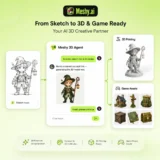
Meshy AI is an advanced AI-powered 3D model generator that transforms text prompts and images into production-ready 3D…

DigiBouquet AI is a digital gifting tool that lets you send a flower bouquet gift as a personalized,…
Stitchgrid (imagetocrochetpattern.com) converts a photo into a lettered, editable crochet stitch chart — choose how many stitches go…
Cutout.Pro is an AI-powered visual content creation and editing platform that helps users create professional-quality images and videos…