Transparent speech bubble PNGs with SpeechBubble Meme
Last updated November 13, 2026
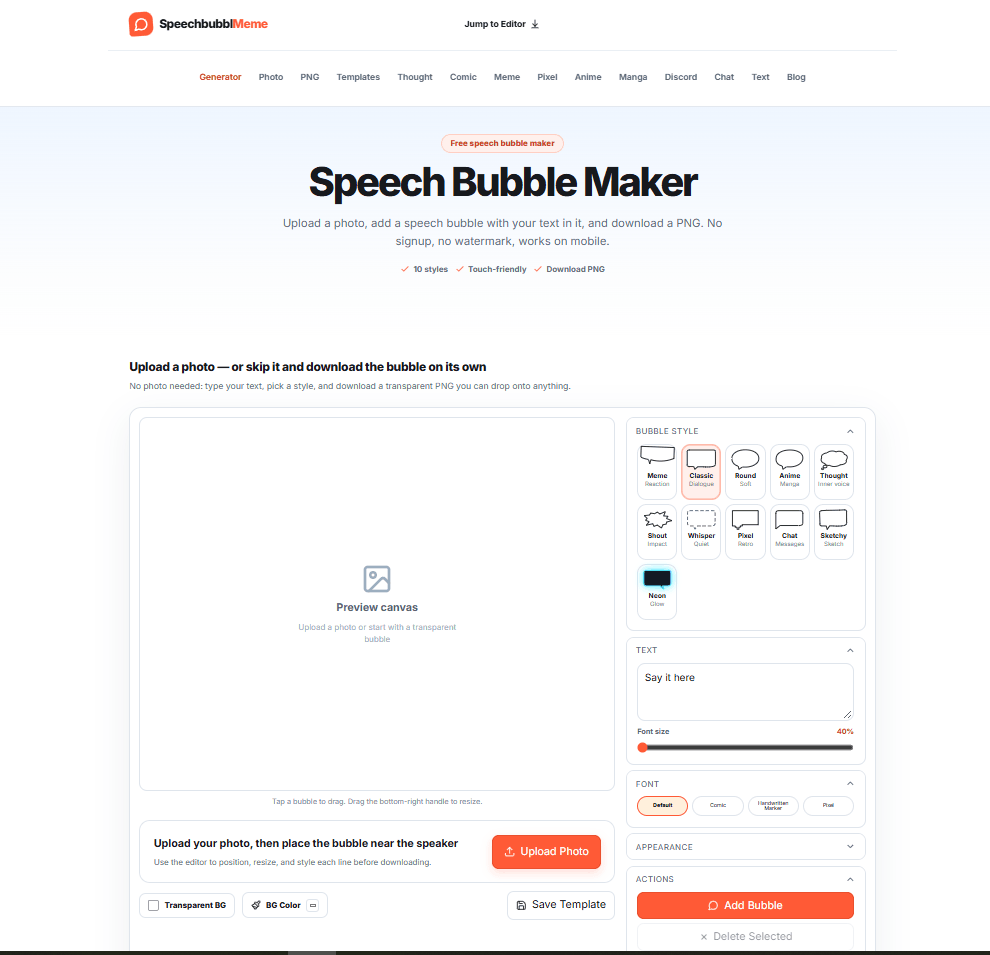
SpeechBubbleMeme is a free, browser-based speech bubble maker — where you upload a photo, add a speech bubble with your text, and download a clean PNG in seconds. No signup required. No watermark. Works on mobile.
It is the simplest and most complete free speech bubble tool available in 2027 — with 10 bubble styles, touch-friendly controls, custom colours, multiple bubbles per image, and transparent PNG export — all in one lightweight web app that requires zero installation and zero account creation.
SpeechBubbleMeme is not just a meme tool. It is a complete speech bubble creation platform — covering memes, comic strips, manga panels, Discord stickers, YouTube thumbnails, chat mockups, educational materials, and UI design — with specialised tools for every use case built into the same workspace.
Built by Rainverse — the team behind Sumi (an untranslated manga reader) — SpeechBubbleMeme brings the same attention to detail and niche focus to speech bubble creation that Sumi brings to manga reading.
SpeechBubbleMeme sits in the AI Tools For Image Editing and AI Tools For Design Generators categories on HeloAITools — alongside tools like CapCut and Fotor — but as the definitive free specialist tool for speech bubble creation that no general-purpose editor can replace.
🗨️ 10 Speech Bubble Styles — Every Format Covered Choose from 10 distinct bubble styles — each drawn differently on your photo:
| Style | Best For |
|---|---|
| Meme | Reddit, Discord, and reaction image memes |
| Classic | Traditional comic book dialogue bubbles |
| Round | Clean, versatile everyday speech bubbles |
| Anime | Anime-style edits and fan art |
| Thought | Cloud-shaped thinking and inner monologue bubbles |
| Shout | Bold starburst comic shout and exclamation bubbles |
| Whisper | Quiet, subtle speech for soft dialogue |
| Pixel | 8-bit retro pixel art speech bubbles |
| Chat | iMessage and WhatsApp-style chat bubbles |
| Sketchy | Hand-drawn, rough sketch-style bubbles |
For more AI Tools For Generative Art and creative tools, explore the full category on HeloAITools.
📸 Photo Upload or Transparent Background Upload any photo — meme templates, selfies, screenshots, or artwork — and place speech bubbles directly on it. Or skip the photo entirely and download a transparent PNG bubble on its own to drop onto anything in your own editor. For more AI Tools For Image Editing tools, explore the full category on HeloAITools.
✏️ Full Text Customisation Type your text directly into the bubble. Adjust font size, choose from Default, Comic, Handwritten Marker, or Pixel fonts, and customise colours to match your project. Every line is editable before downloading.
🎨 Custom Colours Customise bubble fill colour, outline colour, and text colour independently. Match your brand, your meme aesthetic, or your comic style — full colour control with no restrictions.
↔️ Drag, Resize, and Position Tap any bubble to drag it to the perfect position. Drag the bottom-right handle to resize. Place the bubble tail near the speaker for natural dialogue flow. Full touch support for mobile editing.
➕ Multiple Bubbles Per Image Add as many speech bubbles as you need to a single image — perfect for comic strip dialogue, multi-character conversations, and complex meme formats. Each bubble is independently positioned, resized, and styled.
🔄 Tail Direction Control Control which direction the speech bubble tail points — left, right, up, or down — to accurately indicate which character is speaking in any composition.
💾 Save Template Save your bubble layout as a template for reuse — useful for recurring meme formats, comic strip series, or branded content with consistent bubble placement.
📥 Download PNG — No Watermark Download your finished image as a full-resolution PNG with no watermark, no signup, and no credit system. What you create is yours, instantly.
📱 Mobile-Friendly SpeechBubbleMeme is fully touch-friendly — drag, resize, and edit on any smartphone or tablet without needing a desktop. For more mobile-compatible AI Tools For Content Creation tools, explore the full category on HeloAITools.
SpeechBubbleMeme is not just one tool — it is a suite of 12 specialised speech bubble generators, each optimised for a specific use case:
| # | Tool | What It Does |
|---|---|---|
| 1 | Speech Bubble Maker | Main editor — upload photo, add bubble, download PNG |
| 2 | Speech Bubble Meme Generator | Cropped bubble that blends with Reddit and Discord formats |
| 3 | Thought Bubble Generator | Cloud-shaped thinking bubbles and free transparent PNGs |
| 4 | Comic Bubble Generator | Bold starburst and classic comic styles |
| 5 | Pixelated Bubble Text | 8-bit pixel art speech bubbles |
| 6 | Anime Bubbles | Speech bubbles for anime edits and fan art |
| 7 | Manga Bubble Generator | Manga text bubbles for panels |
| 8 | Discord Speech Bubble Maker | Sized for Discord emojis and stickers |
| 9 | Customisable Chat Bubbles | Free iMessage, WhatsApp, and custom colour chat bubbles |
| 10 | Fake Text Message Generator | Make a fake iMessage-style conversation screenshot |
| 11 | Text Bubble Generator | Captions, labels, and callouts |
| 12 | Blank Bubbles | Empty bubble templates to download |
Step 1 — Upload a Photo Click Upload Photo to load any image — meme templates, selfies, screenshots, or artwork. Or skip the photo and start with a transparent background for a standalone bubble PNG.
Step 2 — Pick a Style and Add Text Choose from 10 bubble styles. Drag to position, resize using the handle, type your text, choose your font, and customise colours. Add multiple bubbles if needed. Adjust tail direction to point at the speaker.
Step 3 — Download PNG Hit Download PNG — full resolution, no watermark, no signup, ready to post or print immediately.
😂 Memes and Reaction Images Add empty or text-filled speech bubbles to photos for Discord, Reddit, Twitter, and social media. The Meme style is specifically designed to blend with Reddit and Discord reaction image formats. For more AI Tools For Social Media tools, explore the full category on HeloAITools.
📖 Comic Strips and Manga Panels Turn photos into comic panels with Classic, Shout, and Thought bubbles. The dedicated Manga Bubble Generator and Comic Bubble Generator are built specifically for panel-based storytelling. For more AI Tools For Generative Art tools, explore the full category on HeloAITools.
🎓 Education and Presentations Make worksheets, slides, and infographics more engaging with speech bubbles. Add dialogue to historical photos, create visual vocabulary exercises, or make presentation slides more dynamic.
💬 Chat Screenshots and UI Mockups Simulate iMessage and WhatsApp conversations for design mockups, storytelling, and social media content. The Fake Text Message Generator creates realistic conversation screenshots.
🎮 Gaming and Discord Servers Create retro pixel-art speech bubbles for emojis, stickers, and stream overlays. The Discord Speech Bubble Maker is sized specifically for Discord emoji and sticker dimensions.
▶️ YouTube and Social Thumbnails Add eye-catching speech bubbles to YouTube thumbnails and social media graphics to boost click-through rates. Bold Shout and Classic styles work best for thumbnail text.
🎨 Anime and Fan Art Add authentic anime-style speech bubbles to fan art, edits, and original illustrations. The Anime Bubbles tool is built specifically for anime aesthetics.
Uncommon Use Cases:
Three things set SpeechBubbleMeme apart from every other tool in the AI Tools For Image Editing and AI Tools For Design Generators categories:
1. Completely free — no signup, no watermark, no credits Every other speech bubble tool either requires an account, adds a watermark, limits downloads, or charges for full features. SpeechBubbleMeme is 100% free — no signup, no watermark, no credit system, no hidden limits. Download as many PNGs as you want, immediately, for free. Tools like CapCut and Fotor include speech bubble features — but behind paywalls or with watermarks on free plans.
2. 12 specialised tools — not one generic editor Most image editors include speech bubbles as one feature among hundreds. SpeechBubbleMeme is built entirely around speech bubbles — with 12 dedicated generators each optimised for a specific use case. Meme creators get the Meme Generator. Manga artists get the Manga Bubble Generator. Discord users get the Discord Speech Bubble Maker. No other tool offers this level of speech bubble specialisation.
3. Transparent PNG export — works with any workflow The transparent PNG export means SpeechBubbleMeme fits into any creative workflow. Download a bubble without a background and drop it onto any image in Photoshop, Canva, Figma, or any other editor. It is not a closed ecosystem — it is a tool that enhances whatever workflow you already use. For more AI Tools For Design Generators that integrate with your workflow, explore the full category on HeloAITools.
| SpeechBubbleMeme | Canva | CapCut | Fotor | Adobe Express | |
|---|---|---|---|---|---|
| Speech bubble styles | ✅ 10 dedicated styles | ⚠️ Basic shapes | ⚠️ Limited | ⚠️ Limited | ⚠️ Limited |
| Specialised generators | ✅ 12 tools | ❌ No | ❌ No | ❌ No | ❌ No |
| Transparent PNG export | ✅ Free | ✅ Paid only | ✅ Yes | ✅ Paid only | ✅ Yes |
| No signup required | ✅ Yes | ❌ Required | ❌ Required | ❌ Required | ❌ Required |
| No watermark (free) | ✅ Yes | ❌ Watermark | ✅ Yes | ❌ Watermark | ✅ Yes |
| Mobile-friendly | ✅ Yes | ✅ Yes | ✅ Yes | ✅ Yes | ✅ Yes |
| Manga and anime styles | ✅ Yes | ❌ No | ❌ No | ❌ No | ❌ No |
| Discord-sized export | ✅ Yes | ❌ No | ❌ No | ❌ No | ❌ No |
| Fake chat generator | ✅ Yes | ❌ No | ❌ No | ❌ No | ❌ No |
| Best for | Speech bubbles | General design | Video editing | Photo editing | Adobe ecosystem |
| Category | Rating |
|---|---|
| Speech Bubble Styles | ⭐ 5.0/5 |
| Ease of Use | ⭐ 4.9/5 |
| Free Plan Value | ⭐ 5.0/5 |
| Mobile Experience | ⭐ 4.7/5 |
| Export Quality | ⭐ 4.8/5 |
| Specialised Tools | ⭐ 4.9/5 |
| Font Selection | ⭐ 4.0/5 |
| Advanced Features | ⭐ 4.2/5 |
Q1. What is SpeechBubbleMeme?
SpeechBubbleMeme is a free browser-based speech bubble maker — upload a photo, add a speech bubble with your text, and download a PNG. No signup, no watermark, works on mobile. It is the leading free specialist tool in the AI Tools For Image Editing category for speech bubble creation on HeloAITools.
Q2. Is SpeechBubbleMeme free?
Yes — completely free. No signup, no watermark, no credit card, no download limits. Every feature including transparent PNG export is available at no cost.
Q3. What speech bubble styles are available?
SpeechBubbleMeme offers 10 styles — Meme, Classic, Round, Anime, Thought, Shout, Whisper, Pixel, Chat, and Sketchy. Each style draws differently on your photo. For more AI Tools For Design Generators, explore the full category on HeloAITools.
Q4. Can I add multiple speech bubbles to one image?
Yes. Add as many speech bubbles as you need to a single image. Each bubble is independently positioned, resized, and styled — perfect for comic strip dialogue and multi-character conversations.
Q5. Can I download a speech bubble without a photo?
Yes. Skip the photo upload and download a transparent PNG bubble on its own — ready to drop onto any image in Photoshop, Canva, Figma, or any other editor.
Q6. Does SpeechBubbleMeme work on mobile?
Yes. SpeechBubbleMeme is fully touch-friendly — drag, resize, and edit on any smartphone or tablet. For more mobile-compatible AI Tools For Content Creation tools, explore the full category on HeloAITools.
Q7. Can I use SpeechBubbleMeme for commercial projects?
Check the Terms of Service at speechbubblememe.app for the current commercial use policy. The tool is free to use — verify commercial rights before using outputs in paid projects.
Q8. What is the difference between the Meme Generator and the main Speech Bubble Maker?
The main Speech Bubble Maker is the full editor — upload a photo, add multiple bubbles, customise everything, and download. The Speech Bubble Meme Generator is a focused tool that produces a cropped bubble format specifically designed to blend with Reddit and Discord reaction image formats.

MimicPC is a browser-based AI workspace that lets users run powerful AI applications without installing software or configuring complex…
Raphael AI is a completely free AI image generator — the world’s first with no sign-up requirement, no…
BGRemover is a 100% free AI background remover that creates clean transparent PNGs from any photo in seconds…
Meshy AI is an advanced AI-powered 3D model generator that transforms text prompts and images into production-ready 3D…
remove.bg is the world’s most popular AI background remover — used by millions of people, photographers, marketers, developers,…
Img2Img AI is a browser-based reference-first image editing and generation workspace — where you start with an image,…
AI Interior Design is an intelligent home design platform that creates realistic room transformations using AI while preserving…
VidMage is an AI-powered face swap platform that lets you instantly swap faces in photos, videos, and GIFs…
GoEnhance AI is an all-in-one AI video and image enhancement platform that helps creators produce professional-quality content with…
BeadPattern is an AI-powered pattern generator built specifically for physical bead crafting — Perler, Hama, Fuse, and Artkal…
Photoroom is the complete AI photo and video solution for e-commerce — used by over 1 million businesses…
MakeHalftone is a free browser-based halftone generator that converts any photo or image into a print-ready dot pattern…