AI Writing & Rewording Assistant
Last updated August 18, 2026
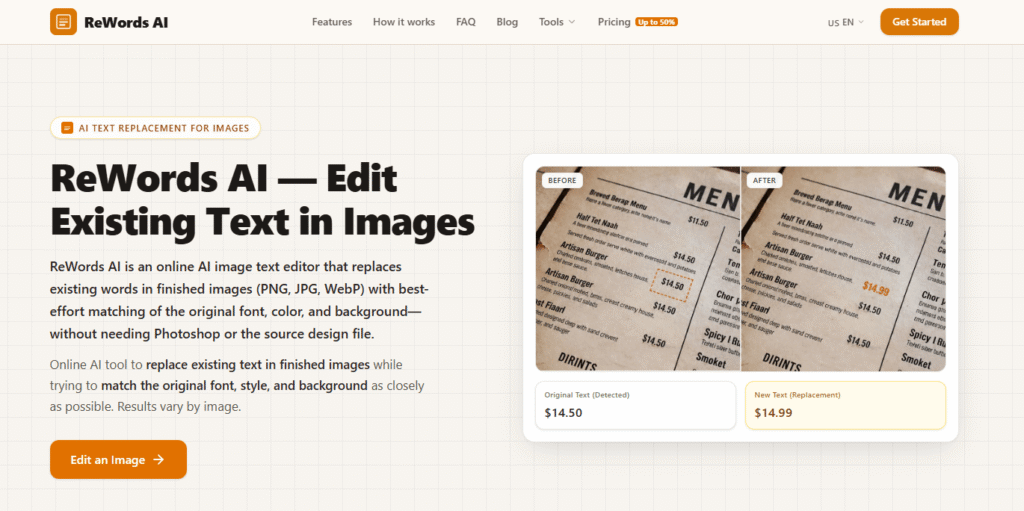
ReWords AI is an online AI tool built for one specific, genuinely useful job: replacing existing text inside a finished image — PNG, JPG, or WebP — while matching the original font, style, color, and background. Rather than pasting a new text layer on top of your image, it removes and rebuilds the surrounding area so the replacement blends in like it was part of the original photo.
That’s a meaningfully different problem than a text-overlay tool solves, and it’s the gap ReWords AI is positioned to fill — useful for updating a price on a menu photo, changing a sign or storefront banner, correcting a typo in a finished product image, or localizing text in an existing photo without a reshoot.
Pros
Cons
ReWords AI’s specific “replace existing text in an image” function is a narrower niche than most general photo editors on the market — if you need broader photo editing alongside occasional text fixes, these are worth comparing:
Browse more in AI Tools for Image Editing and AI Tools for Graphic Design.
How do I replace text in an image online?
Upload your image to ReWords AI, select or draw a box around the existing text, enter the new text, and the AI replaces it while matching the original font, style, and background — no design software required.
Can I match the font style in the image?
Yes. Matching the original font, style, and color is ReWords AI’s core function — it’s built specifically to blend replacement text into the existing image rather than overlay it.
Does ReWords AI work with complex backgrounds or handwritten text?
Results depend on image quality and background complexity — simpler, cleaner backgrounds behind the original text tend to produce the most seamless results.
How is ReWords AI different from Photoshop or Canva?
Photoshop and Canva require manual masking, cloning, and font-matching skill to replace text convincingly. ReWords AI automates that process specifically for text replacement, without needing design software experience.
Is there a free plan or trial?
ReWords AI offers a free trial edit before you need to purchase credits or subscribe — check the current signup flow on their site for exact free-tier limits.
Is my data secure?
Review ReWords AI’s current privacy policy directly for specifics on how uploaded images are stored and handled before uploading sensitive content.
| Criteria | Rating |
|---|---|
| Accuracy & Reliability | ⭐ 4.5/5 |
| Ease of Use | ⭐ 4.7/5 |
| Features & Functionality | ⭐ 4.2/5 |
| Performance | ⭐ 4.5/5 |
| Customization | ⭐ 4.0/5 |
| Security & Privacy | ⭐ 4.3/5 |
| Customer Support | ⭐ 4.1/5 |
| Value for Money | ⭐ 4.4/5 |
| Integrations | ⭐ 3.9/5 |

Craiyon is an AI image generator that turns text prompts into original images and artwork. It is designed…

Pixlr is a free, browser-based AI photo editor and image generator that combines a full photo editing suite,…

Manus AI is an autonomous general-purpose AI agent — you give it a goal, not just a prompt,…

ProductShot AI is an AI product photography tool built specifically for ecommerce — turning a single product photo…
MakeHalftone is a free browser-based halftone generator that converts any photo or image into a print-ready dot pattern…

AdGPT is an AI-powered advertising platform that helps businesses create complete, high-converting marketing campaigns from a single product…

Luna Lisa is an AI image generation and photo editing platform built around its VIP Luna Lisa image…

DigiBouquet AI is a digital gifting tool that lets you send a flower bouquet gift as a personalized,…

AI Interior Design is an intelligent home design platform that creates realistic room transformations using AI while preserving…
Topaz Video AI is a powerful AI-powered video enhancement software developed by Topaz Labs that helps creators improve…

Cutout.Pro is an AI-powered visual content creation and editing platform that helps users create professional-quality images and videos…

Fotor is an all-in-one online photo editor that combines everyday editing tools with AI-powered features — background removal,…
