
Sell at first sight — turn your product photos into listing images and video ads that help you sell.
Last updated November 10, 2026
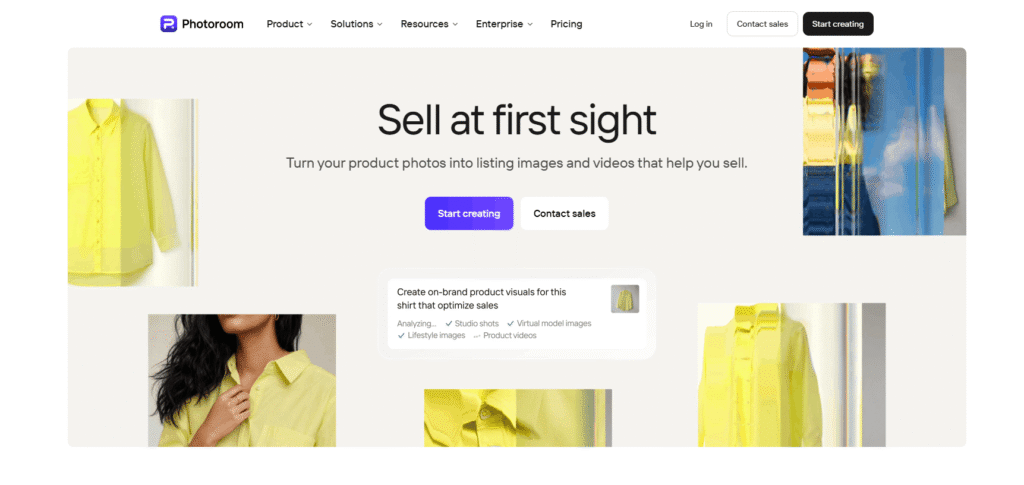
Photoroom is the complete AI photo and video solution for e-commerce — used by over 1 million businesses to turn product photos into listing images and video ads that sell. From solo entrepreneurs listing their first product to enterprise teams managing millions of SKUs, Photoroom scales with every stage of business growth.
Photoroom is not just a background remover. It is a full AI visual production platform — combining AI product photography, video ad creation, background removal, brand library management, batch processing, instant resizing, and enterprise-grade automation — all built specifically for the way e-commerce works.
With 80M+ users trusting its background removal, 99% cost reduction per image reported by enterprise customers, and integrations with Shopify, Amazon, Meta, TikTok, and YouTube, Photoroom is the most complete AI Tools For eCommerce visual production platform available in 2027.
Photoroom sits alongside tools like CapCut and remove.bg in the AI Tools For Image Editing category — but with a laser focus on e-commerce product visuals and video ads that no general-purpose editor can match.
🎬 Video Ad Maker — Turn Product Photos into Video Ads Turn your product photos into video ads with actors, music, and voiceover — in every format for Meta, TikTok, and YouTube. No video production experience required. Upload a product photo, choose a template, and Photoroom generates a complete, platform-ready video ad in minutes. For more AI Tools For Advertising, explore the full category on HeloAITools.
📸 AI Product Photography — Studio Quality Without a Studio Generate studio-quality product visuals without a studio. Upload a product photo and Photoroom’s AI generates professional lifestyle shots, staged backgrounds, and on-brand visuals — in seconds. No photographer, no studio rental, no post-production. For more AI Tools For Image Generator tools, explore the full category on HeloAITools.
✂️ Background Remover — Trusted by 80M+ Users The fastest AI background removal trusted by 80 million+ users. Get pixel-perfect cutouts for clean product listings, white backgrounds, or transparent PNG exports. Handles complex edges — hair, fur, jewellery, transparent products — with accuracy that competitors cannot match. For more dedicated background removal tools, also see remove.bg in the AI Tools For Image Editing category.
🎨 Brand Library — Every Image Stays On Brand Lock in your colours, logos, and layouts. Every image Photoroom generates stays on brand automatically — no manual checking, no inconsistency across channels. The Brand Library ensures that whether you are producing 10 images or 10,000, every visual matches your brand standards. For more AI Tools For Design Generators, explore the full category on HeloAITools.
📐 Instant Resize — One Image, Every Format One image, every format. Resize for Instagram, Amazon, Shopify, and more in a single click. Photoroom’s Instant Resize automatically adapts your product visuals to every platform’s required dimensions — no manual cropping, no quality loss. For more AI Tools For Social Media tools that handle multi-platform sizing, explore the full category on HeloAITools.
⚡ Batch Processing and Automation — Thousands of Images in Minutes Edit hundreds of images at once. Choose your parameters, apply across your catalogue, and export marketplace-ready visuals in minutes. Automated QA applies brand rules on upload — checks that took hours run in minutes. One master image generates every channel format from a single run. For more AI Tools For Automation tools, explore the full category on HeloAITools.
🛒 Shopify Integration — Publish Directly to Your Store Batch edit your products and publish them directly to Shopify — with your brand consistent across every channel. Photoroom’s Shopify app connects your visual production pipeline directly to your storefront, eliminating manual upload and formatting steps.
🔌 Photoroom API — Visual Production at Enterprise Scale For global teams running visual production at catalogue scale — custom AI models, API access, and dedicated support. PIM, DAM, API, seller, and supplier inputs all flow into the same pipeline. SOC 2 Type 2 audited, GDPR compliant, built on GCP, AWS, and Cloudflare.
📊 Product Page Rater — Free Conversion Rate Tool Enter your product page URL and Photoroom tells you what to fix to increase your conversion rate by up to 50%. A free tool that analyses your product visuals and listing quality — no account required.
🎭 Video Templates — Every Product, Every Season Browse video templates for Beauty, Halloween, Food and Drink, Ads, Motion, Black Friday, Christmas, Dresses, UGC, Product Unboxing, Tops, Bottoms, Outerwear, Accessories, Footwear, Bags, and Furniture. One-click start for any seasonal or category campaign.
| Tool | What It Does |
|---|---|
| AI Product Photography | Studio-quality shots from a single product photo |
| Video Ad Maker | Product photos → video ads with actors, music, voiceover |
| Background Remover | Pixel-perfect cutouts — 80M+ users |
| Brand Library | Lock colours, logos, layouts — auto-applied to every image |
| Instant Resize | One image → every platform format |
| Batch Processing | Thousands of images in one job |
| Product Staging | Place products in lifestyle scenes |
| AI Fashion Models | Dress products on AI models |
| Ghost Mannequin | Remove mannequins from clothing shots |
| Flat Lay | Automated flat lay product photography |
| Product Beautifier | Enhance product details and finish |
| Unwrinkle Clothes | Remove wrinkles from clothing photos |
| AI Shadows | Add realistic shadows to product images |
| White Background | Clean white background in one click |
| Background Generator | AI-generated custom backgrounds |
| Remove Objects | Remove unwanted elements from product photos |
| Recolor Clothing | Change clothing colours without reshooting |
| Transparent Background | PNG export with transparent background |
| Shopify App | Direct publish to Shopify store |
| Photoroom API | Enterprise-scale automation pipeline |
| Product Page Rater | Free conversion rate analysis tool |
For Growing Brands:
Step 1 — Upload Your Product Photo Take a simple photo of your product — no studio, no professional lighting required. Upload it to Photoroom on web, mobile, or via the Shopify app.
Step 2 — Generate Professional Visuals Photoroom’s AI removes the background, generates lifestyle scenes, applies your brand colours and logos, and produces listing-ready images in seconds.
Step 3 — Create Video Ads Use the Video Ad Maker to turn your product images into video ads with actors, music, and voiceover — formatted for Meta, TikTok, and YouTube automatically.
Step 4 — Publish Everywhere Use Instant Resize to generate every platform format from one image. Publish directly to Shopify or export for Amazon, Instagram, and any other channel.
For Scaling Businesses and Enterprise:
Step 1 — Connect Your Pipeline Connect your PIM, DAM, API, seller, and supplier inputs to Photoroom’s pipeline. All sources flow into the same automated queue.
Step 2 — Set Brand Rules Lock your brand colours, logos, layouts, and quality standards in the Brand Library. Rules apply automatically on upload — no manual QA required.
Step 3 — Batch Process at Scale Run thousands of images in one job. Automated QA checks that previously took hours run in minutes. One master image generates every channel format.
Step 4 — Export and Publish Export marketplace-ready visuals for every channel simultaneously — or use the API to push directly into your production systems.
Uncommon Use Cases:
Three things set Photoroom apart from every other tool in the AI Tools For eCommerce and AI Tools For Image Editing categories:
1. The only complete AI visual production platform built specifically for e-commerce CapCut is a general-purpose video editor. remove.bg is a background remover. Gamma handles presentations. Photoroom is the only platform that covers the entire e-commerce visual production workflow — from product photography and background removal to video ads, brand consistency, batch processing, and direct Shopify publishing — in one place, built specifically for selling products online.
2. Video Ad Maker — the missing link between product photos and paid ads Most e-commerce sellers have great product photos but no video ads — because video production is expensive and time-consuming. Photoroom’s Video Ad Maker closes this gap by turning existing product photos into complete video ads with actors, music, and voiceover in every format for Meta, TikTok, and YouTube. No video production experience, no budget, no team required. For more AI Tools For Advertising, explore the full category on HeloAITools.
3. Enterprise-grade scale with consumer-grade simplicity Photoroom serves both a solo seller listing their first product and a global enterprise processing millions of SKUs — with the same platform. The 99% cost reduction per image reported by enterprise customers, combined with a free trial accessible to anyone, makes Photoroom the most scalable AI Tools For Automation platform in the e-commerce visual production space.
| Photoroom | remove.bg | CapCut | Canva | Adobe Express | |
|---|---|---|---|---|---|
| AI product photography | ✅ Yes | ❌ No | ❌ No | ⚠️ Basic | ⚠️ Basic |
| Video ad maker | ✅ Yes — actors, music, voiceover | ❌ No | ✅ General video | ✅ General video | ✅ General video |
| Background removal | ✅ Yes — 80M+ users | ✅ Best-in-class | ✅ Yes | ✅ Yes | ✅ Yes |
| Brand library | ✅ Yes — auto-applied | ❌ No | ❌ No | ✅ Yes | ✅ Yes |
| Batch processing | ✅ Thousands/job | ✅ 500/min | ❌ No | ❌ Limited | ❌ No |
| Shopify integration | ✅ Direct publish | ❌ No | ❌ No | ✅ Yes | ❌ No |
| Enterprise API | ✅ Custom AI models | ✅ Yes | ❌ No | ✅ Yes | ❌ No |
| E-commerce focus | ✅ Built for e-commerce | ⚠️ Image only | ❌ General | ❌ General | ❌ General |
| Free plan | ✅ Free trial | ✅ Yes | ✅ Yes | ✅ Yes | ✅ Yes |
| Best for | E-commerce visual production | Background removal | Video editing | Marketing design | Adobe ecosystem |
| Category | Rating |
|---|---|
| AI Product Photography | ⭐ 4.9/5 |
| Background Removal | ⭐ 4.9/5 |
| Video Ad Maker | ⭐ 4.8/5 |
| Brand Consistency | ⭐ 4.8/5 |
| Batch Processing | ⭐ 4.8/5 |
| Ease of Use | ⭐ 4.8/5 |
| E-commerce Integration | ⭐ 4.9/5 |
| Free Plan Value | ⭐ 4.6/5 |
| Enterprise Features | ⭐ 4.8/5 |
| Overall | ⭐ 4.8/5 |
Q1. What is Photoroom?
Photoroom is the complete AI photo and video solution for e-commerce — used by 1M+ businesses and 80M+ background removal users. It turns product photos into studio-quality listing images and video ads that sell, with tools for AI product photography, background removal, brand management, batch processing, and direct Shopify publishing. It is the leading tool in the AI Tools For eCommerce category on HeloAITools.
Q2. Is Photoroom free?
Yes. Photoroom has a free trial with no credit card required. The free plan includes AI product photography, background removal, and basic editing tools. Paid plans unlock batch processing, brand library, video ad maker, and Shopify integration.
Q3. What is the Photoroom Video Ad Maker?
The Video Ad Maker turns your product photos into complete video ads with actors, music, and voiceover — in every format for Meta, TikTok, and YouTube. No video production experience required. For more AI Tools For Advertising tools, explore the full category on HeloAITools.
Q4. Can Photoroom process images in bulk?
Yes. Photoroom’s batch processing handles thousands of images in one job — from the web app or the API. Brand rules apply automatically on upload, automated QA runs in minutes, and one master image generates every channel format. For more AI Tools For Automation tools, explore the full category on HeloAITools.
Q5. Does Photoroom integrate with Shopify?
Yes. Photoroom has a dedicated Shopify app that lets you batch edit products and publish them directly to your Shopify store — with brand consistency across every channel. For more AI Tools For eCommerce tools that integrate with Shopify, explore the full category on HeloAITools.
Q6. How is Photoroom different from remove.bg?
remove.bg specialises in background removal — it does one thing exceptionally well. Photoroom is a complete e-commerce visual production platform — covering AI product photography, video ads, brand management, batch processing, and Shopify integration in addition to background removal. Both are strong tools in the AI Tools For Image Editing category — the right choice depends on whether you need background removal only or a full visual production workflow.
Q7. Is Photoroom suitable for enterprise teams?
Yes. Photoroom’s enterprise plan includes custom AI models, API access, dedicated support, SOC 2 Type 2 certification, GDPR compliance, and infrastructure built on GCP, AWS, and Cloudflare. Enterprise customers have reported 99% cost reduction per image through automation. For more AI Tools For Business with enterprise features, explore the full category on HeloAITools.
Q8. What is the Photoroom Product Page Rater?
The Product Page Rater is a free tool — enter your product page URL and Photoroom analyses your visuals and listing quality, telling you exactly what to fix to increase your conversion rate by up to 50%. No account required.

HeyGen is an AI-powered video generation platform trusted by over 1,000,000 developers and leading organisations — from solo creators and…

DFIRST.AI is an AI-powered marketing platform that helps businesses create consistent, on-brand campaigns by understanding their unique brand…

Fotor is an all-in-one online photo editor that combines everyday editing tools with AI-powered features — background removal,…

Meshy AI is an advanced AI-powered 3D model generator that transforms text prompts and images into production-ready 3D…

PixPix is an AI-powered creative workspace built for brands, e-commerce sellers, and creative teams who need professional-grade image and video…

A2E AI Videos is an all-in-one AI video generation platform that enables creators, businesses, and developers to create…
BGRemover is a 100% free AI background remover that creates clean transparent PNGs from any photo in seconds…

Img2Gen is an AI-powered image creation platform focused on product photography, advertising, portraits, and image editing. Users can…

Copysmith is the company behind three connected AI platforms built to help content rank on Google, get cited…

Text to Brainrot is a browser-based AI video generator that turns any written content — text, notes, essays,…
Algolia is an AI-powered search and retrieval platform used by 18,000+ customers across 150+ countries to power search,…
Lucent AI is a creative AI platform designed specifically for performance marketers, agencies, and brands looking to scale…