
8 Best AI Coding Tools for Team Collaboration in 2026 (Tested & Ranked)
The question isn’t just “which AI writes the best code?” — it’s “which AI coding tool keeps the…
Read →You have a SaaS idea. You know the problem it solves. You know who will pay for it.
The only thing standing between you and launch is code — and you don’t write it.
That used to be a dealbreaker. In 2024, it meant hiring a developer, burning 50K on an MVP, and waiting 6 months to find out if anyone actually wanted it.
Not anymore.
The no-code AI tools available to SaaS founders today are genuinely different from what existed even 18 months ago. You can describe your product in plain English, get a working app in hours, automate your entire backend without touching a terminal, and launch to paying customers — all without a single line of code.
This guide covers the 7+ best no-code AI tools for SaaS founders — not a generic list of “tools you might like,” but a founder-specific breakdown of what each tool actually does, who it’s for, what it costs, and where it hits its limits.
Not every no-code tool belongs in a SaaS founder’s stack. A tool built for bloggers or e-commerce stores has different priorities than one built for someone shipping a subscription product with real users, real data, and real money flowing through it.
Here’s what actually matters for SaaS founders specifically:
Every tool in this list has been evaluated against these criteria. Some are better for building the product. Some are better for automating the business around it. The best SaaS founder stacks use both.
If you have one tool in your no-code SaaS stack, make it Replit.
Replit’s Agent 4 is the closest thing to having a developer on call 24/7. You describe what you want to build — a dashboard, a SaaS MVP, an API, a customer portal — and Agent 4 writes the code, sets up the database, configures authentication, and deploys it to a live URL. All from a text prompt.
What makes Replit different from other “AI coding” tools is that it handles the full stack. It’s not just generating code snippets you have to paste somewhere. It builds, debugs, deploys, and hosts your application in one workspace. You can have a working, publicly accessible SaaS MVP running in under an hour.
What SaaS founders use it for:
Real founder use case: A solo founder building a B2B analytics SaaS used Replit Agent 4 to build the entire MVP — user auth, data ingestion, dashboard, and Stripe billing — in a weekend. First paying customer came 11 days after starting.
Pricing:
Where it hits its limit: Complex multi-role permission systems and production-grade security reviews still benefit from a developer’s eye. Replit gets you to 70–80% of a real SaaS fast. The last 20% — especially for regulated industries — may need engineering input.
Rating: ⭐ 4.8/5
YouWare is built for the “vibe coding” era — where you describe the feel and function of what you want, and AI builds it.
Where Replit is more developer-oriented (it generates real code), YouWare is designed for founders who think visually. You describe your app’s purpose, the user experience you want, and the features you need — and YouWare generates a fully functional website, app, game, or dashboard from that description.
It’s particularly strong for front-end heavy SaaS products — tools where the UI is the product. Think calculators, interactive tools, client-facing portals, or any SaaS where the experience matters as much as the functionality.
What SaaS founders use it for:
Pricing:
Where it hits its limit: YouWare is strongest on the front-end. For complex backend logic, database management, or payment processing, you’ll want to pair it with a tool like Replit or n8n.
Rating: ⭐ 4.2/5
Building the product is only half the job. The other half is everything that happens around it — onboarding new users, sending trial expiry emails, notifying your team when a customer churns, syncing data between tools, and a hundred other tasks that would otherwise eat your entire day.
Zapier handles all of it without code.
With 8,000+ app integrations, Zapier connects virtually every tool in your SaaS stack. But what’s changed recently is the AI layer on top. Zapier Copilot lets you describe an automation in plain English and builds the workflow for you. Zapier Agents act as autonomous AI teammates that make decisions and execute multi-step tasks across your apps — without you manually triggering anything.
For SaaS founders, the most valuable Zapier workflows are:
Pricing:
Where it hits its limit: Zapier’s task-based pricing can get expensive fast if your automations run frequently. For high-volume or complex workflows, n8n is often more cost-effective — especially if you’re comfortable with a slightly steeper setup.
Rating: ⭐ 4.9/5
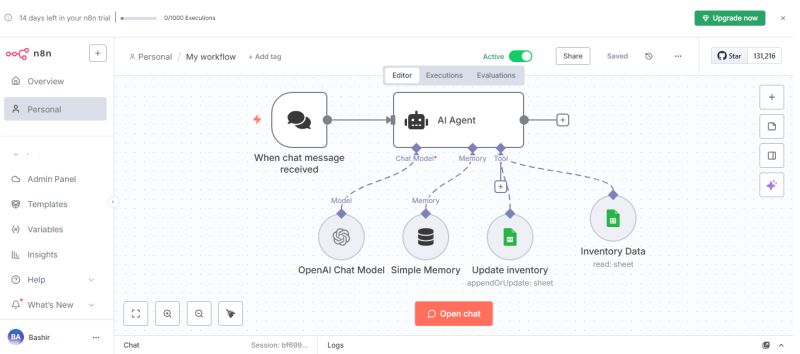
If Zapier is the beginner-friendly automation tool, n8n is what you graduate to when your workflows get complex and your Zapier bill starts climbing.
n8n is a visual workflow automation platform that lets you build AI agents and multi-step automations on a drag-and-drop canvas — with the option to write custom JavaScript or Python when you need precision. It supports 500+ integrations, multi-agent AI setups, and — crucially for SaaS founders who care about data privacy — full self-hosting.
The self-hosting option is a genuine differentiator. If your SaaS handles sensitive customer data, you can run n8n entirely on your own infrastructure. No third-party servers touching your data. Full control.
What SaaS founders use it for:
Pricing:
Where it hits its limit: n8n has a steeper learning curve than Zapier. Self-hosting requires Docker setup, which isn’t beginner-friendly. If you want something you can get running in 10 minutes, start with Zapier and migrate to n8n when you need more control.
Rating: ⭐ 4.9/5
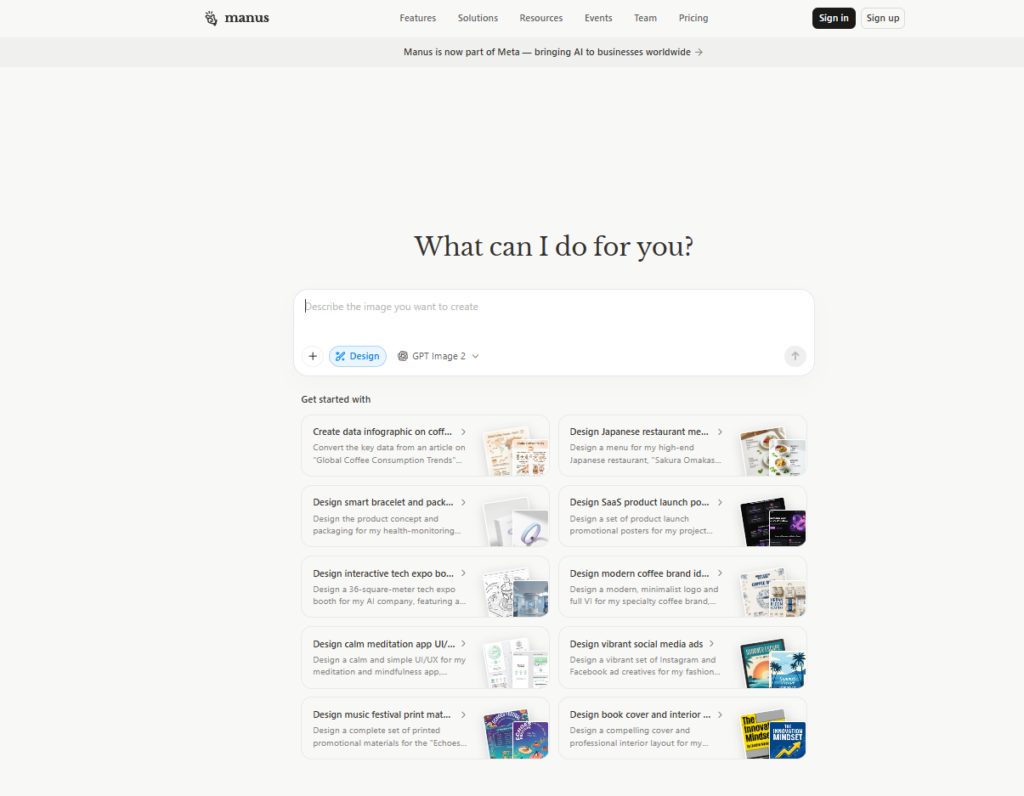
Most AI tools respond to prompts. Manus AI executes goals.
Manus is an autonomous general-purpose AI agent — you give it an objective, not just a question, and it figures out the steps, uses the tools it needs, and delivers a finished result. Think of it as a virtual employee who can research competitors, draft a go-to-market strategy, analyze your SaaS metrics, write and send reports, and complete multi-step tasks while you focus on something else.
For SaaS founders wearing 10 hats at once, this is genuinely transformative. Tasks that used to take hours of your time — market research, content creation, data analysis, customer outreach drafts — can be delegated to Manus with a single instruction.
What SaaS founders use it for:
Pricing:
Where it hits its limit: Manus works best for well-defined tasks with clear outputs. Open-ended creative work or tasks requiring deep domain expertise still benefit from human judgment. It’s a force multiplier, not a replacement for strategic thinking.
Rating: ⭐ 4.8/5
FoxyApps is built for one specific type of SaaS founder: someone who wants to launch an AI-powered software business without any coding experience whatsoever.
The platform lets you build, host, and monetize AI tools — calculators, generators, analyzers, chatbots, and other AI-powered utilities — and sell access to them as a SaaS product. You’re not just building an app; you’re building a business with built-in monetization, user management, and hosting.
This is particularly powerful for founders who want to validate a SaaS idea quickly. Instead of spending months building a full product, you can launch a focused AI tool, charge for access, and validate whether people will pay — all before writing a single line of code.
What SaaS founders use it for:
Pricing:
Where it hits its limit: FoxyApps is best for AI tool-based SaaS products. If your SaaS requires complex user workflows, custom databases, or deep integrations, you’ll need to combine it with other tools in this list.
Rating: ⭐ 4.6/5
Building a SaaS isn’t just about the product. It’s about everything that keeps the business running — product roadmaps, meeting notes, customer research, team wikis, investor updates, and the hundred other documents that pile up the moment you have more than one user.
Notion AI is the operational backbone for solo and small-team SaaS founders. It combines a powerful workspace (notes, docs, databases, wikis) with an AI layer that can write, summarize, analyze, and automate within that workspace.
For SaaS founders, the most valuable use cases are:
Pricing:
Where it hits its limit: Notion AI is an operational tool, not a product-building tool. It won’t help you build your SaaS — but it will help you run the business around it without losing your mind.
Rating: ⭐ 4.8/5
Every SaaS founder eventually faces the same problem: users have questions, and answering them manually doesn’t scale.
Chatbase lets you build an AI-powered support agent trained on your own product documentation, FAQs, and knowledge base — and deploy it on your SaaS website or inside your product in minutes. No code required.
Your users get instant, accurate answers 24/7. You stop spending 2 hours a day answering the same 10 questions. And your support agent gets smarter over time as you add more content.
For early-stage SaaS founders, this is one of the highest-leverage tools in the stack. It handles the support volume that would otherwise require hiring, at a fraction of the cost.
What SaaS founders use it for:
Pricing:
Where it hits its limit: Chatbase is excellent for answering questions based on content you’ve provided. For complex, multi-step support workflows or integrations with your product’s backend data, you’ll want to pair it with Zapier or n8n.
Rating: ⭐ 4.9/5
| Tool | Best For | Pricing Starts | Skill Level |
|---|---|---|---|
| Replit | Building the SaaS product | Free / $18/mo | Beginner–Intermediate |
| YouWare | Building the UI/front-end | Free | Beginner |
| Zapier | Automating ops & workflows | Free / $19.99/mo | Beginner |
| n8n | Advanced automation & AI agents | Free (self-hosted) | Intermediate |
| Manus AI | Delegating tasks to AI | Custom | Beginner |
| FoxyApps | Launching AI-powered micro-SaaS | $19/mo | Beginner |
| Notion AI | Running SaaS operations | Free / $10/mo | Beginner |
| Chatbase | AI customer support | Free / $19/mo | Beginner |
You don’t need all 8 tools. Here’s how to build your stack based on where you are:
Monthly cost: ~38–50
Monthly cost: ~70–100
Monthly cost: ~100–150
No-code AI tools are genuinely powerful. But there are things they don’t solve, and knowing the limits saves you from building on the wrong foundation.
They can’t replace product judgment. AI can build what you describe. It can’t tell you what to build. The founder’s job — understanding the customer, prioritizing the right features, knowing when to pivot — is still entirely yours.
They hit walls at production-grade complexity. Multi-role authentication, complex permission systems, high-volume data processing, and security audits for regulated industries still benefit from engineering expertise. No-code gets you to 70–80% of a real SaaS fast. The last 20% may need a developer.
They don’t replace distribution. The best no-code SaaS stack in the world doesn’t matter if nobody knows your product exists. Marketing, SEO, outreach, and community building are still the founder’s job.
Use these tools to move fast, validate early, and build lean. Then bring in engineering expertise when the complexity genuinely requires it — not before.
Can I really build a SaaS without coding?
Yes — for most early-stage SaaS products. Tools like Replit, YouWare, and FoxyApps let non-technical founders build working, deployable applications from text prompts. The caveat: very complex products with advanced security requirements or high-scale infrastructure needs will eventually require engineering input.
What’s the best no-code AI tool for a complete beginner?
Start with Replit for building and Zapier for automation. Both have free tiers, beginner-friendly interfaces, and enough capability to get a real SaaS MVP live.
How much does it cost to build a SaaS with no-code AI tools?
A lean early-stage stack — Replit Core + Zapier Professional + Chatbase + Notion AI — runs approximately 80/month. That’s a fraction of what a developer would cost for the same output.
When should I move from no-code to custom development?
When your product needs features that no-code tools genuinely can’t deliver: complex multi-tenant architecture, custom security requirements, high-performance data processing, or deep integrations that no-code platforms don’t support. Most SaaS founders don’t hit this wall until they have real revenue and real scale.
Is n8n better than Zapier for SaaS founders?
It depends on your technical comfort level. Zapier is easier to start with and has more app integrations. n8n is more powerful, more cost-effective at scale, and can be self-hosted — but requires more setup. Start with Zapier, migrate to n8n when your automation needs outgrow it.
Can I charge customers for a SaaS built with no-code tools?
Absolutely. Stripe integration is available in Replit, FoxyApps, and most no-code platforms. Many successful SaaS businesses generating 100K+ MRR run entirely on no-code stacks.
The barrier to building a SaaS has never been lower. The tools in this list — Replit, YouWare, Zapier, n8n, Manus AI, FoxyApps, Notion AI, and Chatbase — give a solo founder the capability that used to require a full engineering team.
The question is no longer “can I build this without code?” The question is “what am I waiting for?”
Pick the tools that match your current stage. Build the MVP. Get it in front of real users. Charge money. Iterate.
The best SaaS founders in 2026 aren’t the ones with the biggest engineering teams. They’re the ones who move fastest with the least.

The question isn’t just “which AI writes the best code?” — it’s “which AI coding tool keeps the…
Read →Managing social media in 2026 means producing more content, across more platforms, at higher quality, with smaller teams…
Read →Freelancers in 2026 are running one-person businesses. You’re the writer, the marketer, the project manager, the accountant, and…
Read →