The AI software engineer that learns your codebase and ships the work
Last updated August 31, 2026
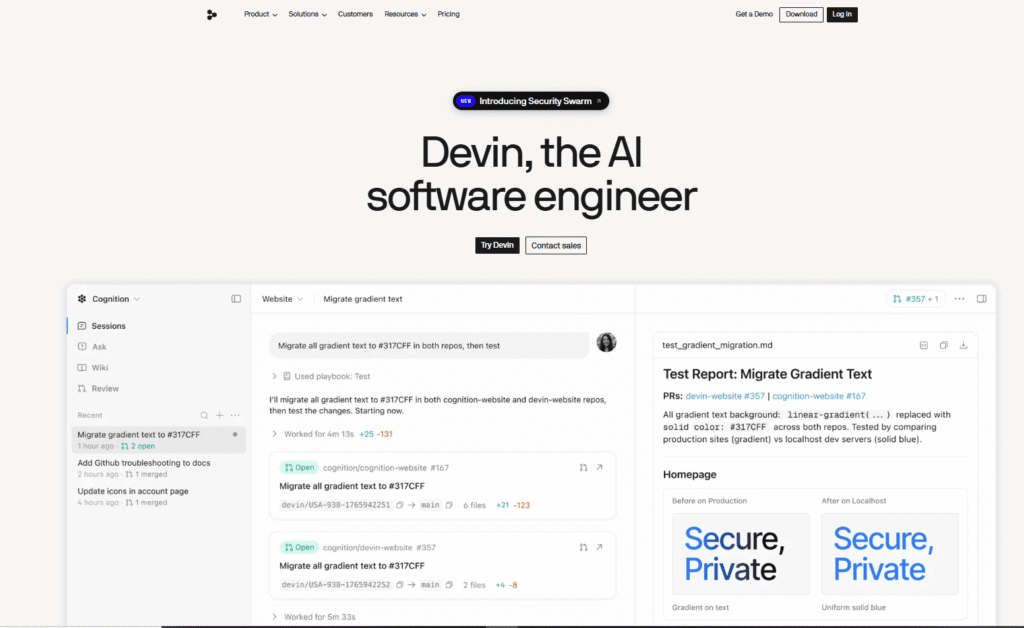
Devin is the world’s first AI software engineer, built by Cognition for engineering teams that need more than autocomplete. Where most AI coding tools assist developers with suggestions, Devin acts as a full autonomous software engineer — it plans, codes, tests, debugs, reviews pull requests, investigates incidents, migrates legacy codebases, and ships production-ready work independently.
Powered by SWE 1.7, Cognition’s latest software engineering model, Devin is built specifically for the hardest engineering problems: multi-week, multi-repo projects that require understanding your entire codebase, picking up tribal knowledge, and working across the tools your team already uses — GitHub, Slack, Linear, Jira, Datadog, AWS, and hundreds more.
Unlike general-purpose AI coding assistants, Devin learns your codebase over time, reads past session trajectories to get better with each task, and can spin up a fleet of parallel Devin agents to tackle large-scale work simultaneously. It works where your team works — triaging Datadog incidents from Slack, picking up Linear tickets automatically, reviewing PRs in GitHub, and reporting back with completed work.
Devin is available as a desktop app, via CLI, and through the Devin API for full automation. Individual plans start free. Teams and Enterprise plans add centralized billing, admin controls, SSO, and dedicated deployment options.
Pros
Cons
Engineering teams with complex codebases — If your team manages multiple repos, has legacy systems, or deals with recurring engineering chores, Devin’s ability to learn your codebase and work autonomously across all of it is the core value proposition.
Platform and DevOps teams — Devin’s Automations and Datadog integration make it ideal for teams that want to automate incident investigation, CI failure fixes, and infrastructure maintenance without manual intervention.
Enterprise engineering organizations — The Enterprise plan’s VPC deployment, SAML/OIDC SSO, centralized admin controls, and dedicated account management make Devin viable for large organizations with strict security and compliance requirements.
Individual power developers — The Pro plan ($20/month) gives individual developers access to frontier models (OpenAI, Claude, Gemini), cloud agents, and SWE 1.7 — enough to handle serious solo engineering work.
Teams doing legacy modernization — Devin’s code migration capabilities for COBOL, .NET, Talend, and legacy ETL systems with complete auditability at each step make it one of the few AI tools genuinely suited for enterprise modernization projects.
Uncommon use cases: Auto-generating documentation for inherited codebases via DeepWiki; using Security Swarm to continuously scan and patch security vulnerabilities; assigning Devin to handle all user feedback triage and documentation updates on a weekly schedule.
| Feature | Devin | Cursor | GitHub Copilot |
|---|---|---|---|
| Type | Autonomous AI software engineer | AI coding agent + IDE | AI code completion + chat |
| Autonomous agents | ✅ Yes — full software engineer | ✅ Yes — Cloud Agents | ❌ No |
| Parallel agent fleets | ✅ Yes — fleet of Devins | ✅ Yes — parallel agents | ❌ No |
| Codebase learning | ✅ Yes — tribal knowledge over time | ✅ Yes — codebase indexing | ⚠️ Limited |
| PR review | ✅ Yes — visual QA + bug fixing | ✅ Yes — Bugbot | ✅ Yes — Copilot PR review |
| Legacy code migration | ✅ Yes — COBOL, .NET, Talend, ETL | ⚠️ Limited | ❌ No |
| Documentation generation | ✅ Yes — DeepWiki | ❌ No | ❌ No |
| Slack/Teams integration | ✅ Yes — native | ✅ Yes | ❌ No |
| Linear/Jira integration | ✅ Yes — native | ❌ No | ❌ No |
| Datadog integration | ✅ Yes — incident triage | ❌ No | ❌ No |
| Scheduled automations | ✅ Yes — Devin Automations | ✅ Yes | ❌ No |
| Multi-model support | ✅ Yes — OpenAI, Claude, Gemini, open source | ✅ Yes — Grok, GPT-5, Claude, Gemini | ⚠️ Limited |
| Free plan | ✅ Yes | ✅ Yes | ✅ Yes |
| Individual paid from | $20/mo (Pro) | $20/mo (Pro) | $10/mo |
| Teams paid from | 40/seat | $40/user/mo | $19/user/mo |
| Best for | Complex multi-repo engineering, legacy modernization | Agentic development, multi-model flexibility | Code completion inside existing IDE |
Choose Devin if: Your team needs a full autonomous software engineer that learns your codebase, works across Slack, Linear, Datadog, and GitHub natively, and can handle complex multi-repo projects including legacy code migrations. Devin is the most capable tool for serious engineering team workflows.
Choose Cursor if: You want the most flexible AI coding agent with the widest model selection (Grok 4.6, GPT-5, Claude Opus 5) and a strong desktop IDE experience. Cursor’s multi-model flexibility and Teams plan pricing (80 base + $40/seat) make it more cost-effective for smaller teams.
Choose GitHub Copilot if: You want the lowest-cost individual plan ($10/month) and primarily need AI code completion inside VS Code or JetBrains without the complexity of full agentic workflows.
Step 1: Download and set up
Step 2: Connect your tools
Step 3: Add codebase knowledge
Step 4: Assign your first task
Step 5: Set up Automations (optional)
| Plan | Price | Best For |
|---|---|---|
| Free | $0/mo | Light agent usage; unlimited inline edits and Tab completions; limited model availability |
| Pro | $20/mo | Individual developers — frontier models (OpenAI, Claude, Gemini), SWE 1.7, Devin Cloud, extra usage at API pricing |
| Max | $200/mo | Power users — significantly higher quotas; everything in Pro |
| Teams | 40/mo per full dev seat | Engineering teams — unlimited members, shared collaboration, centralized billing, admin dashboard, priority support |
| Enterprise | Custom | Large organizations — VPC deployment, SAML/OIDC SSO, centralized admin controls, dedicated account management, custom terms |
How usage works: Each paid plan includes a usage allowance that refreshes daily and weekly. Most users never hit their limits. If you exceed your included usage on a paid plan, you can purchase extra usage at API pricing.
Teams plan note: The 40/month and includes their own generous quota plus access to Devin Desktop. Flex seats (view-only or limited access) are unlimited at no extra cost.
Free plan includes: Light agent quota, limited model availability, unlimited inline edits, unlimited Tab completions.
Pro plan includes: Everything in Free, plus increased quotas, access to OpenAI, Claude, and Gemini frontier models, full model availability, free use of SWE 1.7 and leading open source models, Devin Cloud access, and the ability to purchase extra usage at API pricing.
Verdict: Yes — the most capable autonomous AI software engineer available, and the clear choice for engineering teams with complex, multi-repo codebases.
Devin is in a different category from most AI coding tools. It’s not an autocomplete assistant or a chat interface bolted onto an IDE — it’s a full autonomous software engineer that learns your codebase, picks up tribal knowledge, works natively inside your team’s existing tools, and ships production-ready work independently.
The combination of DeepWiki for legacy documentation, parallel agent fleets for large-scale migrations, native Datadog and Linear integrations for incident triage, and Devin Automations for scheduled engineering chores makes it the most complete AI engineering platform available in 2026.
Best for: Engineering teams managing complex, multi-repo codebases who want an AI that genuinely learns their systems and works autonomously across their entire toolchain — not just inside an editor.
Skip it if: You’re an individual developer who primarily needs code completion and chat assistance — Cursor at 10/month cover that use case at lower cost and complexity.
Rating: 4.8/5
| Criteria | Rating |
|---|---|
| Accuracy & Reliability | ⭐ 4.8/5 |
| Ease of Use | ⭐ 4.5/5 |
| Features & Functionality | ⭐ 5.0/5 |
| Performance & Speed | ⭐ 4.7/5 |
| Customization | ⭐ 4.8/5 |
| Security & Privacy | ⭐ 5.0/5 |
| Customer Support | ⭐ 4.6/5 |
| Value for Money | ⭐ 4.5/5 |
| Integrations | ⭐ 5.0/5 |
What is Devin AI?
Devin is the world’s first autonomous AI software engineer, built by Cognition. It plans, codes, tests, debugs, reviews pull requests, investigates incidents, and migrates legacy codebases independently — acting as a full software engineer rather than just a coding assistant.
Is Devin AI free?
Yes — Devin has a free plan with a light agent quota, unlimited inline edits, and unlimited Tab completions. No credit card is required. Paid plans start at $20/month (Pro) for access to frontier models and Devin Cloud.
How much does Devin cost?
Devin’s Pro plan is 200/month for power users needing significantly higher quotas. Teams plans start at 40/month per full developer seat. Enterprise pricing is custom.
What is SWE 1.7?
SWE 1.7 is Cognition’s latest software engineering model — purpose-built for real engineering tasks rather than adapted from a general-purpose language model. It’s available free on Pro plans and above.
How is Devin different from Cursor?
Devin is a full autonomous software engineer that learns your codebase, works natively in Slack, Linear, Datadog, and GitHub, and handles complex multi-repo projects including legacy migrations. Cursor is a more flexible AI coding agent with broader model selection and a stronger desktop IDE experience. Devin is better for team-wide engineering automation; Cursor is better for individual developer workflows with multi-model flexibility.
Can Devin work on multiple repositories at once?
Yes — Devin can spin up a fleet of parallel Devin agents to work across multiple repositories simultaneously. This is particularly useful for large-scale code migrations, refactors, and modernization projects.
What is DeepWiki?
DeepWiki is Devin’s documentation generation feature that automatically creates documentation and system diagrams for legacy codebases — including systems your team didn’t build. It provides comprehensive visibility into inherited or undocumented code.
Does Devin integrate with Slack?
Yes — Devin integrates natively with Slack and Microsoft Teams. You can tag Devin in any conversation to surface relevant context, investigate issues, or turn discussions directly into pull requests.
Does Devin integrate with Linear and Jira?
Yes — Devin integrates with both Linear and Jira. You can assign Devin tickets directly in Linear by adding a Devin label, or connect Jira for automatic ticket pickup and resolution.
What is Devin Automations?
Devin Automations lets you set up always-on agents that run on schedules or triggers — for example, daily QA runs, weekly release notes, automatic CI failure fixes, or incident triage when a Datadog alert fires. Available via the Devin API and the Automations interface.
Is Devin safe for enterprise use?
Yes — Devin Enterprise supports VPC deployment, SAML/OIDC SSO, centralized enterprise admin controls, teamspace isolation, and custom terms. Dedicated account management and highest-priority support are included.
What is the Devin Teams plan?
The Teams plan costs 40/month per full developer seat. It includes unlimited team members (flex seats at no extra cost), shared collaboration, centralized billing, an admin dashboard with analytics, and priority support.
How does Devin learn my codebase?
Devin indexes your repositories and learns from the knowledge you add — coding conventions, architectural decisions, team workflows, and context about specific systems. It also reads past session trajectories to improve its understanding of your codebase over time.
Read More:

Myzoqena is a done-for-you AI automation service for small businesses that builds three simple systems to stop revenue…

CodeDesign.ai is an AI website builder that helps individuals, startups, agencies, and businesses create professional websites without coding.…
Chatbase is an AI-powered customer experience platform that enables businesses to build intelligent AI agents for customer support,…

LivePerson is an enterprise conversational AI platform built for large-scale customer experience (CX) operations — orchestrating both human…
Atera is an all-in-one AI-powered IT management platform built for Managed Service Providers (MSPs), internal IT departments, enterprises,…
Replit AI is an advanced AI-powered software development platform that enables anyone to build websites, mobile apps, dashboards,…
gpu.fund is an independent, live cloud GPU price index that tracks rental prices across 15 cloud providers, 49…

Zendesk is an AI-powered customer service and engagement platform that helps businesses manage customer conversations, automate support, empower…

AnyBiz AI is an AI-powered sales automation platform that helps businesses generate qualified leads, book meetings, and close…
Zapier is a no-code automation platform that connects over 8,000 apps, letting you build workflows (“Zaps”) that trigger…
Youware is an AI-powered “vibe coding” platform that lets you build fully functional websites, apps, games, and dashboards…
CodexTheme Tools is a free, browser-based theme builder for OpenAI’s Codex desktop app — upload a wallpaper or…
