AI photo cleanup with a free preview for ecommerce sellers
Last updated October 12, 2026
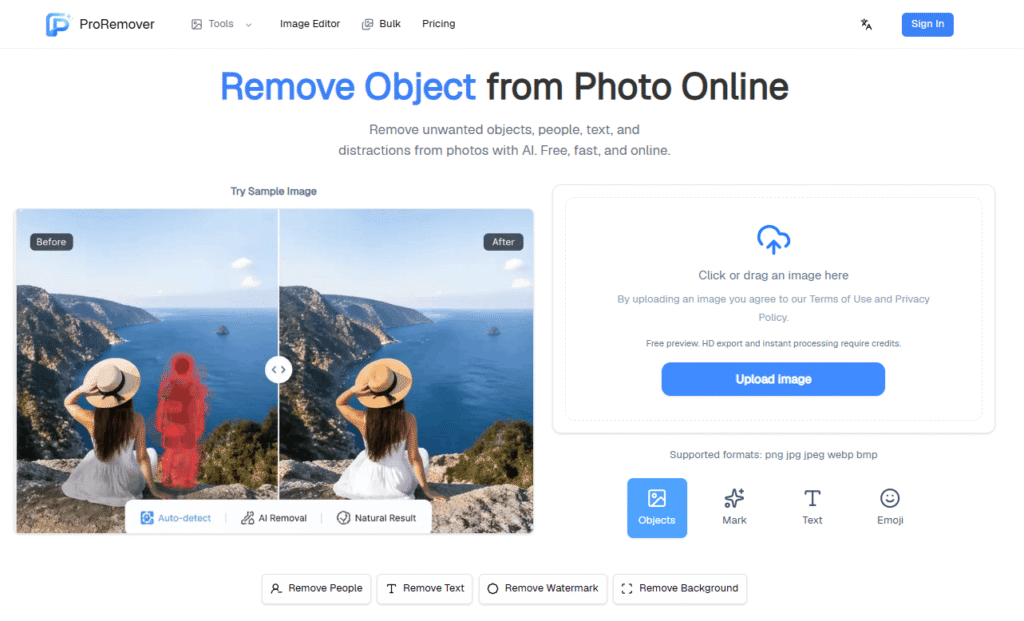
ProRemover is an AI-powered online object remover that lets you remove unwanted objects, people, text, logos, watermarks, emojis, stickers, and background distractions from photos — free, fast, and entirely in your browser.
The workflow is simple: upload a photo, paint over the area you want removed, and the AI fills the removed area naturally so the final photo still looks usable for publishing, sharing, or selling. No Photoshop, no desktop software, no complex editing skills required.
ProRemover handles the full range of photo cleanup jobs — from erasing photobombers from travel shots to removing background clutter from product photos, cleaning date stamps from screenshots, and stripping watermarks from images. It also includes an AI image editor for re-editing, cleaning up, or creatively transforming images with a text prompt.
For creators already using AI image editing tools like TextRemover for text-specific removal or BGRemover for background removal, ProRemover fills the broader object and people removal gap in one unified platform.
| Category | What It Removes |
|---|---|
| Objects | Trash, signs, wires, poles, cars, clutter, props |
| People | Photobombers, strangers, background people |
| Text | Captions, timestamps, date stamps, subtitles |
| Logos and Watermarks | Brand marks, watermarks, copyright overlays |
| Emojis and Stickers | Emojis, stickers, arrows, overlays, pasted graphics |
| Background | Full background removal to transparent or new background |
1. Travel and Landscape Photos Erase crowds, signs, trash, cars, and clutter from scenic shots while keeping the place looking natural. Remove people, trash cans, poles, photobombers, and signs when the location is perfect but the background is crowded.
2. Product Images Remove props, dust, labels, background objects, and messy edges before publishing product photos. Clean unwanted items including background clutter, extra props, small marks, tags, and messy edges.
3. Memes and Posters Clean captions, stickers, overlays, old logos, and distracting marks from shareable graphics.
4. Social Media Content Prepare cleaner posts, thumbnails, stories, and campaign visuals with less background noise.
5. Portraits and Selfies Remove photobombers, background distractions, stickers, and small marks from portraits and selfies.
Step 1 — Upload your photo Choose a JPG, PNG, or WebP image with an unwanted object, person, logo, date stamp, or background distraction.
Step 2 — Clean the unwanted area Use the online editor to paint over the area you want removed. The AI generates a cleaner version of the photo with the area filled naturally.
Step 3 — Download the cleaned result Save the final image for e-commerce, travel posts, social content, profile visuals, or marketing assets.
ProRemover includes a complete suite of AI image tools beyond object removal:
| Tool | What It Does |
|---|---|
| Object Remover | Remove any unwanted object from photos |
| Clean Image | General photo cleanup and enhancement |
| People Remover | Remove people and photobombers |
| Image Enhancer | Upscale and enhance photo quality |
| Text Remover | Remove text, captions, and timestamps |
| Shadow Remover | Remove unwanted shadows from photos |
| Background Eraser | Remove or replace photo backgrounds |
| Watermark Remover | Remove watermarks and brand marks |
| Video Watermark Remover | Remove watermarks from video clips |
| Bulk Pic Tools | Batch process multiple images |
| AI Video Object Remover | Remove objects from video clips |
ProRemover sits alongside BGRemover and TextRemover as part of a complete AI image editing toolkit. While BGRemover specialises in background removal and TextRemover focuses on text removal, ProRemover covers the full object, people, logo, and distraction removal workflow in one place.
| ProRemover | Adobe Firefly | Canva | Pixelcut | |
|---|---|---|---|---|
| Free preview no sign-in | ✅ | ❌ | ❌ | ❌ |
| Object removal | ✅ | ✅ | ✅ | ✅ |
| People removal | ✅ | ✅ | ❌ | ✅ |
| Text removal | ✅ | ❌ | ❌ | ❌ |
| Watermark removal | ✅ | ❌ | ❌ | ✅ |
| Video object removal | ✅ | ❌ | ❌ | ❌ |
| Bulk processing | ✅ | ❌ | ✅ | ✅ |
| One-time credits | ✅ Never expire | ❌ | ❌ | ❌ |
| Starting price | Free | Free limited | Free limited | Free limited |
Is there a free object remover from photo?
Yes. ProRemover offers a free preview with no sign-in required. Upload your image, see the result, and decide before buying credits. HD export and instant processing require credits.
How do I remove an object from a photo online for free?
Upload your image to ProRemover, paint over the unwanted object, and the AI fills the area naturally. The free preview shows the result before you download.
Can AI remove unwanted objects from photos?
Yes. ProRemover uses AI to detect and fill the removed area with content that matches the surrounding background — no obvious patches or smudges.
Can I remove objects from photos without Photoshop?
Yes. ProRemover is entirely browser-based — no Photoshop, no desktop software, no installation required.
Do ProRemover credits expire?
One-time credit purchases never expire. Monthly Starter plan credits refresh each month. Bulk Pass credits are valid for 30 days.
What image formats does ProRemover support?
JPG, PNG, JPEG, WebP, and BMP.
Does ProRemover support video?
Yes. ProRemover includes an AI Video Object Remover and a Video Watermark Remover for removing objects and watermarks from video clips.
What is Bulk Pro?
Bulk Pro is the high-volume plan for stores, agencies, and content teams. It includes 2,000 credits per month, bulk image processing, Nano Banana Pro, priority processing, and premium quality controls at $39.90/month.
| Criteria | Rating |
|---|---|
| Accuracy & Reliability | ⭐ 4.9/5 |
| Ease of Use | ⭐ 4.6/5 |
| Features & Functionality | ⭐ 4.9/5 |
| Performance | ⭐ 4.8/5 |
| Customization | ⭐ 4.7/5 |
| Security & Privacy | ⭐ 4.6/5 |
| Customer Support | ⭐ 4.3/5 |
| Value for Money | ⭐ 4.2/5 |
| Integrations | ⭐ 4.8/5 |
Craiyon is an AI image generator that turns text prompts into original images and artwork. It is designed…
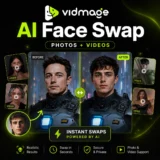
VidMage is an AI-powered face swap platform that lets you instantly swap faces in photos, videos, and GIFs…
MakeHalftone is a free browser-based halftone generator that converts any photo or image into a print-ready dot pattern…
ProductShot AI is an AI product photography tool built specifically for ecommerce — turning a single product photo…
BGRemover is a 100% free AI background remover that creates clean transparent PNGs from any photo in seconds…
ReWords AI is an online AI tool built for one specific, genuinely useful job: replacing existing text inside…
Img2Gen is an AI-powered image creation platform focused on product photography, advertising, portraits, and image editing. Users can…
Cutout.Pro is an AI-powered visual content creation and editing platform that helps users create professional-quality images and videos…
AI Baby Generator is an advanced AI-powered future baby prediction tool that creates realistic images of your potential…
Pixlr is a free, browser-based AI photo editor and image generator that combines a full photo editing suite,…

MimicPC is a browser-based AI workspace that lets users run powerful AI applications without installing software or configuring complex…
Fotor is an all-in-one online photo editor that combines everyday editing tools with AI-powered features — background removal,…
